
Uno strumento semplificato per un Wi-Fi assessment veloce e un punto di partenza per chi inizia.
Questo è il primo articolo del sito, e ho scelto di dedicarlo ad un mio progetto: WiFiCatcher, un tool open source per la ricognizione Wi-Fi, per la quale ha contribuito anche @tvasari. L’idea di partenza è semplice ed è quella di unificare le funzionalità degli strumenti più noti e renderle fruibili da un’unica interfaccia. Questa necessità è nata direttamente sul campo durante i Wi-Fi Assessment a cui ho preso parte, rivelandosi al contempo un ottimo punto di partenza per chi si sta avvicinando al wireless penetration testing.
L’Idea di Base
Chiunque abbia provato a fare recon su una rete wireless conosce airodump-ng: uno strumento eccezionale, ma il cui output è un muro di testo che scorre nel terminale. Access point, client, BSSID, canali, potenza, cifratura, handshake, tutto mescolato in tabelle che si aggiornano di continuo. Se per un professionista questo è pane quotidiano, per un principiante rappresenta spesso un ostacolo scoraggiante.
La vera criticità non risiede nella mancanza di informazioni ma nella loro forma. Le relazioni tra access point e dispositivi connessi costituiscono a tutti gli effetti un grafo strutturato, eppure vengono mostrate come semplici righe di testo. WiFiCatcher nasce proprio da una riflessione fatta durante i nostri assessment. Ci siamo posti una domanda ben precisa. E se potessimo letteralmente vedere la rete invece di limitarci a leggerne i dati?
Cos’è WiFiCatcher
Dal punto di vista funzionale, il progetto si fonda sugli strumenti già consolidati nel settore del pentesting, come airodump-ng, aireplay-ng, tshark e EAP_buster. La vera novità è la veste grafica in cui sono integrati, progettata per rendere immediatamente comprensibile tutto ciò che accade nell’etere.
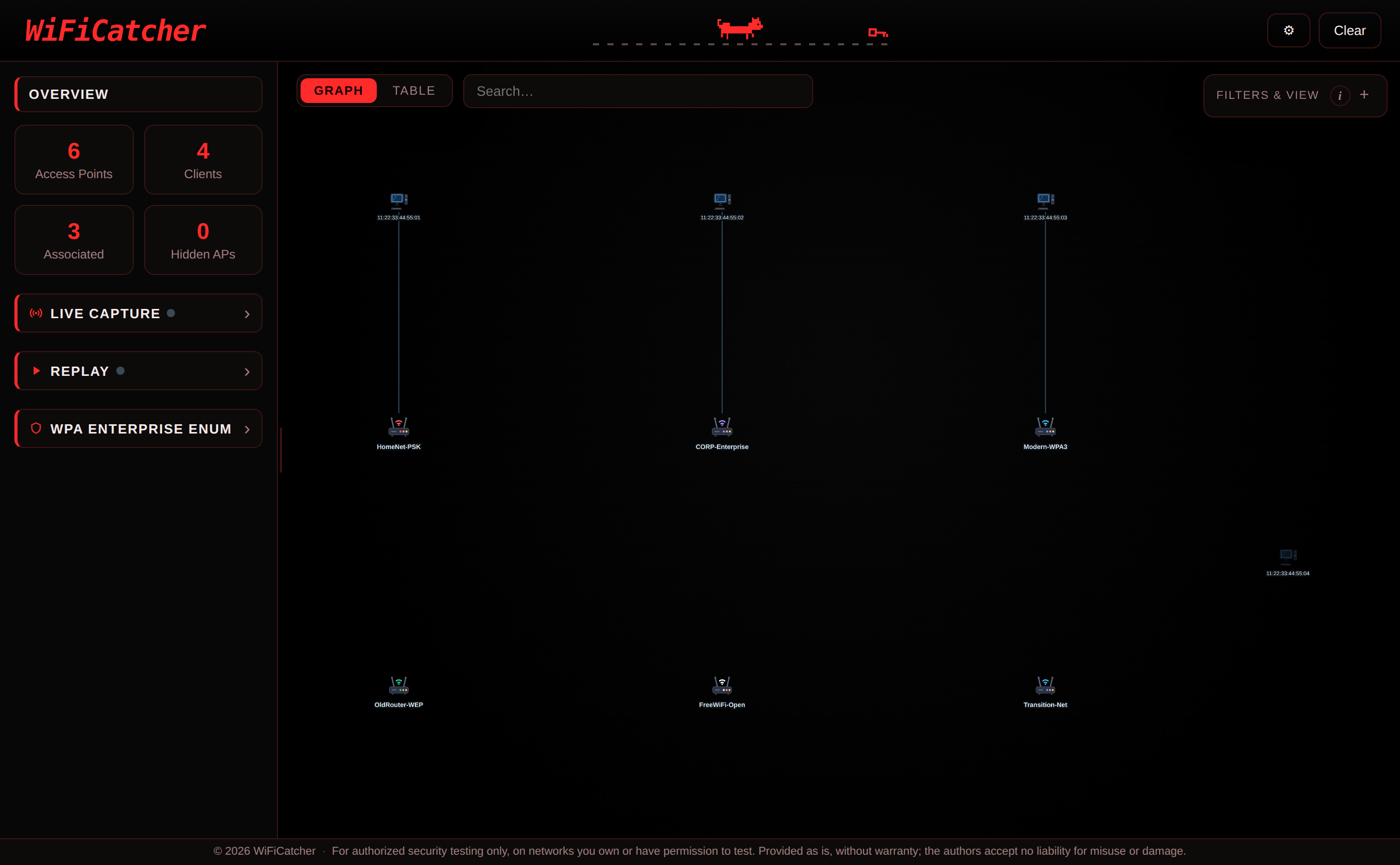
Ogni access point e ogni client diventa un nodo, ogni associazione client-AP diventa un arco. Il risultato è una fotografia dell’ambiente che si costruisce sotto i tuoi occhi, con dettaglio per ogni nodo come potenza del segnale, canale, cifratura, cipher, autenticazione, ecc…
Architettura
L’applicazione è suddivisa in due componenti ben distinti, l’app principale WiFiCatcher e un piccolo servizio separato chiamato warden. Grazie a questa struttura WiFiCatcher gira sempre con i permessi dell’utente che lo lancia, mentre al warden vengono delegate le poche operazioni che richiedono un accesso di root. Lo installi una volta sola come demone systemd attivato via socket e da quel momento ci pensa il sistema operativo ad avviarlo su richiesta solo quando serve davvero accedere all’hardware di rete. Si tratta di un approccio molto più pulito che fa sì che l’applicazione principale non debba mai girare come root.
Dal punto di vista tecnologico il codice è scritto in Python e si appoggia a un numero ridotto di dipendenze molto solide:
-
Backend: si basa su FastAPI servito da uvicorn in ascolto esclusivamente in locale. Espone le API che il frontend interroga e coordina le chiamate agli strumenti di sistema.
-
Frontend: sfrutta una pagina nel browser per disegnare il grafo interattivo appoggiandosi a Cytoscape.js con layout fCoSE. L’intero sistema gira sulla tua macchina senza richiedere account o servizi in cloud.
-
Strumenti esterni: sfrutta la suite aircrack-ng, tshark, wpa_supplicant e altri programmi noti. WiFiCatcher semplicemente non li reimplementa e non distribuisce i binari. L’approccio è quello di appoggiarsi ai pacchetti già presenti nel sistema e richiamarli all’occorrenza.
Il punto di forza del progetto sta proprio nell’unificazione. Il sistema non mira a ricreare le funzionalità dei singoli tool, ma a centralizzarle orchestrando il loro lavoro e restituendo una visione d’insieme su un’unica piattaforma.
Cosa puoi fare
WiFiCatcher offre tre funzionalità principali, tutte selezionabili direttamente dall’interfaccia iniziale. Di seguito analizziamo ogni modalità nel dettaglio.
Cattura live
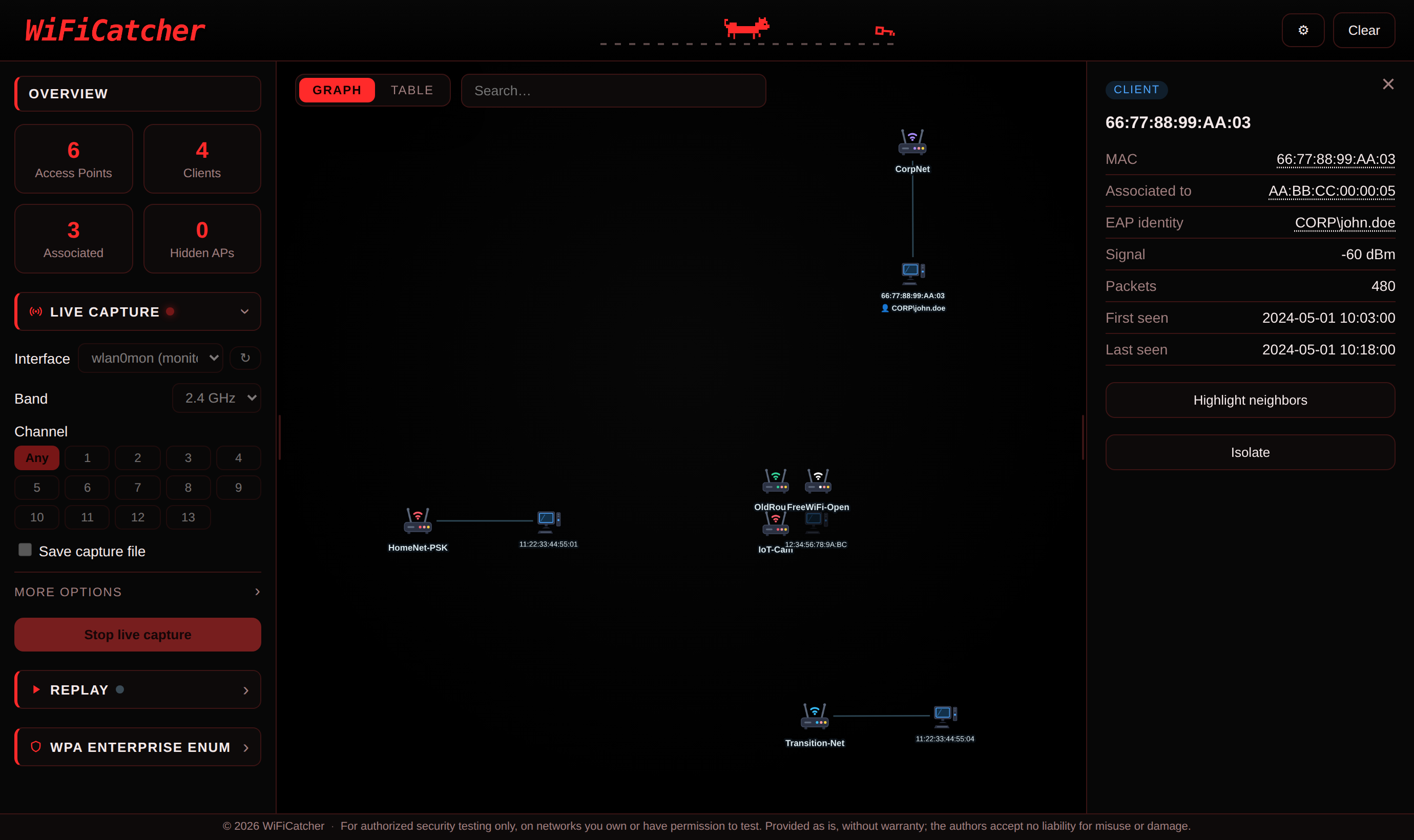
In questa modalità basta selezionare la scheda di rete per vedere il grafo prendere vita in tempo reale man mano che vengono scoperti access point e dispositivi connessi. Cliccando su ogni nodo è possibile esaminarne a fondo le caratteristiche e visualizzare dettagli tecnici chiave come ESSID, BSSID, canale, cipher, tipo di encryption ed altro. Il tool non si limita a mostrare i dati ma fornisce suggerimenti pratici e delinea i possibili percorsi di attacco in base alla specifica tecnologia rilevata sul target. Dal punto di vista offensivo si ha il pieno controllo per inviare pacchetti di deautenticazione mirati verso client o AP e catturare il conseguente handshake WPA direttamente in tempo reale. Il sistema gestisce in modo trasparente anche le reti WPA-Enterprise mostrando a schermo i certificati del server RADIUS e gli username intercettati durante l’autenticazione.
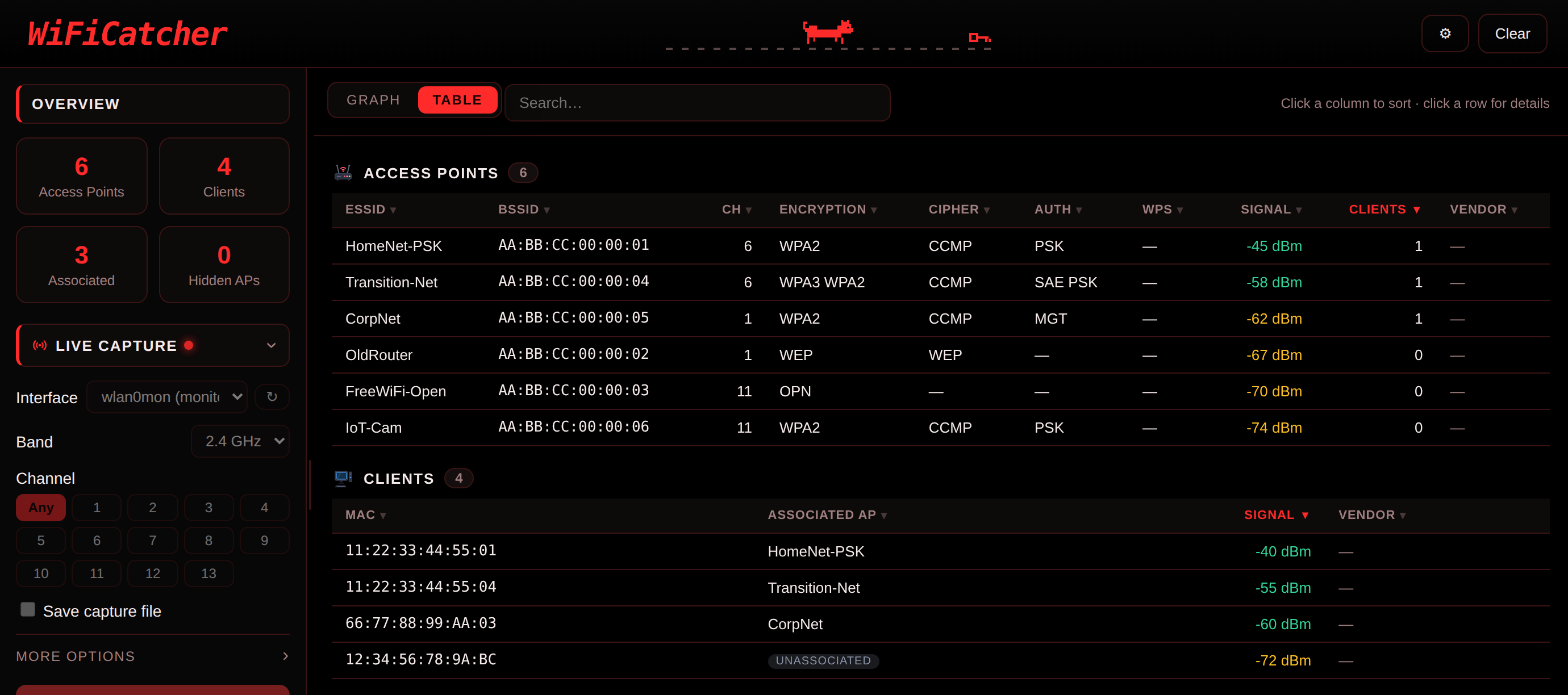
Quando la scansione si affolla e il grafo diventa difficile da seguire, gli stessi dati si possono leggere anche in forma tabellare con access point e client su righe distinte.
Replay
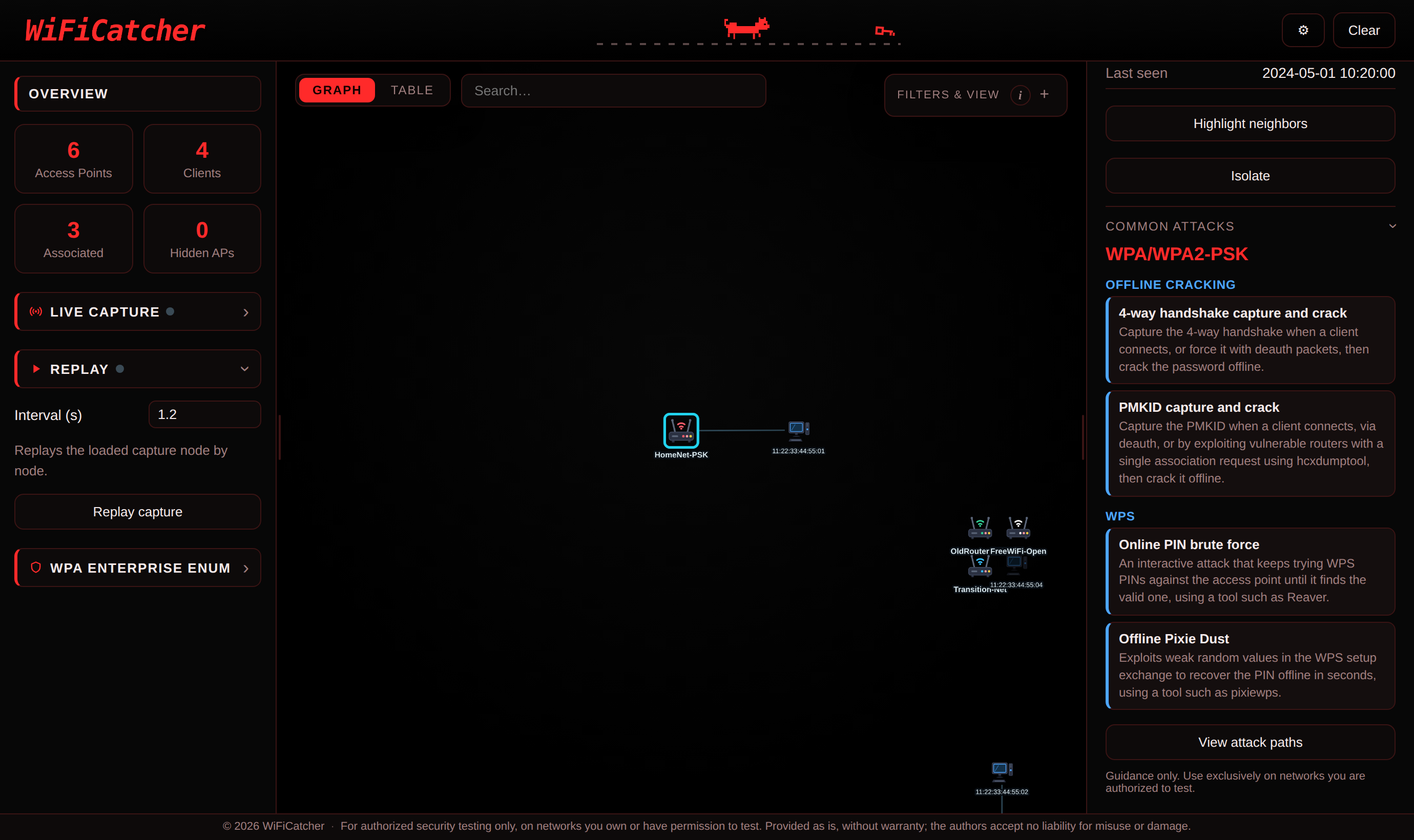
Questa funzione permette di caricare un file CSV salvato da airodump-ng per esplorare una scansione passata in totale assenza di rete. È possibile ripercorrere l’acquisizione nodo per nodo simulando una scoperta in tempo reale oppure visualizzare immediatamente il quadro completo. L’interfaccia mantiene il medesimo grafo, la stessa tabella e tutti i dettagli di una sessione live. In questo modo si ha tutto il tempo di rivedere la ricognizione e pianificare le strategie di attacco.
WPA Enterprise Enum
L’applicazione mette a disposizione tre strumenti fondamentali per l’analisi su reti WPA enterprise. I primi due operano in maniera passiva e richiedono l’intercettazione di uno scambio EAP iniziale tra client e access point. Avendo a disposizione questa cattura il tool permette di esportare il certificato del server RADIUS e di estrarre in chiaro i nomi utente intercettati.
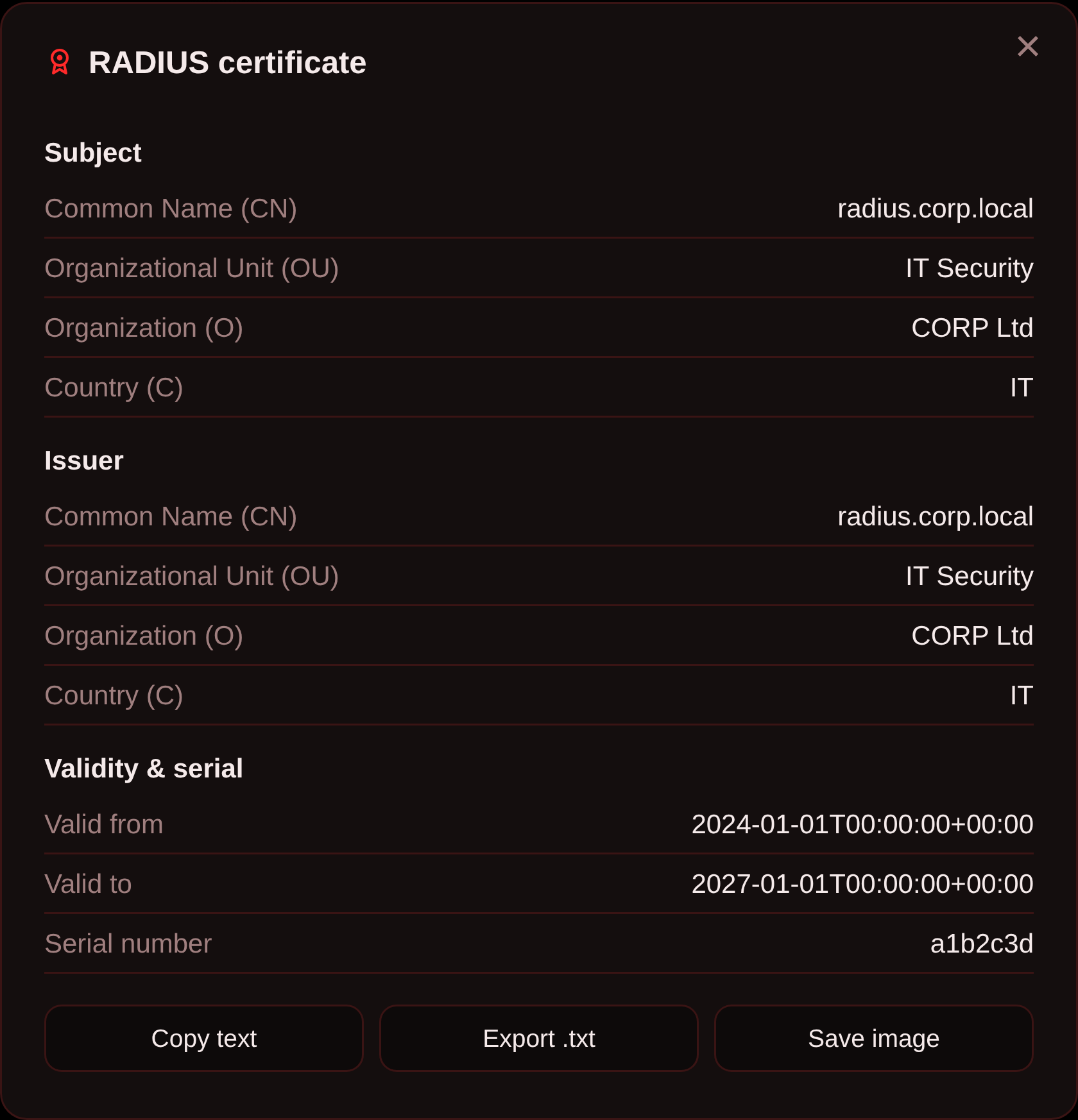
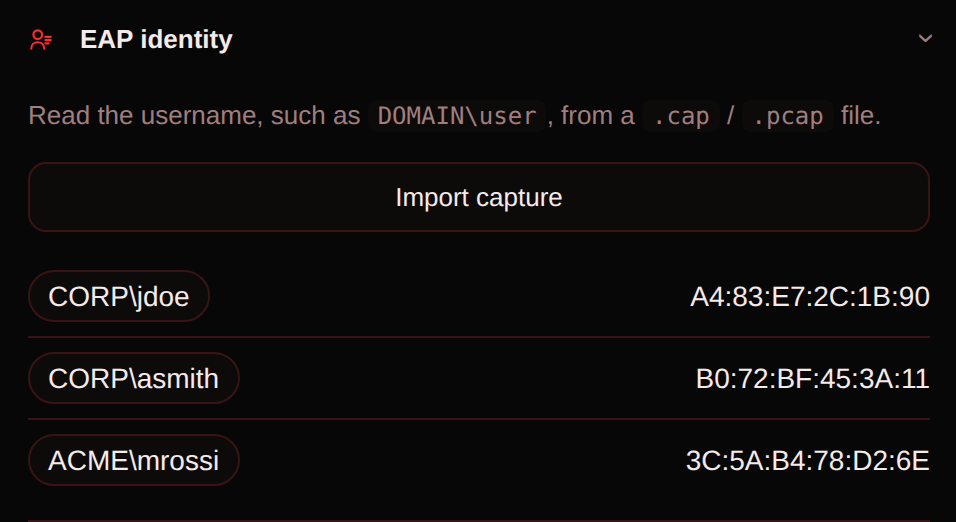
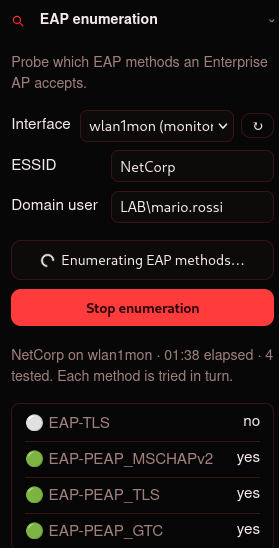
Il terzo strumento agisce invece in modo attivo. Fornendo le credenziali di un account di dominio valido il sistema esegue l’enumerazione dei metodi EAP supportati dalla rete e ti permette di seguire in diretta l’avanzamento dei vari tentativi.
Installazione
git clone https://github.com/0xPR3ST1JH0NN7/WiFiCatcher
cd WiFiCatcher

# strumenti di sistema
sudo apt install aircrack-ng tshark wpasupplicant

# dipendenze Python
python3 -m venv .venv && source .venv/bin/activate
pip install -r requirements.txt

# installa il warden
sudo ./packaging/install-warden.sh
Avvio
# Dopo aver attivato il virtual env
python -m WiFiCatcher
Stato del progetto
WiFiCatcher ha raggiunto la versione 1.0.0 e lo sviluppo continua attivamente. La roadmap delle prossime release espanderà il tool con nuove funzionalità
-
Integrazione di ulteriori tecniche e vettori di attacco Wi-Fi
-
Sviluppo di un sistema di suggerimenti mirato per gli attacchi più comuni contro le reti WPA3
Note Legali e Disclaimer
L’intercettazione del traffico Wi-Fi, l’invio di frame di deautenticazione e i tentativi di accesso tramite 802.1X su reti di terzi, in assenza di un’esplicita autorizzazione, costituiscono un illecito. WiFiCatcher è uno strumento sviluppato esclusivamente per finalità didattiche, per l’impiego in laboratori personali e per attività di penetration testing regolarmente autorizzate. L’utente è il solo responsabile delle proprie azioni e gli autori declinano ogni responsabilità per eventuali usi impropri o illegali del software.
Licenza
WiFiCatcher è distribuito con licenza MIT, che si applica esclusivamente al codice sorgente del progetto. Gli strumenti esterni e gli eventuali componenti di terze parti inclusi nel repository mantengono le rispettive licenze originali. Maggiori dettagli sono disponibili nel file THIRD_PARTY_NOTICES.md.
Autori
WiFiCatcher è sviluppato da @0xPR3ST1JH0NN7 e @tvasari.
A simplified tool for a fast Wi-Fi assessment and a starting point for beginners.
This is the first article on the site, and I chose to dedicate it to a project of mine: WiFiCatcher, an open-source tool for Wi-Fi reconnaissance, which @tvasari also contributed to. The starting idea is simple: to bring together the features of the best-known tools and make them usable from a single interface. This need came up directly in the field, during the Wi-Fi assessments I took part in, and at the same time it turned out to be a great starting point for anyone getting into wireless penetration testing.
The Basic Idea
Anyone who has tried to do recon on a wireless network knows airodump-ng: an excellent tool, but one whose output is a wall of text scrolling in the terminal. Access points, clients, BSSIDs, channels, power, encryption, handshakes, all mixed together in tables that keep refreshing. For a professional this is everyday routine, but for a beginner it is often a discouraging obstacle.
The real problem isn’t the lack of information but its form. The relationships between access points and connected devices are effectively a structured graph, yet they are shown as plain lines of text. WiFiCatcher was born exactly from a thought we had during our assessments. We asked ourselves one precise question: what if we could literally see the network instead of just reading its data?
What WiFiCatcher is
From a functional standpoint, the project is built on tools already established in the pentesting field, such as airodump-ng, aireplay-ng, tshark and EAP_buster. The real novelty is the graphical form they are wrapped in, designed to make everything happening on the air immediately clear.
Every access point and every client becomes a node, every client-AP association becomes an edge. The result is a picture of the environment that builds up in front of your eyes, with detail for every node such as signal strength, channel, encryption, cipher, authentication, etc.
Architecture
The application is split into two clearly separate components: the main WiFiCatcher app and a small separate service called the warden. Thanks to this structure WiFiCatcher always runs with the permissions of the user who starts it, while the few operations that need root access are handed off to the warden. You install it only once, as a systemd daemon activated through a socket, and from that moment on the operating system takes care of starting it on demand, only when access to the network hardware is really needed. It is a much cleaner approach, and it means the main application never has to run as root.
On the technology side, the code is written in Python and leans on a small number of very solid dependencies:
-
Backend: based on FastAPI served by uvicorn, listening on the local machine only. It exposes the APIs the frontend queries and coordinates the calls to the system tools.
-
Frontend: uses a page in the browser to draw the interactive graph, relying on Cytoscape.js with the fCoSE layout. The whole system runs on your own machine, with no accounts or cloud services.
-
External tools: it uses the aircrack-ng suite, tshark, wpa_supplicant and other well-known programs. WiFiCatcher simply does not reimplement them and does not ship the binaries. The approach is to rely on the packages already present on the system and call them when needed.
The project’s strength lies precisely in this unification. The system does not aim to recreate the features of the single tools, but to centralize them, orchestrating their work and giving an overall view on a single platform.
What you can do
WiFiCatcher offers three main features, all selectable directly from the start interface. Below we look at each mode in detail.
Live capture
In this mode you just select the network card to watch the graph come to life in real time, as access points and connected devices are discovered. By clicking on each node you can look closely at its features and view key technical details such as ESSID, BSSID, channel, cipher, encryption type and more. The tool doesn’t only show the data, it also gives practical hints and outlines the possible attack paths based on the specific technology found on the target. On the offensive side you have full control to send targeted deauthentication packets at clients or APs and capture the resulting WPA handshake directly in real time. The system also handles WPA-Enterprise networks smoothly, showing on screen the RADIUS server certificates and the usernames intercepted during authentication.
When a scan gets crowded and the graph is hard to follow, the same data also reads as a table with access points and clients on separate rows.
Replay
This feature lets you load a CSV file saved by airodump-ng to explore a past scan with no network at all. You can go back over the capture node by node, simulating a real-time discovery, or view the full picture right away. The interface keeps the same graph, the same table and all the details of a live session. This way you have all the time you need to review the reconnaissance and plan the attack strategies.
WPA Enterprise Enum
The application provides three essential tools for the analysis of WPA enterprise networks. The first two work passively and require capturing an initial EAP exchange between a client and an access point. With that capture in hand, the tool lets you export the RADIUS server certificate and pull out the intercepted usernames in clear text.
The third tool, on the other hand, works actively. By providing the credentials of a valid domain account, the system runs the enumeration of the EAP methods the network supports and lets you follow the progress of the various attempts live.
Installation
git clone https://github.com/0xPR3ST1JH0NN7/WiFiCatcher
cd WiFiCatcher

# system tools
sudo apt install aircrack-ng tshark wpasupplicant

# Python dependencies
python3 -m venv .venv && source .venv/bin/activate
pip install -r requirements.txt

# install the warden
sudo ./packaging/install-warden.sh
Run
# After activating virtual env
python -m WiFiCatcher
Project status
WiFiCatcher has reached version 1.0.0 and development is still active. The roadmap for the next releases will expand the tool with new features:
-
Adding more Wi-Fi attack techniques and vectors
-
Building a focused hint system for the most common attacks against WPA3 networks
Legal Notes and Disclaimer
Intercepting Wi-Fi traffic, sending deauthentication frames and attempting 802.1X access on third-party networks, without explicit authorization, is against the law. WiFiCatcher is a tool developed only for educational purposes, for use in personal labs and for properly authorized penetration testing activities. The user is the only one responsible for their own actions, and the authors decline any responsibility for improper or illegal use of the software.
License
WiFiCatcher is distributed under the MIT license, which applies only to the project’s own source code. The external tools and any third-party components included in the repository keep their own original licenses. More details are available in the THIRD_PARTY_NOTICES.md file.
Authors
WiFiCatcher is developed by @0xPR3ST1JH0NN7 and @tvasari.